Apps Games Articles
Themes-Wallpaper&Icons&Widgets
Innova Tool
Rating 3.1star icon
Editor's summary
Editor rating
star icon star icon star icon empty star icon empty star icon
3.3

One-line summary Themes-Wallpaper&Icons&Widgets is easy to enjoy if you want lots of cute home-screen looks fast, but the ad-heavy, coin-gated experience makes it harder to recommend to anyone who values a smooth setup.

  • Installs

    500K+

  • Developer

    Innova Tool

  • Category

    Personalization

  • Content Rating

    Everyone

  • Latest version

    2.0.3

  • Package

    com.theme.wallpaper.widget

Screenshots
In-depth review
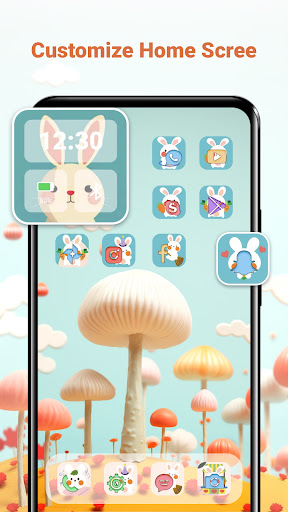
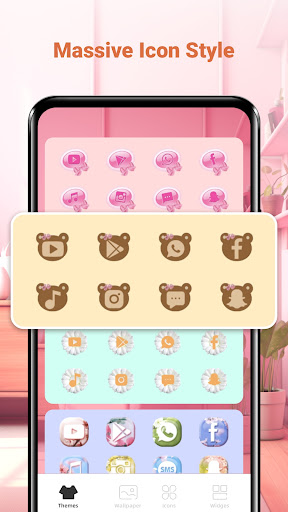
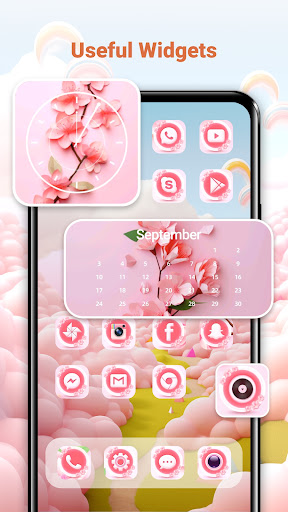
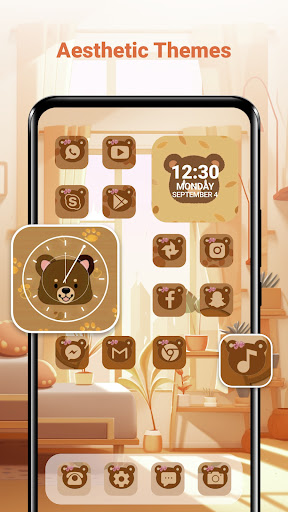
Themes-Wallpaper&Icons&Widgets is the kind of personalization app that knows exactly what catches your eye in the first few minutes: bright previews, trendy aesthetics, and the promise of turning a plain phone screen into something much more expressive without much effort. After spending time with it, my impression is that this app is at its best when you want quick visual inspiration and don’t mind working through a few interruptions to get there. It is not the most refined personalization tool I have used, but it does deliver the core appeal: lots of attractive home-screen ideas in one place. The strongest thing this app has going for it is variety. Open it up and the appeal is immediate. It is built around visual browsing, and that works in its favor. If your goal is to swap out a boring wallpaper, try a coordinated icon style, or add a widget that makes your home screen feel more designed, there is enough here to keep you scrolling for a while. The overall direction leans heavily into aesthetic, decorative customization rather than deep control, and that makes it approachable. You do not need to be a power user to understand what the app is trying to do. That ease of use is the second big strength. Themes-Wallpaper&Icons&Widgets clearly wants to lower the barrier to entry for phone customization. The basic flow is simple: browse a theme, look through the included elements, and apply what you like. That matters because many personalization apps become fiddly very quickly, especially when they involve icons and widgets. Here, the app aims for a more guided, one-tap feel. In practice, it is not always perfectly seamless, but it is straightforward enough that someone who has never customized a home screen beyond changing a wallpaper can still get results without feeling lost. A third positive is that the app feels generous in the sense that it gives free users ways to unlock content without forcing an immediate purchase. There is an in-app currency layer, and ads are part of that equation, but at least the app does not wall off the entire experience behind a pay prompt the moment you open it. If you are patient, you can still get good-looking content without spending money, and that flexibility makes the app easier to live with than some aggressively monetized theme tools. That said, the biggest issue is also obvious almost immediately: friction. This is not a calm, elegant browsing experience. Ads are part of the app’s rhythm, and while that may be expected in a free personalization app, the frequency affects the overall mood. A category built around visual pleasure should feel playful and relaxing; instead, the app can feel transactional. You browse, tap, wait, unlock, return, and repeat. If you only want one wallpaper, that may be acceptable. If you want to rebuild your whole home screen, the interruptions become much more noticeable. The second weakness is that the app’s polish does not consistently match its ambition. The store description sells an all-in-one vision of themes, wallpapers, icons, and widgets, and that broad promise is appealing. But when using it, the experience feels more like a content catalog than a deeply integrated customization suite. It gives you plenty to choose from, but not always the feeling of a premium design environment. The difference matters. The app can make your phone look better, but it does not always make the process feel especially premium. The third drawback is that the app seems more focused on fast visual payoff than precision customization. That will be a plus for some users, but it limits the audience. If you are someone who wants complete control over icon consistency, widget placement aesthetics, or a highly curated home-screen system, this app may feel a little shallow. It is better at helping you quickly land on a cute or stylish look than it is at supporting detailed personalization workflows. In day-to-day use, I found Themes-Wallpaper&Icons&Widgets most enjoyable in short sessions. It works well when you are in the mood to freshen up your screen, test a new vibe, and move on. The wallpapers are the easiest win because they give immediate results and require almost no effort. The icon and widget side adds extra personality, though that process can feel slightly more involved and less satisfying if you are expecting everything to transform perfectly in one smooth pass. Still, for casual users, the app succeeds more often than it fails because the visual payoff arrives quickly enough to justify the effort. Who is this app for? It is for users who like trendy phone aesthetics, enjoy browsing lots of visual options, and do not mind watching ads or engaging with a coin system to unlock content. It is especially suited to younger users or casual customizers who want their phone to look cute, themed, or more expressive without learning a complicated setup process. Who is it not for? If you are allergic to ads, impatient with unlock mechanics, or looking for a cleaner, more premium-feeling customization tool, this will probably wear out its welcome. It is also not ideal for advanced users who want a more robust theming environment with finer control and fewer interruptions. Overall, Themes-Wallpaper&Icons&Widgets is a decent but uneven personalization app. It wins on visual variety, accessibility, and the ability to give free users a path to attractive content. It loses points for ad pressure, a somewhat choppy experience, and a level of polish that does not fully match its all-in-one promise. If your expectations are modest and your priority is making your phone look better fast, it can be a fun download. If you want a smoother and more refined journey, you may hesitate before making it part of your regular setup routine.