Apps Games Articles
PdaNet+
June Fabrics Technology Inc.
Rating 3.9star icon
Editor's summary
Editor rating
star icon star icon star icon
half star icon
empty star icon
3.9

One-line summary PdaNet+ is still one of the most practical no-root tethering tools around, but I’d only recommend it to people willing to tolerate setup quirks and device-specific limitations in exchange for that flexibility.

  • Installs

    10M+

  • Developer

    June Fabrics Technology Inc.

  • Category

    Communication

  • Content Rating

    Everyone

  • Latest version

    5.23

  • Package

    com.pdanet

Screenshots
In-depth review
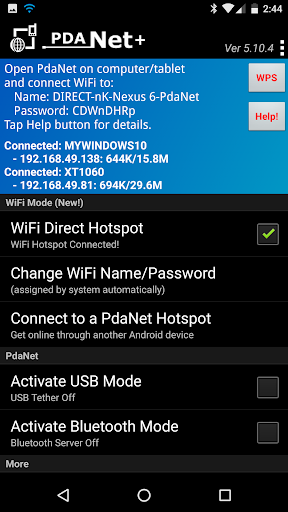
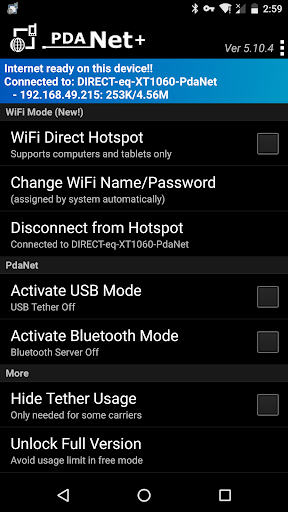
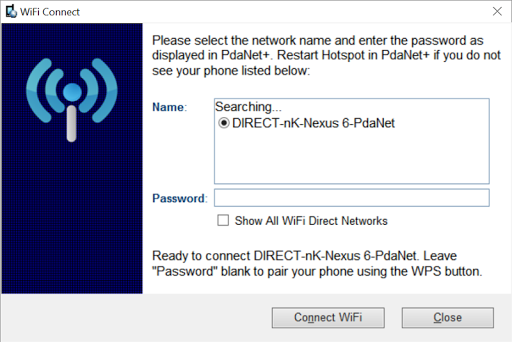
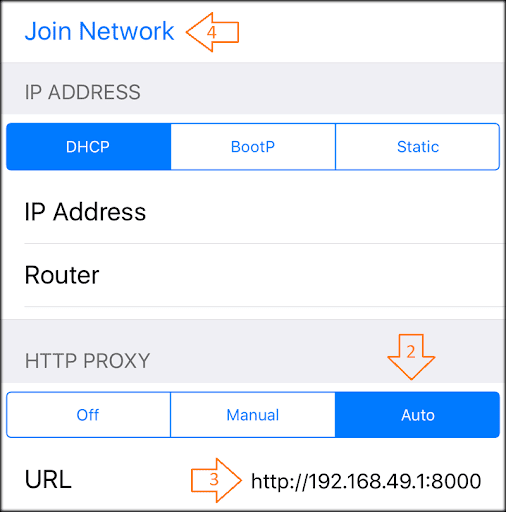
PdaNet+ feels like one of those stubborn utility apps that has survived because it solves a very specific problem better than most polished modern alternatives: getting your phone’s internet onto a laptop or tablet when the usual hotspot route is blocked, limited, or unreliable. After spending time with it, that remains the core appeal. This is not a pretty app, and it is not especially beginner-friendly, but when you actually need it, it can feel indispensable. The first thing that stands out is that PdaNet+ approaches tethering like a toolbox rather than a single big on/off hotspot switch. Depending on your setup, you can try WiFi Direct Hotspot, USB, or Bluetooth. That variety matters because this app clearly lives in the real world, where one mode may work better than another depending on the phone, the computer, and the restrictions imposed by the carrier or device. In testing, that flexibility was one of the app’s biggest strengths. If one path feels awkward, there is at least a chance another will get you connected. USB mode is where PdaNet+ feels most dependable. Once the phone is recognized properly and the desktop-side software is in place, the connection is functional and stable enough for regular laptop work: web browsing, cloud docs, messaging, and general productivity. It does not feel magical; it feels utilitarian. But that is exactly the point. You plug in, connect, and get on with your day. There is something refreshing about an app that is clearly built around solving a practical headache rather than impressing you with a sleek interface. WiFi Direct Hotspot is the more ambitious option, and it is also where the app’s personality really shows. It is clever, and in the right situation, very useful. But it is not the same frictionless experience as turning on the built-in hotspot on a phone. You may need a client app or proxy setup depending on what you are connecting, and that extra layer makes the experience feel more technical than the average user may expect. During use, this translated into a setup flow that required paying attention. It is not impossible, but it does ask more from the user than most mainstream network tools. That is the first major weakness: convenience is not always this app’s strong suit, especially if you expected a one-tap universal hotspot. The second weakness is the app’s interface and communication style. PdaNet+ is functional, but it feels old-school. Menus, prompts, and instructions are more practical than elegant. In one sense, that is forgivable because the app is doing complex work under Android’s restrictions. In another sense, it means the onboarding can feel heavier than it should. New users may find themselves double-checking instructions, visiting the installation page for the computer-side component, and wondering whether something is wrong or simply waiting for the right step. It is the kind of app that rewards patience, not casual curiosity. The third complaint is that its usefulness is clearly shaped by technical limitations outside the app’s control. PdaNet+ is upfront about that, and in practice you feel it. Some modes are better suited to certain devices than others, some hardware combinations are clearly less cooperative, and not every scenario is equally supported. If your ideal use case is sharing internet to anything and everything exactly like a standard hotspot, this app may frustrate you. It works best when you understand that it is a workaround-oriented utility, not a perfect replacement for every native tethering feature on every device. That said, PdaNet+ earns real respect in everyday use because of three things it does very well. First, it offers genuine no-root utility. There are not many apps in this category that still feel this purpose-built. Second, the connection options give it resilience. USB in particular can be a lifesaver when wireless options are flaky or restricted. Third, once you get it configured, it fades into the background nicely. The best moments with PdaNet+ are not exciting; they are the moments when you forget about it because your laptop is online and your work is moving again. There is also a certain confidence in the app’s design philosophy. It does not pretend Android tethering restrictions do not exist. Instead, it works around them in ways that are sometimes clever and sometimes clunky. That honesty actually helps set expectations. PdaNet+ is not trying to be a lifestyle app. It is trying to be a connectivity tool for people who have a specific need and are willing to do a little setup to meet it. So who is it for? PdaNet+ is for travelers, remote workers, students, and anyone who occasionally finds themselves needing to share a phone connection with a computer when the normal hotspot option is unavailable, capped, or unreliable. It is especially well suited to users who are comfortable following setup instructions and installing companion software on a PC or Mac. It is also a strong fit for people who value function over visual polish. Who is it not for? If you want a dead-simple, native-feeling hotspot replacement with zero tinkering, this is probably not your app. It is also not ideal for people who get frustrated by technical setup steps or who need broad compatibility with every kind of device and streaming gadget. In the end, PdaNet+ remains relevant for the same reason old utility software often survives: when you truly need it, there are not many substitutes that do the same job as reliably. It is not elegant, and it is not universal, but it is often effective. That makes it easy to respect, even when it occasionally makes you work harder than you want to.
Alternative apps