Apps Games Articles
WhatsApp Business
WhatsApp LLC
Rating 4.7star icon
Editor's summary
Editor rating
star icon star icon star icon star icon
half star icon
4.5

One-line summary WhatsApp Business is one of the easiest ways to turn everyday chat into organized customer communication, but its missing advanced controls and occasional feature inconsistencies keep it from feeling fully professional-grade.

  • Installs

    1B+

  • Developer

    WhatsApp LLC

  • Category

    Communication

  • Content Rating

    Everyone

  • Latest version

    2.26.9.72

  • Package

    com.whatsapp.w4b

Screenshots
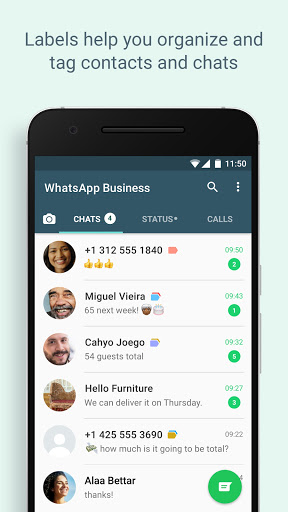
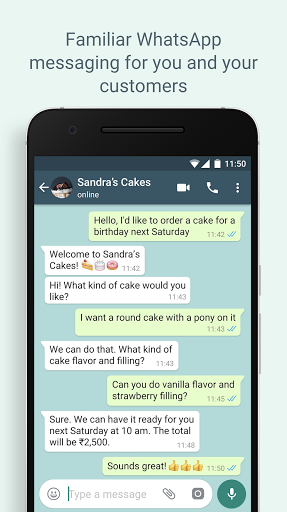
In-depth review
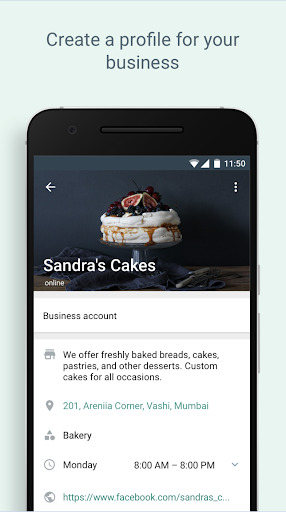
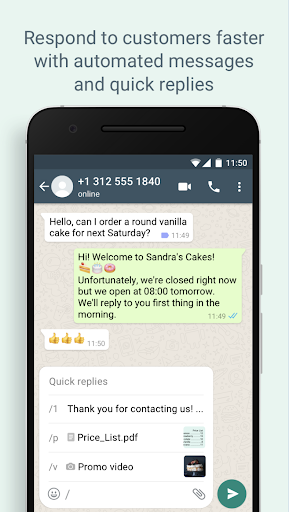
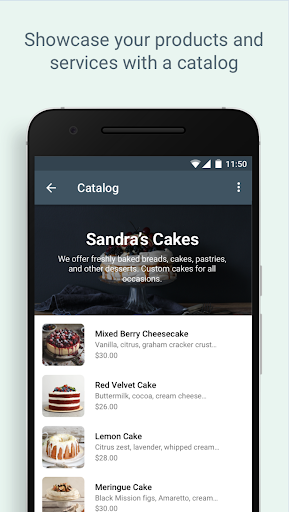
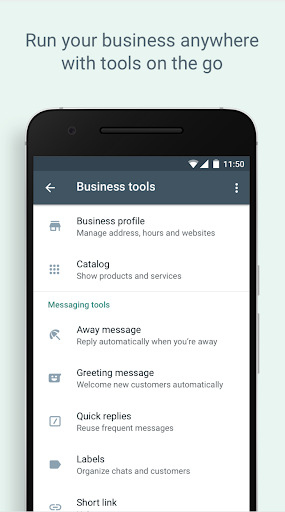
WhatsApp Business succeeds for one big reason: it takes an app most people already understand and layers just enough business structure on top to make customer communication feel manageable instead of chaotic. After spending time with it as a day-to-day communication tool, that is the impression that stayed with me. This is not a heavy CRM, not a full storefront platform, and not an enterprise support desk. It is WhatsApp with a practical business brain added in, and for many small operators, that is exactly the right formula. The setup experience is refreshingly straightforward. If you already know how to use WhatsApp, the learning curve is minimal. That matters more than it sounds. Business apps often bury useful functions under clumsy menus and jargon, but WhatsApp Business keeps things familiar. The basic messaging experience is still fast, clean, and reliable, whether you are handling a single inquiry or a long stream of customer chats. Text, media, voice notes, calls, and status updates all feel like part of one coherent system rather than awkward bolt-ons. What makes the app genuinely useful in practice are the built-in business tools that save small bursts of time all day long. Quick replies are one of the best examples. When you answer the same questions repeatedly, being able to send polished responses without retyping them changes the rhythm of work. Greeting and away messages also help the app feel more professional, especially if you are not available around the clock. Labels are another quiet win. They are simple, but they make a real difference when you need to separate leads, active orders, follow-ups, and completed conversations without losing your place. The catalog feature is also more valuable than it first appears. It is not trying to replace a full e-commerce system, but it gives businesses a presentable way to show products or services inside a familiar chat environment. In testing, that convenience was the point: instead of sending scattered photos and explanations one by one, you can direct people to something that feels organized and intentional. For freelancers, solo sellers, and service providers, that can make the whole interaction smoother. Another clear strength is accessibility. WhatsApp Business works well because customers are already there. You are not asking them to learn a new support portal or download a niche app. From a pure usability perspective, that lowers friction immediately. The app is also easy to operate on weak connections, and the core messaging and calling experience remains one of the strongest in its class. The interface is approachable enough for first-time business users, yet functional enough that it does not feel toy-like. That said, WhatsApp Business is not without its frustrations. The first weakness is inconsistency. Some business features feel central to the app’s identity, yet they do not always feel equally visible or dependable across setups. When an app is marketed around automation and business tools, those tools need to feel consistently present and easy to find. At times, the app still feels like standard WhatsApp wearing a business badge rather than a deeply thought-out work tool. The second issue is that organization only goes so far. Labels help, quick replies help, catalogs help, but once your conversation volume grows, the app starts to show its limits. There is only so much structure you can create inside a chat-first environment. If your workflow depends on advanced automation, detailed tracking, or richer operational controls, you may quickly run into the app’s ceiling. It is excellent for keeping things tidy, but it does not transform chat into a complete business management system. The third weakness is polish in certain everyday details. Media handling and status posting can feel less elegant than they should. Browsing and selecting files is not always as intuitive as it ought to be, and media quality can sometimes feel compromised during sharing. There are also little interface annoyances in parts of the app that should be smoother by now, especially for people who depend on it every day rather than casually opening it to answer a few messages. Security and trust are also part of the experience, and here WhatsApp Business largely benefits from the wider WhatsApp ecosystem. End-to-end encryption and optional verification tools add reassurance, and the business profile helps establish legitimacy. That matters when customers are deciding whether a number looks trustworthy enough to engage with. In actual use, the business profile creates a more professional first impression than a plain personal account. So who is this app for? It is ideal for freelancers, small retailers, service businesses, creators, and anyone who manages customer conversations directly from a phone. If your needs are centered around messaging, quick updates, product sharing, and simple organization, it is one of the most practical tools you can install. It is especially good for people who want to separate work and personal communication without moving into a complicated software stack. Who is it not for? It is not the best fit for teams that need deep analytics, complex automation, highly structured workflows, or a more formal support environment. It is also not for anyone expecting every business feature to feel extensive or desktop-grade. This is a lightweight business communication app, not a full operations platform. Overall, I came away impressed. WhatsApp Business gets the fundamentals right: it is easy to use, genuinely helpful in daily communication, and strong enough to make a personal messaging habit feel professional. Its best features save time without demanding retraining, and that is a rare kind of usefulness. It does have rough edges, and power users will eventually want more, but for the audience it is built for, it remains one of the smartest and most practical communication apps available.