Apps Games Articles
Extra Volume Booster Equalizer
Magic Mobile Studio
Rating 4.7star icon
Editor's summary
Editor rating
star icon star icon star icon star icon
half star icon
4.5

One-line summary Extra Volume Booster Equalizer is easy to recommend because it genuinely makes weak phone, headphone, and Bluetooth audio louder, but I’d hesitate if you hate ads, battery drain, or pushing tiny speakers past their comfort zone.

  • Installs

    10M+

  • Developer

    Magic Mobile Studio

  • Category

    Audio

  • Content Rating

    Everyone

  • Latest version

    4.5.6

  • Package

    com.music.sound.speaker.volume.booster.equalizer

In-depth review
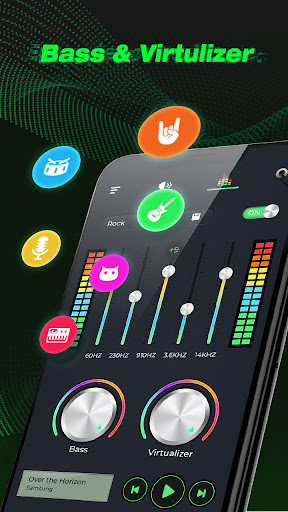
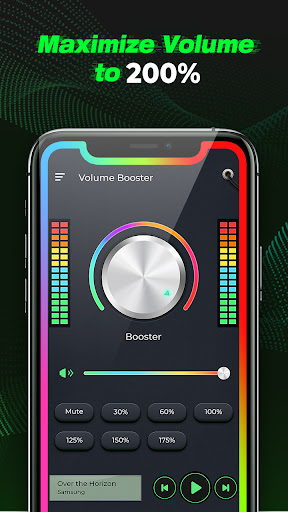
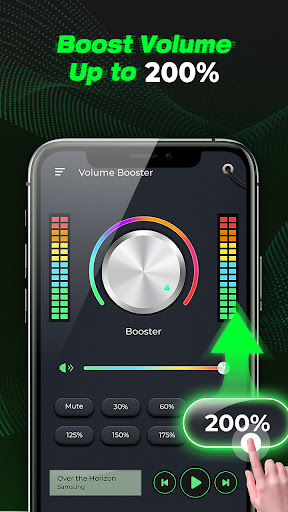
Extra Volume Booster Equalizer is one of those apps I opened with low expectations and kept installed longer than I expected. Volume booster apps on Android often promise absurd gains, slap a giant dial on the screen, and then deliver little more than distortion. This one is better than that. In day-to-day use, it actually does what most people want from this category: it makes audio louder in a noticeable, immediate way, and it gives you just enough control over the sound to shape it instead of simply blasting everything into a harsh mess. The first thing that stood out in my testing was how quickly it gets to the point. The interface is simple, approachable, and doesn’t require any setup ritual. You launch it, start playing something, and adjust the boost. That matters because this kind of app is usually used in practical, slightly annoying situations: a phone speaker that is too quiet for podcasts, Bluetooth audio that gets drowned out outdoors, or headphones that just don’t hit the volume level you want. Extra Volume Booster Equalizer feels built for those moments. It is not trying to be a full music studio tool. It is trying to solve a basic problem fast, and most of the time it succeeds. In actual listening, the app’s strongest quality is that the volume increase feels real across different use cases. Music, YouTube, spoken audio, and Bluetooth playback all benefited in my time with it. On a weak device speaker, the difference was obvious. On Bluetooth headphones and a portable speaker, the effect was even more useful because there was more headroom before the sound started breaking up. That flexibility is one of the app’s biggest strengths. It is not limited to one playback scenario, and it does not feel fussy about what app your audio is coming from. The equalizer is the second reason this app rises above throwaway booster apps. It is not especially deep or professional, but it is functional. More importantly, it helps you compensate for the ugly side effects that come with aggressive volume boosting. If vocals get too sharp, you can rein that in. If boosted audio sounds thin, you can add some bass weight. I also appreciated that the app does not force you to become an audio nerd to get results. You can make small adjustments and hear the difference quickly. For a free utility app, that is exactly the right level of control. A third strength is that it generally behaves like a practical background tool rather than something that constantly demands attention. Once I found a level I liked, I could leave it running and get on with listening. That makes it much more useful than apps that feel like they need babysitting every few minutes. It also means the app fits real life: yard work, showers, household chores, commuting, or any situation where you just need your media to cut through ambient noise. That said, this is not a miracle app, and its weaknesses show up pretty quickly if you push it too hard. The biggest issue is also the most predictable one: distortion. Yes, it boosts volume, but the app cannot rewrite the laws of physics. If your phone speaker is small or already strained, cranking the boost too high will expose its limits fast. Crackling, fuzziness, and harshness arrive well before the marketing language of “super volume” starts to sound appealing. In other words, the app works best as a smart boost, not as a permanent max-everything setting. The second weakness is advertising. I would not call the ads unbearable, and in my use they were not constant pop-up chaos, but they are present enough to remind you this is a free app. That is manageable when you are setting it once and leaving it alone. It is more annoying when you are actively tweaking levels and just want to get back to your audio without interruption. Anyone highly sensitive to ad-supported utilities will feel that friction. The third drawback is resource use. During longer sessions, the app can feel less lightweight than its simple design suggests. Extended use may contribute to extra battery drain or phone warmth, especially on older devices or when paired with heavy media use. I also noticed that these kinds of booster apps can be at the mercy of Android’s background behavior, so depending on your phone, the experience may occasionally require reopening the app or checking that it is still applying the desired effect. There are a few smaller limitations too. The equalizer is useful, but not especially advanced. If you are the kind of listener who wants highly detailed frequency control, this app will feel broad rather than precise. Likewise, the volume controls can feel a little unconventional once the app is doing the heavy lifting, so getting the exact level you want sometimes takes a moment of back-and-forth between system volume and the in-app boost. So who is this app for? It is for people with phones that sound too quiet, listeners who use Bluetooth speakers or earbuds in noisy environments, and anyone who wants a simple, effective loudness boost without rooting a device or diving into technical settings. It is especially good for casual media use: music, videos, audiobooks, and podcasts. It is not for purists chasing clean, high-fidelity audio at extreme volume, and it is definitely not for anyone who tends to drag every slider to maximum and leave it there. If you treat it like a precision loudness aid rather than a magic amplifier, it is genuinely useful. After spending time with it, my takeaway is straightforward: Extra Volume Booster Equalizer is one of the better examples of a category that usually disappoints. It sounds louder, it is easy to use, and the equalizer makes it more than a one-trick app. You do pay for that convenience with some ads, some extra strain on your device, and the ever-present risk of distortion if you overdo it. But used responsibly, it is an effective, practical tool that earns its place on your phone.
Alternative apps