Apps Games Articles
Spotify - Music and Podcasts
Spotify AB
Rating 2.6star icon
Editor's summary
Editor rating
star icon star icon
half star icon
empty star icon empty star icon
2.8

One-line summary Spotify on Android TV still benefits from a familiar music catalog and simple lean-back playback, but the rough app experience and low overall polish make it hard to recommend without reservations.

  • Installs

    10M+

  • Developer

    Spotify AB

  • Category

    Audio

  • Content Rating

    Teen

  • Latest version

    1.55.0

  • Package

    com.spotify.tv.android

In-depth review
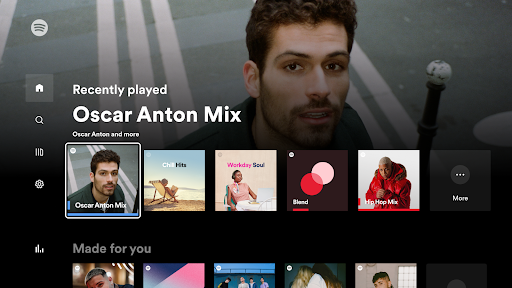
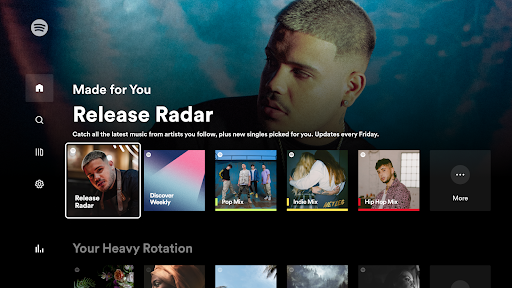
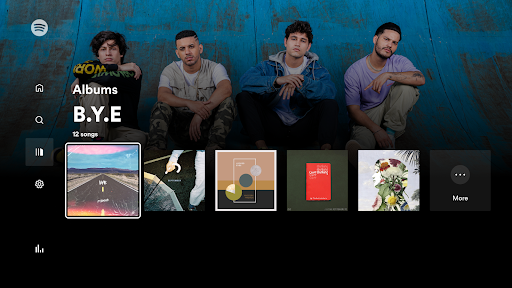
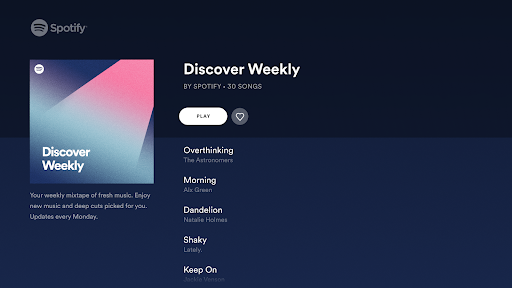
I went into Spotify - Music and Podcasts on Android TV expecting a straightforward living-room version of a service many people already know well: open the app, sign in quickly, pick music or a podcast, and let it run in the background while the room gets on with life. In that narrow sense, it does work. You can get audio playing on a TV device without much conceptual friction, and that alone gives the app a baseline usefulness. But after spending time with it as an everyday listening option rather than just a quick demo, the experience feels far less polished than the Spotify name might lead you to expect. The first thing the app gets right is familiarity. If you already use Spotify elsewhere, there is immediate comfort in seeing the same overall content universe on a TV screen. That matters more than it sounds. A TV app lives or dies by how little effort it takes to settle in, pick something, and keep listening. Spotify generally understands that lean-back behavior. It is easy to imagine using it for background playlists during dinner, long podcast sessions from the couch, or passive listening while doing chores in the room. The app also benefits from a format that naturally suits TV use: big artwork, simple categories, and playback that can run while your attention drifts elsewhere. When it is behaving, it is pleasant in a low-effort way. That said, the app never fully shakes the feeling that it is a compromised adaptation rather than a truly refined TV-first experience. Navigation is the biggest sticking point. On a phone, tapping around Spotify can feel fast and fluid. On a TV, every extra click is amplified, and small interface annoyances quickly become real friction. During use, I often felt like the app was asking for more remote input than it should. Finding something specific or moving between sections lacked the speed and snap I want from a living-room audio app. Instead of disappearing into the background, the interface too often reminded me that I was operating software. That matters because TV listening is usually not active, screen-focused listening. It is ambient. You want to sit down, launch a playlist, maybe queue up a podcast, and stop thinking about the app. Spotify gets part of the way there, but not all the way. The layout is serviceable, yet there is a roughness to how it feels in practice. The low rating attached to this version of the app does not come as a surprise after using it for a while; there is enough drag here to make routine use less enjoyable than it should be. A second strength is that the core idea still makes sense on this platform. Music and podcasts are natural fits for a television-connected device because the TV often doubles as the sound system in a room. If you already spend time in an Android TV environment, having a free app that can put on audio content without switching devices is genuinely convenient. I liked being able to treat the TV as a communal speaker for casual listening sessions. In shared spaces, that simplicity has value. But convenience is also where one of the app's weaknesses becomes more obvious: reliability and consistency of the experience feel shaky. I am not pointing to one dramatic failure so much as an accumulation of little moments where the app did not feel as smooth or trustworthy as a mature TV app should. Menus, transitions, and general responsiveness never gave me the sense of a premium, settled product. Even when playback itself was the goal, getting there felt uneven enough to break the illusion of ease. The third clear strength is accessibility of entry. Because the app is free to install, the barrier to trying it is low, and that makes it easy to recommend in a very specific scenario: if you already live in the Spotify ecosystem and simply want a basic TV endpoint, this app can fill that role. You do not need much patience to get initial value out of it. For casual users who just want to throw on some music in the background and are not overly demanding about interface refinement, there is a workable experience here. Still, there are three recurring reasons I would hesitate before broadly recommending it. First, the overall polish is underwhelming for such a widely known app. Second, TV navigation does not feel efficient enough for regular use with a remote. Third, the experience lacks the sense of stability and smoothness that makes a media app feel invisible. None of these problems necessarily make the app unusable on their own, but together they create a product that feels more frustrating than it should. So who is this app for? It is for existing Spotify users who want occasional music or podcast playback on Android TV, especially in a communal setting where the TV serves as the room's audio hub. It is also for people who value familiarity over refinement and are willing to tolerate some rough edges to stay inside one ecosystem. Who is it not for? It is not for anyone expecting a slick, premium television experience, and it is definitely not for users who are sensitive to interface friction. If you want your TV audio app to feel effortless, fast, and confidently designed around remote navigation, this one may test your patience. In the end, Spotify - Music and Podcasts on Android TV is useful more than it is enjoyable. It succeeds at the basic job of bringing a well-known audio service to the TV, and there is real convenience in that. But convenience only carries an app so far. In day-to-day use, this version feels too rough around the edges to earn an enthusiastic recommendation. I can see myself using it when I specifically need Spotify in the living room, but I cannot say I ever forgot I was making compromises to do so.