Apps Games Articles
Sell on Etsy
Etsy, Inc
Rating 4.1star icon
Editor's summary
Editor rating
star icon star icon star icon star icon empty star icon
4.1

One-line summary Sell on Etsy is easy to recommend to active Etsy shop owners who need quick order and message management on the go, but harder to love as a complete mobile workspace when you want every seller task to feel effortless from a phone.

  • Installs

    1M+

  • Developer

    Etsy, Inc

  • Category

    Business

  • Content Rating

    Everyone

  • Latest version

    -

  • Package

    com.etsy.android.soe

In-depth review
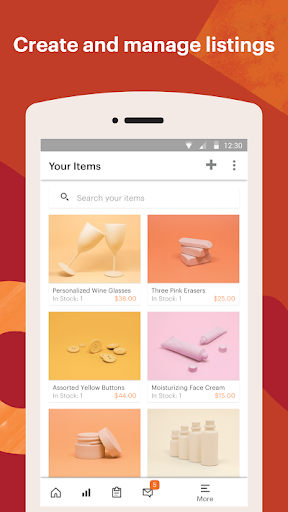
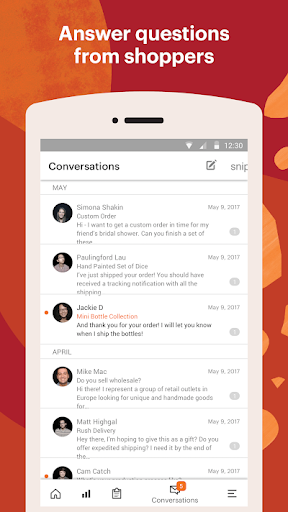
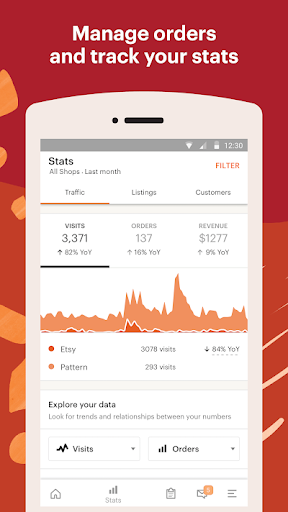
Sell on Etsy feels like the kind of app that was built around the reality of running a handmade or niche product shop in spare moments: checking an order while standing in line, replying to a buyer during lunch, or keeping an eye on activity without being tied to a laptop. After spending time with it as a daily-use seller companion, my overall impression is positive. It does an awful lot of the practical, high-frequency work well, and that matters more than flashy design in an app like this. At the same time, it still carries the familiar frustration of a seller tool that is very useful but not always fully comfortable as your only control center. The first thing the app gets right is focus. From the moment I started using it as part of a seller workflow, it was clear that this is not trying to be a general Etsy browsing app with a few shop tools bolted on. It is centered on the seller’s everyday pulse: orders, conversations, and shop activity. That focus makes the app immediately useful. If you are the kind of seller who needs to respond quickly and keep your shop moving throughout the day, it works well as a mobile command post. Order monitoring is where the app feels most valuable. Being able to check incoming sales and keep track of active shop activity without sitting down at a desktop changes the rhythm of managing a store. In use, that convenience adds up fast. I found myself opening it for small but important tasks: seeing whether an order came through, checking whether a buyer had written with a question, and making sure nothing urgent was sitting unattended. For busy sellers, that kind of instant visibility is the app’s biggest strength. Messaging is another area where the app earns its place on your phone. Buyer communication is one of those things that can either make a seller feel in control or permanently behind, and Sell on Etsy makes quick replies fairly natural. I liked the feeling of being able to keep conversations moving instead of waiting until I was back at my computer. The app is at its best when it reduces that friction between “I need to respond” and “I’ve already handled it.” That responsiveness can make the shop feel more manageable, especially for solo sellers juggling production, packing, and customer service. A third strength is that the app generally keeps the learning curve low. You do not get the sense that you need to memorize a complex mobile dashboard just to perform basic tasks. Even if you are not especially technical, most of the important seller functions feel understandable quickly. That matters because many Etsy sellers are running very hands-on businesses and do not want to wrestle with software every time they check their shop. Still, the app is not friction-free. My main hesitation is that it can feel more like a strong companion app than a perfect all-in-one seller workspace. For light daily management, it is helpful. For deeper shop administration, the phone experience can start to feel limiting. There were moments when I could do enough to stay on top of things, but not always enough to feel fully comfortable handling everything mobile-first. That gap between “good for staying responsive” and “great for complete management” is the app’s clearest weakness. Another issue is that the experience can feel a little utilitarian rather than genuinely polished. It gets the job done, but not always with the smoothness you want from something you may open dozens of times a day. Some seller tools feel invisible when they are working well; Sell on Etsy occasionally reminds you that you are operating inside a work app, not a beautifully streamlined mobile environment. That does not ruin the experience, but it does keep it from feeling truly premium. The third weakness is mental overload during busy periods. When your shop is active, having messages, orders, and shop tasks flowing through one mobile app is convenient, but it can also feel crowded. On a phone screen, seller work naturally becomes more compressed, and the app does not completely escape that problem. It is functional, but there are times when it feels like too much seller context packed into too little space. If you are handling a high volume of tasks or trying to make careful shop updates on a small screen, you may start wishing for desktop breathing room. That leads directly to who this app is for. Sell on Etsy is best for existing Etsy sellers who need reliable mobile access to the essentials. If your day is full of quick check-ins, order awareness, and customer communication, this app makes a lot of sense. It is especially good for solo shop owners who are frequently away from their desks but still want to stay responsive and organized. It is not ideal for someone hoping to run every aspect of a shop comfortably from a phone with no compromises. If you prefer deep editing, extended admin work, or a more spacious workflow, you may find it useful but incomplete. It is also not for general Etsy shoppers; this is clearly a seller-side utility, and it feels like one. In the end, Sell on Etsy succeeds because it respects the real pace of seller life. It lets you keep a hand on your shop throughout the day, and that alone makes it valuable. Its best qualities are practical: fast access, seller-focused design, and useful communication tools. Its shortcomings are equally practical: occasional clunkiness, limits as a full mobile workspace, and a cramped feel when things get busy. But judged for what it is—a mobile control app for Etsy sellers—it performs well enough that I would keep it installed without hesitation. I just would not confuse that with saying it replaces the desktop experience entirely.
Alternative apps