Apps Games Articles
WiFi Info & Launcher
RUITA LIMITED
Rating 4.1star icon
Editor's summary
Editor rating
star icon star icon star icon
half star icon
empty star icon
3.7

One-line summary WiFi Info & Launcher is a handy two-in-one utility if you want quick network details and a simpler home screen, but it’s harder to fully recommend if you expect either a serious Wi-Fi diagnostics tool or a deeply polished launcher.

  • Installs

    100K+

  • Developer

    RUITA LIMITED

  • Category

    Tools

  • Content Rating

    Everyone

  • Latest version

    VARY

  • Package

    com.wifiinfo.launcher.zxiert

Screenshots
In-depth review
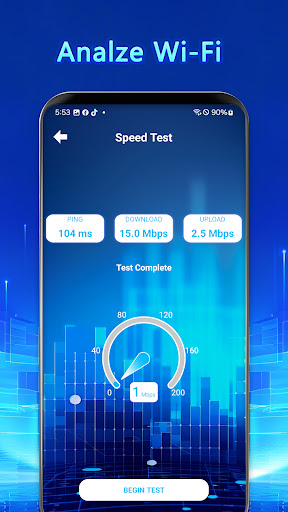
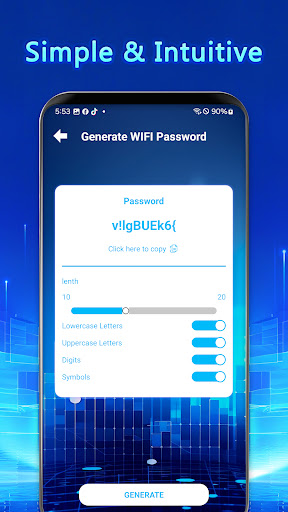
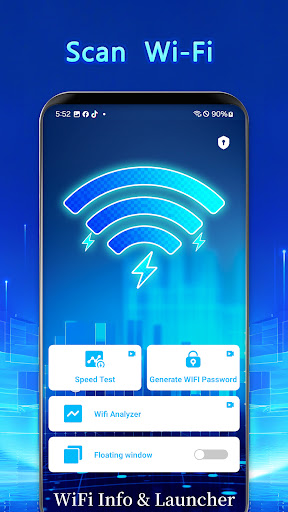
WiFi Info & Launcher is one of those Android apps with a slightly unusual pitch: it tries to be both a network information tool and a lightweight launcher. After spending time with it, that combination makes more sense than it sounds at first. There is some real convenience here. If you’re the kind of person who regularly checks what network you’re connected to and also prefers a cleaner, more controlled app setup, this app can fit into a daily routine surprisingly well. At the same time, its biggest limitation is also obvious pretty quickly: because it is doing two jobs at once, it doesn’t feel as complete or as refined as the best apps that focus on just one of them. The Wi-Fi side is the part that makes the strongest first impression. The app surfaces the basics you actually want to see without much digging: SSID, BSSID, band, channel, and signal strength. That sounds simple, but in practice it is useful. When moving around the house, switching between rooms, or checking whether a weak connection is due to distance or interference, having that information visible in one place saves time. I especially liked that it gives the app a practical reason to exist beyond cosmetic launcher tweaks. This is not just another launcher trying to differentiate itself with themes alone. The real-time monitoring angle also adds value, at least at a glance. Watching the signal fluctuate while moving between areas of stronger and weaker reception gives you a quick feel for your network conditions. It is helpful for everyday troubleshooting in a casual sense: checking if the kitchen gets worse reception than the bedroom, confirming whether a router reboot improved things, or verifying that you are on the network you think you are on. That said, this is where one of the app’s weaknesses starts to show. The monitoring feels useful as a snapshot tool, but not like a deep diagnostic environment. If you are expecting advanced analysis, dense technical controls, or the kind of detail a networking enthusiast might want, this app feels more lightweight than specialized. The launcher portion is a mixed but generally positive experience. The best thing about it is how straightforward it is. Instead of throwing endless customization panels at you, it appears designed around quick access and a less cluttered home screen. Creating groups for frequently used apps is genuinely convenient, especially if you mostly use the same small set of apps every day. In actual use, that made my phone feel a bit more focused. It’s the kind of setup that works well for people who are tired of scrolling through a bloated app drawer and just want a few organized destinations. This simplicity is the app’s second major strength. The interface doesn’t feel overloaded, and that matters because utility apps can easily become ugly or fiddly. Here, the overall design approach is cleaner than expected. Even when switching between network info and launcher functions, the app rarely feels chaotic. There is a clear effort to keep things approachable rather than intimidating. For less technical users who want to understand their Wi-Fi without learning networking jargon in depth, that restraint is a plus. Still, the launcher side also reveals one of the app’s biggest trade-offs. It is functional, but it doesn’t feel especially distinctive or deeply polished as a full-time home screen replacement. If you love tweaking every icon, gesture, animation, and layout detail, this will likely feel limited or at least less mature than dedicated launchers. The customization is there in spirit, but the overall impression is more “convenient utility” than “premium launcher experience.” I could use it, but I never fully forgot that I was using a tool with launcher features, not a launcher built from the ground up to compete on smoothness and flexibility alone. Another issue is that the app’s identity can feel slightly split. On paper, combining network tools and home screen management sounds efficient. In practice, those are two different mindsets. When I wanted Wi-Fi information, I appreciated the directness. When I wanted launcher convenience, I didn’t necessarily want a utility feel attached to my home screen. That doesn’t make the app bad, but it does make it a little niche. The overlap exists, just not for everyone. Ads are also part of the experience, and while that is understandable for a free app, they do affect the overall sense of polish. In an app that is supposed to support efficiency, any interruption works against its core appeal. I wouldn’t call it a deal-breaker based on the app’s free positioning, but it is another reminder that this is not a premium-grade streamlined environment from top to bottom. So who is this app for? It is best suited to Android users who want a simpler launcher and occasionally need quick Wi-Fi visibility without installing a separate network utility. It also makes sense for casual troubleshooters who want immediate connection data in a friendly format. It is not ideal for power users who want advanced networking tools, and it is also not the best fit for launcher enthusiasts who treat the home screen as a hobby and expect extensive customization and refinement. In the end, WiFi Info & Launcher is a practical app with a good idea behind it. Its third real strength is that it solves two small daily annoyances in one place: checking network conditions and reaching favorite apps quickly. That efficiency is meaningful. But its three notable weaknesses are just as clear: the Wi-Fi diagnostics do not go especially deep, the launcher experience is serviceable rather than standout, and the ad-supported feel slightly undercuts its clean, productivity-first ambition. I came away thinking it is useful and easy to live with, just not quite strong enough in either half to become an essential app for every Android user.