Apps Games Articles
Cleaner Toolbox
SELBY TEAM
Rating 4.4star icon
Editor's summary
Editor rating
star icon star icon star icon star icon
half star icon
4.5

One-line summary Cleaner Toolbox is easy to recommend if you want a genuinely simple, free all-in-one phone cleaner, but I’d hesitate if you’re sensitive to intrusive prompts or impatient with ad-heavy interruptions.

  • Installs

    10M+

  • Developer

    SELBY TEAM

  • Category

    Tools

  • Content Rating

    Everyone

  • Latest version

    1.1.5

  • Package

    com.cleanertool.box

Screenshots
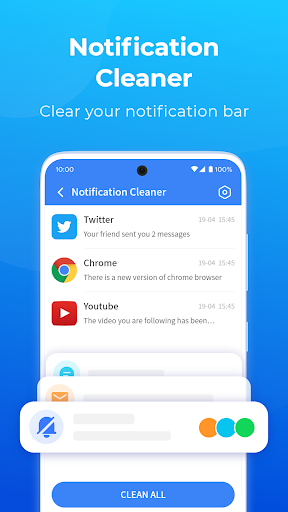
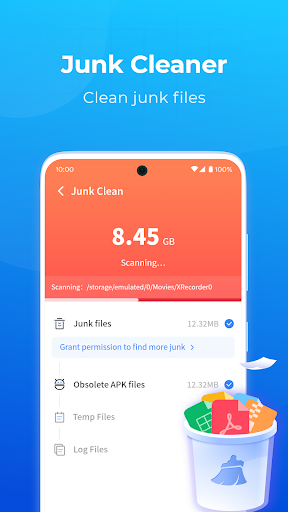
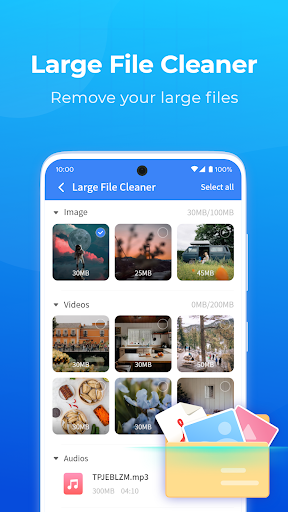
In-depth review
Cleaner Toolbox is one of those Android utility apps that makes a strong first impression because it does not try to bury its main purpose under ten layers of gimmicks. From the moment I started using it, the app felt built for people who want quick maintenance tools in one place: scan junk, check battery information, review installed apps, and see what is running in the background. It is not trying to be a full security suite or a desktop-class optimization platform. It is a cleaner, and for the most part it stays in that lane. What I liked immediately was the app’s straightforwardness. The interface is easy to understand, even if you are not the kind of user who enjoys digging through Android settings. The core cleaning flow is simple: run a scan, review what it found, and decide what to remove. That last part matters. Cleaner Toolbox does a good job of making cleaning feel like a user-controlled action rather than a blind “tap here and hope nothing important disappears” experience. In day-to-day use, that gives it a more trustworthy feel than a lot of cleaner apps that throw around dramatic warnings and try to push you into one-tap panic cleaning. The junk cleaning side is the app’s biggest strength. In testing, it felt fast, clear, and practical. It identifies cache, temporary files, and leftover clutter in a way that makes immediate sense. You are not staring at vague labels that sound scary just to make the numbers look bigger. I appreciated that because storage-cleaning apps often rely on urgency and confusion. Cleaner Toolbox is better when it is just quietly doing the housekeeping job you opened it for. The second thing it gets right is consolidation. There are plenty of Android utilities that send you from one feature to another, or from one utility to an entirely different download, until your “cleaner” turns into a maze of unrelated tools. Cleaner Toolbox generally feels more self-contained. You can clean junk, look at battery basics, uninstall apps you no longer need, and inspect background processes without constantly feeling like the app is upselling you into a larger ecosystem. That makes it especially suitable for casual users who want one utility that handles the obvious cleanup tasks without turning maintenance into a project. A third strength is accessibility. This is an easy app to hand to someone who just wants their phone to run a little smoother and free up some space. The controls are readable, the actions are familiar, and the benefit is obvious almost immediately after a scan. If your phone has become cluttered over time and you want a low-friction way to tidy things up, Cleaner Toolbox delivers that kind of satisfaction well. That said, the experience is not entirely friction-free. The biggest drawback is that the app can feel too eager to insert itself into your routine. During my time with it, the most annoying moments were not during a cleaning session, but when the app seemed determined to remind me that it existed. Utility apps work best when they are available on demand, not when they become part of the background noise. If you like your maintenance tools quiet and invisible, Cleaner Toolbox may occasionally test your patience. Ads are the second weak point. For a free app, the ad load is not shocking, but there are stretches where it starts to interrupt the flow more than I would like. The issue is less that ads exist and more that they can make the app feel less polished than its core design deserves. When you are simply trying to read a prompt, confirm a cleaning action, or move to the next tool, repeated ad interruptions break the rhythm. A cleaner app should feel efficient; when ads pile up, efficiency is the first casualty. The third limitation is scope. Cleaner Toolbox is best when used as a practical cleanup assistant, not as a miracle cure for every phone problem. The battery section is useful for basic information, but it is not some advanced battery lab. The background process management is handy to look at, but this is not a deeply technical system utility for power users who want forensic-level visibility into Android behavior. In other words, it is broad enough to be useful, but not deep enough to replace specialist tools. That balance defines who this app is for. It is a great fit for everyday Android users, especially people dealing with low storage, too much cached clutter, or too many apps they forgot to uninstall. It is also well suited to less technical users who want clear options and quick results without signing up, entering payment details, or decoding jargon-heavy dashboards. On the other hand, it is not ideal for users who dislike promotional interruptions, want complete silence from utility apps, or expect highly advanced device diagnostics and control. After spending time with Cleaner Toolbox, my overall impression is positive. It succeeds because it makes common maintenance tasks feel approachable and useful instead of intimidating. It is not perfect, and the ad pressure plus occasional intrusiveness keep it from feeling truly premium. But at its best, it is exactly what a lot of people want from a free cleaner app: fast scans, visible results, understandable controls, and enough flexibility to clean up your phone without making a mess of it. If you go in expecting a solid general-purpose cleaner rather than a magic wand, Cleaner Toolbox earns its place on your home screen.