Apps Games Articles
Visual Voicemail
Metro by T-Mobile
Rating 3.7star icon
Editor's summary
Editor rating
star icon star icon star icon star icon empty star icon
4.2

One-line summary Visual Voicemail is an easy recommendation for Metro by T-Mobile users who want fast, button-free voicemail management, though its carrier-specific nature and paid transcription option keep it from feeling universally essential.

  • Installs

    50M+

  • Developer

    Metro by T-Mobile

  • Category

    Business

  • Content Rating

    Everyone

  • Latest version

    11.5.0.684478

  • Package

    com.metropcs.service.vvm

Screenshots

In-depth review
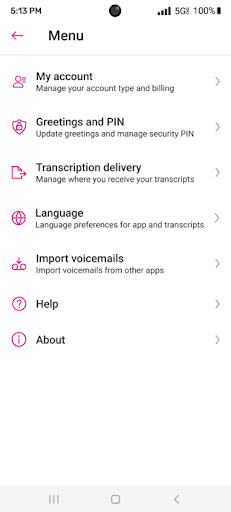
Visual Voicemail is one of those apps that solves a very old problem with a surprisingly simple idea: stop making people call a voicemail number just to dig through messages one by one. After spending time with it, that remains the app’s biggest win. It takes one of the most annoying leftovers from the pre-smartphone era and makes it feel at least somewhat modern. The first thing that stands out in everyday use is convenience. Instead of dialing in, waiting through prompts, and pressing numbers to save or delete messages, you open the app and see your voicemail inbox laid out visually. That alone changes the experience more than any fancy extra feature could. When you have several messages and only care about one of them, the ability to jump directly to it feels liberating. In real-world use, that means less friction when checking a missed callback from a doctor, a delivery update, or a work contact. It turns voicemail from a chore into something you can deal with in a few seconds. The interface is not flashy, but that works in its favor. Visual Voicemail feels built around utility first. Playback is straightforward, message management is easy to understand, and the app generally avoids overcomplicating a task that should be simple. Deleting messages, clearing out clutter, and staying on top of the inbox all feel much faster here than through a traditional voicemail system. That practical clarity is the app’s first major strength. Its second big strength is that it reduces the mental drag of voicemail itself. Normally, voicemail is packed with little annoyances: menus, robotic prompts, repeated instructions, and the constant feeling that you are wasting time. Here, most of that disappears. Messages are accessible in any order, and the app makes voicemail feel more like email or a messages inbox than a phone-tree relic. For people who receive frequent voicemails but hate the ritual of calling in, this is exactly the kind of simplification they have been waiting for. The third strength is that the app goes beyond pure playback just enough to be useful. You can manage greetings from inside the app, and there is an option to upgrade to voicemail transcription if reading messages is more convenient than listening. For some users, especially those who deal with noisy environments or quick workday triage, that text option can be a meaningful quality-of-life boost. Even without paying for transcription, the core voicemail handling is already much better than the old system. That said, Visual Voicemail is not perfect, and the limitations become clearer the longer you use it. The first weakness is that some of the most appealing convenience features are not fully included in the free experience. The app itself is free, but voicemail-to-text is treated as an upgrade. That is understandable, but it does mean one of the headline features sits behind an extra monthly charge. If your main reason for downloading the app is transcript-based voicemail management, this may feel like a partial solution unless you are willing to pay. The second weakness is that the app’s appeal is tied heavily to the carrier environment it was built for. If you are a Metro by T-Mobile user, the setup and purpose make sense immediately. If you are not, this is simply not an app meant for you. Even among supported users, there is a faint sense that this is more of a functional service companion than a broadly polished standalone app. It does its job, but it does not always feel elegant or premium. The third weakness is trust and polish. In day-to-day use, the app is mostly about utility, not delight, and that can cut both ways. When an app handles private voice messages, users naturally want to feel confident about security and reliability. While the basic experience is clear enough, the overall presentation does not always inspire the kind of confidence that a communications app ideally should. It is not that the app is unusable—far from it—but it can feel somewhat bare-bones, and some users may wish for a more modern design and a stronger sense of refinement. Still, what matters most is whether it improves the voicemail experience, and in practice it absolutely does. During testing, the biggest advantage was simply how much faster routine voicemail tasks became. Open app, tap message, listen, delete or save, move on. That flow is dramatically better than calling into voicemail and wrestling with a keypad menu. If you check voicemail even semi-regularly, that improvement is enough to justify installing it. Who is this app for? Primarily, it is for Metro by T-Mobile customers who want a simpler, more visual, less irritating way to manage voicemail. It is especially useful for busy users, people who receive multiple messages a day, and anyone who has long disliked traditional voicemail systems. It also makes sense for users who want quick inbox cleanup and easier greeting management without diving into phone prompts. Who is it not for? It is not for someone outside the supported carrier ecosystem, and it is not the best fit for users expecting a feature-rich communications app with a sleek, modern feel. It is also a less exciting proposition if transcription is the main attraction but paying extra for it feels unnecessary. In the end, Visual Voicemail succeeds because it fixes the part of voicemail that nearly everyone hates: the process. It does not reinvent communication, and it does not feel luxurious, but it removes friction in a very practical way. For the right user, that is more than enough. This is a genuinely useful app, and while it has a few rough edges, it makes voicemail dramatically less annoying—which may be the highest compliment you can give software in this category.