Apps Games Articles
Microsoft Authenticator
Microsoft Corporation
Rating 4.7star icon
Editor's summary
Editor rating
star icon star icon star icon star icon
half star icon
4.5

One-line summary Microsoft Authenticator is one of the easiest and most reliable ways to secure your accounts with phone-based sign-in and solid backup, but its occasional sync quirks and a few rough edges keep it from feeling completely bulletproof.

  • Installs

    100M+

  • Developer

    Microsoft Corporation

  • Category

    Business

  • Content Rating

    Everyone

  • Latest version

    6.2602.0889

  • Package

    com.azure.authenticator

Screenshots
In-depth review
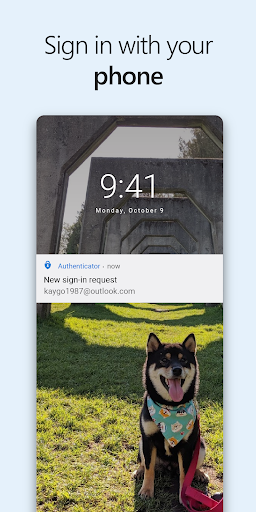
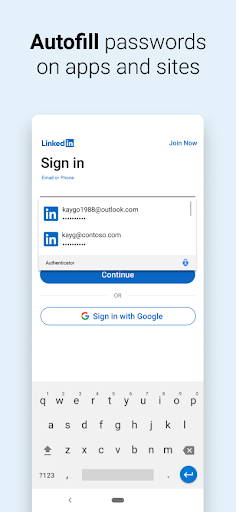
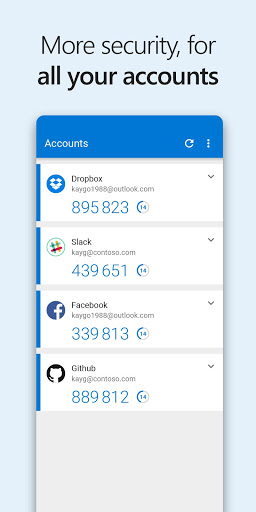
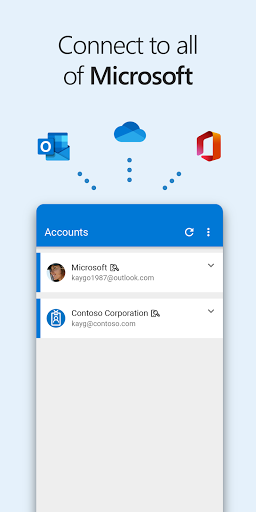
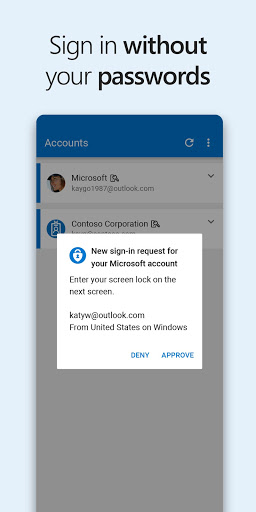
Microsoft Authenticator is one of those apps that does not need to be flashy to be valuable. After spending time with it as a daily sign-in tool rather than just a backup 2FA app, what stands out most is how effectively it gets out of the way. That is a bigger compliment than it sounds. An authenticator app lives or dies by trust, speed, and clarity, and this one generally nails all three. The first thing I noticed is how approachable it feels. A lot of security tools still manage to feel like they were designed for IT admins first and normal humans second. Microsoft Authenticator does a better job than most of making account setup, approval prompts, and code generation feel straightforward. Adding accounts is simple, and once everything is in place, the day-to-day experience is refreshingly low-friction. If you mainly use a Microsoft account for Outlook, OneDrive, Office, or a work login, the passwordless flow is the real headline feature. Typing a username on another device and then approving the request on your phone with a fingerprint, face unlock, or PIN feels faster and cleaner than dealing with passwords and text messages. That convenience is not just about saving a few seconds. It changes the emotional feel of sign-in. Instead of hoping you remember which password variation you used six months ago, you get a prompt, confirm it, and move on. In testing, that part worked well and felt polished. Notifications were prompt, approvals were clear, and the number-matching style approval flow adds a reassuring layer of control without becoming annoying. For Microsoft users in particular, this app feels less like an optional extra and more like the smoothest way to sign in. Its second big strength is that it is not locked into Microsoft accounts only. I had no trouble treating it as a general-purpose authenticator for standard one-time codes, which makes it much more useful than a single-brand utility. If you want one place for work accounts, personal Microsoft accounts, and a pile of third-party logins, it can do that. The rotating codes are easy to read, the timer is clear, and the app does not feel cluttered when you have multiple entries. It also works offline for OTP codes, which is exactly what you want from this category of app. The third thing I appreciated is the sense of security without constant friction. The app being protected by biometrics or a PIN is a small detail that matters. It feels appropriate rather than overbearing. Open the app, authenticate quickly, approve the request, and you are done. In regular use, Microsoft Authenticator has the kind of rhythm that makes good security habits easier to maintain. That said, this is not a perfect app, and some of its annoyances are worth knowing before you commit to it. The biggest is that parts of the experience can feel more complicated than they should, especially if you are not already familiar with how Microsoft handles personal accounts, work accounts, device registration, and backup. None of it is impossible to understand, but there is a mild learning curve. This is not the app I would hand to someone who wants zero setup thought and zero maintenance forever. It is simple once you are in the groove, but not always self-explanatory during the initial setup or when moving between devices. The second weakness is that backup and syncing inspire confidence most of the time, but not absolute confidence all of the time. Cloud backup is one of the app's strongest selling points because it makes switching phones much less stressful, yet there are moments where sync behavior can feel a little slower or less transparent than ideal. If you rely on stored account data across devices, you may occasionally wish the app gave clearer status information or a more predictable sync rhythm. Security apps do not get much goodwill for uncertainty, even small uncertainty. The third complaint is that while the app is generally stable, it does not always feel immune to the odd hiccup. Over long-term use, there can be instances where the app behaves inconsistently enough that you start second-guessing whether the issue is your phone, the app, or the account setup. That is not a constant problem, and in my experience it was not severe enough to overshadow the app's strengths, but it is part of the reality here: this is a very good authenticator app, not a magical one. Another minor disappointment is that Microsoft has clearly been sharpening the app around authentication first, and some adjacent convenience features feel either secondary or in flux. That is not necessarily bad, but if you were hoping for a broader all-in-one identity hub, the app feels strongest when you use it for what its name promises: approving sign-ins and generating codes. In that role, it is excellent. Outside that role, it is merely fine. So who is Microsoft Authenticator for? It is an easy recommendation for anyone invested in the Microsoft ecosystem, whether that means a personal Microsoft account, a Windows-heavy setup, or a work or school login that already leans on Microsoft identity tools. It is also a good pick for people who want one authenticator app that can handle both Microsoft and non-Microsoft accounts, with the added comfort of backup and biometric protection. Who is it not for? If you strongly prefer the most minimal possible interface, want every advanced behavior to be crystal-clear at a glance, or dislike occasional sync ambiguity, you may find it a little less tidy than you want. And if you do not use Microsoft services at all, its best advantages matter less. In the end, Microsoft Authenticator succeeds because it makes security feel less like punishment. It is fast, clean, dependable in everyday use, and especially compelling if you want passwordless Microsoft sign-in on your phone. It is not flawless, and I would like a bit more transparency around sync and a bit less setup complexity in edge cases, but as a practical security tool, it is one of the better authenticator experiences available on Android.
Alternative apps