Apps Games Articles
PDF Reader
Droid Planet
Rating 3.3star icon
Editor's summary
Editor rating
star icon star icon star icon empty star icon empty star icon
3.1

One-line summary PDF Reader is easy to pick up and genuinely handy for quickly opening and sharing documents, but its broad storage access requirement and only-average polish make it hard to recommend without reservations.

  • Installs

    1M+

  • Developer

    Droid Planet

  • Category

    Business

  • Content Rating

    Everyone

  • Latest version

    VARY

  • Package

    reader.pdfreader.com

Screenshots
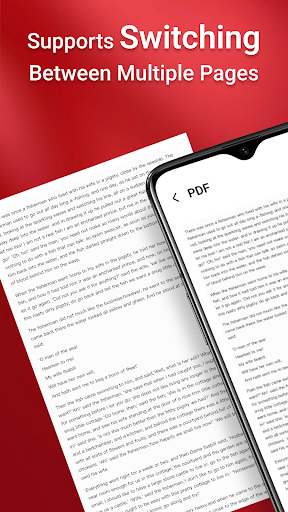
In-depth review
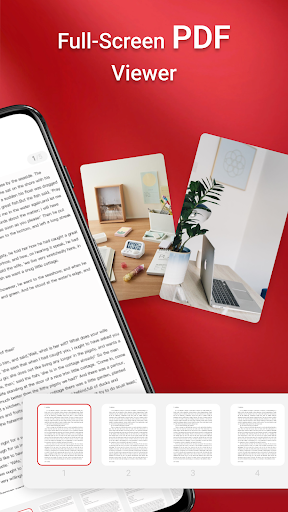
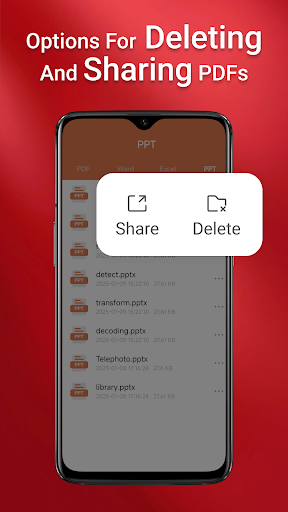
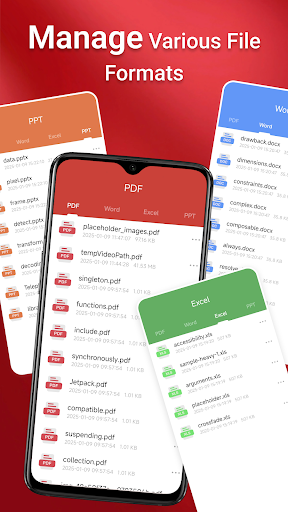
PDF Reader is the kind of app that aims to solve a simple everyday problem: you tap a document, it opens fast, and you get on with your day. After spending time with it in regular use, that straightforward goal is also the app’s biggest strength. It does not feel like an overloaded office suite pretending to be a reader. At its best, it behaves like a practical utility for people who mostly want to find PDF files on their phone, read them without friction, and occasionally share them with someone else. The first thing that stands out is how approachable the app feels. The layout is built around access rather than complexity, so you are not forced through a maze of menus to get to your files. On a phone packed with downloaded forms, attachments, and saved documents, that matters. PDF Reader makes a decent first impression because it appears to understand what most people expect from a mobile document app: scan the device, show the files, and let the reading begin. In daily use, that simplicity works in its favor. Opening a standard PDF is not a chore, and moving between pages feels straightforward enough that you do not spend time learning the app instead of reading the document. That ease of use is the first major reason to consider it. The second is convenience. PDF Reader is not limited to surfacing just one file type in its pitch, and in practice the broad file-access angle gives it a utility-tool feel rather than a narrow single-purpose identity. If your phone tends to collect work documents, school files, and random downloaded PDFs, there is a certain value in having one app that tries to gather them in one place. For users who just want a simple document hub, this can be genuinely useful. The ability to share files easily is another practical win. In testing, the app felt most comfortable in those ordinary moments: opening a form from storage, checking a saved handout, or forwarding a document to someone else without overthinking it. That lines up with the kind of satisfaction you expect from a basic reader app when it is doing the fundamentals right. A third strength is that it stays focused on accessibility. The page navigation tools are easy to understand, and that matters more than flashy extras in this category. If you read long PDFs on your phone, small usability details determine whether the app feels relaxing or irritating. PDF Reader generally lands on the functional side of that line. It is not elegant in a premium way, but it is serviceable in a way that many users will appreciate. Where the experience gets more complicated is in trust and polish. The biggest hesitation comes from the app’s request for MANAGE_EXTERNAL_STORAGE on newer versions of Android. The app explains why it wants broad file access, and the explanation is not irrational for a file-centric tool. Still, from a reviewer’s perspective, this is a meaningful ask. For a document reader, requesting access at that level creates a moment of pause, especially for anyone cautious about privacy and device permissions. Even if the intention is functional, it raises the threshold for recommendation. If you are comfortable granting broad storage permissions in exchange for convenience, you may move past it. If you are more selective about what an app can see, this will likely be the main reason to skip it. The second weakness is that the app feels competent rather than refined. There is a difference between an app that works and one that feels polished enough to rely on every day. PDF Reader lands closer to the former. Nothing about the core reading experience is especially difficult, but it also does not leave the impression of a deeply tuned, premium-grade tool. The store score reflects that middle-ground reality. While using it, I never felt completely put off, but I also never got the sense that this was the last PDF app I would ever need. It is useful, but not especially memorable. The third issue is feature confidence. The description gestures toward document management beyond basic reading, including support for several file types and more advanced file-related operations. In practice, the app’s identity still feels strongest when treated as a simple reader and document finder. If you come in expecting a robust all-in-one productivity environment, the experience may feel thinner than the marketing language suggests. That does not make it bad; it just means expectations need to be set correctly. This is better approached as a convenient everyday PDF utility than as a power-user document workstation. Who is it for? PDF Reader is best for casual users, students, and office workers who mainly want quick access to documents already stored on their phones. If your priority is opening PDFs fast, browsing local files, and sharing them without fuss, it gets the job done with minimal ceremony. It is also a reasonable pick for people who prefer simple interfaces over feature-heavy document apps. Who is it not for? It is not ideal for privacy-sensitive users who dislike broad storage permissions, and it is not the best fit for power users looking for a deeply polished reading environment or an advanced productivity suite. If you want a document app that inspires complete confidence the moment you install it, PDF Reader may feel a little too ordinary and a little too demanding at the permissions stage. Overall, PDF Reader is neither a hidden gem nor a disaster. It is a functional, accessible PDF utility with real everyday usefulness, especially when you need to open and send documents quickly. But its broad access request and only middling sense of polish keep it from being an easy recommendation. If convenience matters more to you than elegance, it is worth trying. If trust, refinement, and top-tier document handling matter most, you may want to keep looking.