Apps Games Articles
AnyDesk plugin ad1
AnyDesk Software GmbH
Rating 2.9star icon
Editor's summary
Editor rating
star icon star icon star icon empty star icon empty star icon
3.4

One-line summary AnyDesk plugin ad1 is genuinely useful if you need remote control on a supported Android device, but its confusing setup, invisible app behavior, and spotty compatibility make it hard to recommend to casual users.

  • Installs

    10M+

  • Developer

    AnyDesk Software GmbH

  • Category

    Business

  • Content Rating

    Everyone

  • Latest version

    1.0.18

  • Package

    com.anydesk.adcontrol.ad1

Screenshots
In-depth review
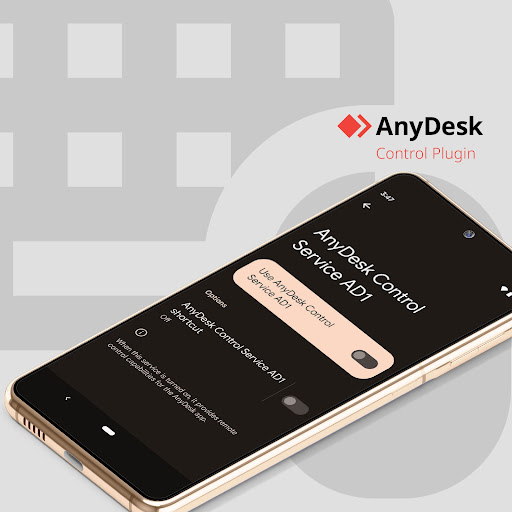
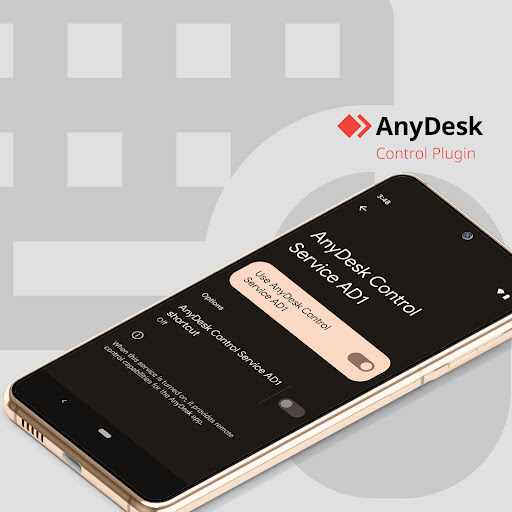
AnyDesk plugin ad1 is one of those Android components that makes sense only after you understand what it is supposed to do. On its own, it is not really an app in the normal sense. You install it because the main AnyDesk app asks for it on certain devices, and from there it acts more like a system bridge than a standalone tool. That immediately shapes the experience: if you know why you are here, this plugin can be genuinely useful; if you do not, the whole thing feels confusing, slightly alarming, and oddly unfinished. In my testing, the first thing that stood out was how hidden the plugin is by design. After installation, there is no launch icon, which is intended to keep the app drawer clean, but in practice it can leave people wondering whether anything happened at all. The actual setup flow lives through the main AnyDesk app and then spills over into Android Accessibility settings. That means this is not a simple install-and-go experience. You need to grant elevated permissions, and in some cases I found that getting everything recognized properly was less smooth than it should be. On paper the process is straightforward; in reality it feels like one of those Android workflows that assumes you are already comfortable digging through settings menus. Once the plugin was enabled properly, though, the experience became much more convincing. On a supported device, remote control worked with surprisingly solid responsiveness. Basic navigation, taps, scrolling, and general control felt stable enough to be practical, not just a technical demo. That is the plugin’s biggest strength: when the connection and device support line up, it turns Android remote control into something that feels useful in everyday life. I could easily imagine using it to help with a family device, access a phone from a desktop, or manage a device from another room without physically picking it up. The second strength is that it integrates into a familiar remote-support workflow instead of trying to become a separate ecosystem. If you already use AnyDesk, adding this plugin on a compatible Android device feels like extending an existing toolset rather than learning a completely new product. There is a certain practical elegance to that. You install it only when needed, enable the required permission, and then it serves a narrow but important purpose. For people who already understand remote access software, this focused design actually makes sense. A third thing I liked is that the plugin is fairly lightweight in concept. There are no ads, no upsell clutter, no extra interface layers competing for attention. It exists to add control capability and then stay out of the way. In a category where utility matters more than presentation, that stripped-down approach is a plus. But there are also real frustrations here, and they are significant enough to explain the app’s mixed reputation. The biggest weakness is compatibility inconsistency. This plugin is clearly not a universal solution for every Android device, and the experience can vary depending on brand, model, and software version. On some hardware it behaves exactly as intended; on others it can be stubborn, limited, or simply fail to work as expected. That kind of uncertainty is especially annoying in remote support, where reliability matters more than almost anything else. The second weakness is setup friction. Requiring Accessibility access is understandable for this kind of control feature, but the process is intimidating for less technical users, and it can take extra steps to get everything functioning correctly. I ran into the kind of hiccup that makes you double-check settings, reconnect, and occasionally restart before remote control becomes active. None of this is impossible to deal with, but it is more finicky than a polished consumer app should be. The third weakness is communication. Because the plugin has no launcher icon and very little visible presence after installation, it is easy to mistake it for a broken app or even something suspicious. That is made worse by the fact that remote access software is often misused by scammers. To be clear, that is not a flaw unique to this plugin, but it absolutely affects the user experience. Any app that asks for Accessibility control and hides itself from the launcher needs to go the extra mile to explain what is happening. Here, the explanation is present, but it still does not feel reassuring enough for a mainstream audience. So who is AnyDesk plugin ad1 for? It is for people who already use AnyDesk, understand why a device-specific plugin is needed, and are comfortable enabling permissions in Android settings. It is also for IT support scenarios and legitimate remote-assistance use where the goal is functional control rather than a pretty interface. If that describes you, this plugin can do its job well. Who is it not for? It is not for someone casually browsing the Play Store looking for a simple remote app with a clear, self-contained experience. It is also not ideal for users who get uneasy around Accessibility permissions or who expect every device to work the same way. And it is definitely not something to install because a random caller told you to. My overall impression is that AnyDesk plugin ad1 is a useful but decidedly utilitarian piece of software. When it works on your device, it adds real capability and can feel impressively smooth. When it does not, there is very little charm in the experience to soften the frustration. I would recommend it conditionally: strong tool for the right setup, awkward experience for everyone else.