Apps Games Articles
The Sims™ FreePlay
ELECTRONIC ARTS
Rating 4.4star icon
Editor's summary
Editor rating
star icon star icon star icon star icon empty star icon
4.2

One-line summary Choose The Sims™ FreePlay if you want a deep, relaxing life sim with excellent building and long-term progression, but skip it if you hate timers, rising costs, and intrusive ad interruptions.

  • Installs

    100M+

  • Developer

    ELECTRONIC ARTS

  • Category

    Simulation

  • Content Rating

    Teen

  • Latest version

    5.88.2

  • Package

    com.ea.games.simsfreeplay_row

Screenshots

In-depth review
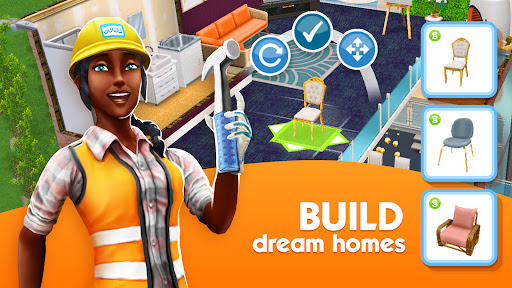
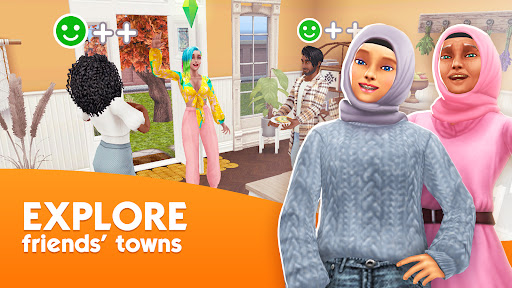
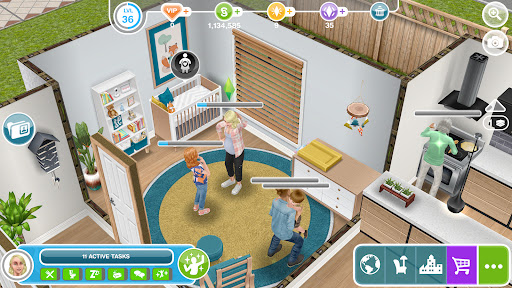
The Sims™ FreePlay is one of those mobile games that makes a very strong first impression and then slowly reveals what kind of player it really wants. After spending real time with it, what stood out most to me was how successfully it captures the fantasy of managing not just one household, but an entire little town of routines, relationships, home design, and low-stakes drama. At its best, it feels like a pocket-sized sandbox where you can check in for a few minutes, queue up some activities, redecorate a room, and leave your Sims to carry on with their day. At its worst, it can feel like a waiting room disguised as a life simulator. The strongest thing here is still the fantasy itself. FreePlay understands that a lot of people come to The Sims not for challenge, but for control and expression. Building homes is genuinely enjoyable. Decorating rooms, picking layouts, and slowly shaping a household gives the game its most satisfying loop. Even on mobile, there is a nice sense of ownership when a bland starter space gradually turns into a stylish, personalized home. Expanding beyond one lot and watching your town fill out adds another layer of satisfaction. That town-building angle makes the game feel bigger than a simple virtual dollhouse, and it gives long-term players a reason to keep coming back. Character management is also surprisingly sticky. Sending Sims to work, assigning hobbies, forming relationships, and moving them through different life stages creates a comfortable rhythm. This is not an app that demands constant twitch-level attention. In fact, one of its better qualities is that it often works well as a background game. You can set tasks that take a while, put the phone down, and return later. For players who like progress without needing to stare at the screen nonstop, that cadence works in the game’s favor. It becomes part planner, part decorating sim, part habit game. Another thing FreePlay gets right is scope. There is a lot to do once your town begins to grow. Careers, hobbies, social interactions, family systems, pets, and building projects all contribute to a sense that the app has real depth. I never had the feeling that I ran out of things to aim for quickly. There is almost always another room to improve, another Sim to direct, or another town goal to chip away at. For a free mobile game, that sense of scale is impressive. But the game absolutely comes with friction, and a lot of it is intentional. The biggest issue in everyday play is time. So many actions, goals, and progression steps are stretched out with lengthy timers that the game can stop feeling relaxing and start feeling padded. A little waiting is fine in a mobile sim; too much waiting makes basic actions feel sluggish. There were moments when I wanted to push a family forward, finish a build idea, or age a Sim into the next stage, only to hit yet another timed wall. If you enjoy slow-burn progress, this may feel cozy. If you want momentum, it can feel exhausting. The economy is the second major sticking point. FreePlay often gives you lots of things to want and then reminds you how expensive those wants are. Buildings, premium-feeling items, and general expansion can create a constant tug between creativity and affordability. Early on, earning currency feels manageable enough, but as your ambitions grow, the pricing pressure becomes much more noticeable. You can still play without paying, but the design frequently nudges you toward shortcuts. The result is a game that is fun to imagine big with, yet occasionally restrictive when you actually try to build big. The third frustration is presentation-related rather than structural: the interruptions. The app is not always as smooth as it should be for a long-running game of this size. Transitional loading moments can feel clunky, and ad pop-ups are easily the fastest way to break immersion. Optional ads for bonuses are one thing; unsolicited interruptions during normal play are another. In a game built around atmosphere and routine, those interruptions feel especially unwelcome. Visually, the game remains charming even if it does not always feel cutting-edge. The art direction is bright and readable, animations are expressive enough to sell the little domestic stories you create, and homes can look great once you put effort into them. The interface is generally understandable, though the amount of systems layered on top of each other can make it feel busy after a while. This is a game that rewards familiarity; the more time you spend with it, the more natural its loops become. Who is this for? It is for players who love life sims as an ongoing hobby, especially those who care about house building, family storytelling, and checking in throughout the day rather than sitting down for one long session. It is also a good fit for people who enjoy setting goals and slowly shaping a world over weeks or months. Who is it not for? Anyone who is impatient with real-time mechanics, easily irritated by ads, or looking for a fast, highly reactive simulation will probably bounce off it. In the end, The Sims™ FreePlay remains compelling because it understands the core appeal of The Sims better than many mobile imitators do. It gives you room to create, decorate, and orchestrate everyday stories on a satisfying scale. But it also asks for patience—sometimes more than it deserves. If you can accept the timers, the occasional grind, and the ad friction, there is a rich and genuinely absorbing mobile life sim here. If not, the same systems that make it feel expansive may also make it feel slow and overly managed.
Alternative apps