Apps Games Articles
Getcontact
Getverify LDA
Rating 3.8star icon
Editor's summary
Editor rating
star icon star icon star icon star icon empty star icon
4.2

One-line summary Getcontact is easy to recommend if you want fast, community-powered caller identification and spam blocking, but it is harder to love if you are sensitive about privacy or expect every feature to work smoothly without login and network hiccups.

  • Installs

    100M+

  • Developer

    Getverify LDA

  • Category

    Communication

  • Content Rating

    Everyone

  • Latest version

    8.11.0

  • Package

    app.source.getcontact

Screenshots

In-depth review
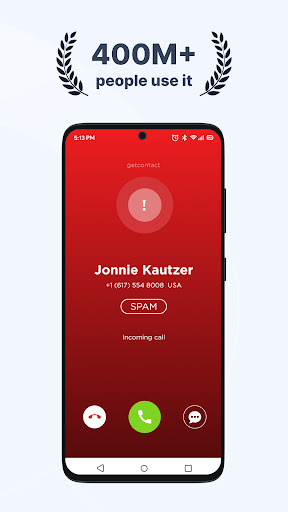
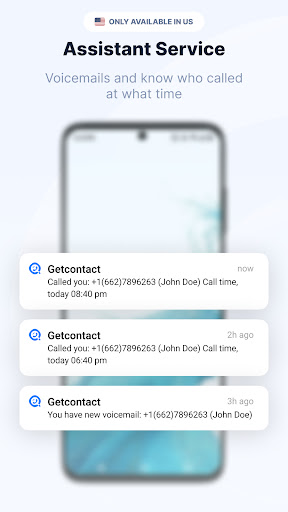
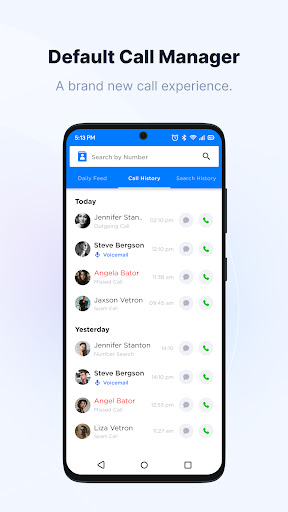
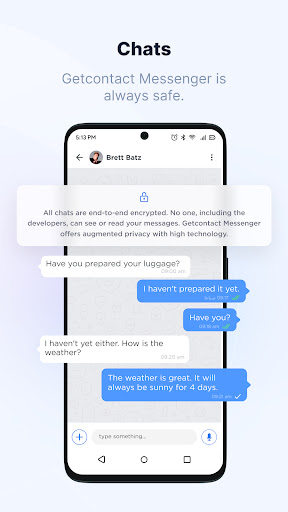
Getcontact is one of those apps that makes its value clear almost immediately. You install it because you are tired of unknown calls, vague numbers, and the constant little decision of whether to answer or ignore. After spending real time with it in everyday use, that core promise mostly holds up. This is an app built around reducing friction: when the phone rings, it tries to tell you who is calling, whether the number looks suspicious, and whether the interruption deserves your attention at all. What stood out first in use was how straightforward the main experience feels. The app does not require much of a learning curve to become useful. Unknown numbers are the heart of the experience, and Getcontact is at its best when it surfaces a recognizable label or tag quickly enough to help you decide what to do. In practice, that means fewer blind pickups and fewer “maybe this is important” moments. For anyone who deals with frequent calls from customers, delivery drivers, service providers, or random spam numbers, that alone can make the app worth having. The strongest part of Getcontact is its crowd-informed identification system. Rather than only telling you that a number is not in your contacts, it often gives that number some context. Sometimes that context is enough to be genuinely useful: it can suggest whether the call looks personal, commercial, spammy, or potentially fraudulent. In day-to-day use, that makes the app feel more practical than a basic caller ID tool. It is not simply identifying a number; it is trying to describe the number’s reputation. When it works well, it takes the uncertainty out of incoming calls in a way that feels immediately modern and helpful. A second strength is that the app generally keeps the interface digestible. There is enough detail to be useful, but not so much that every incoming call becomes a mini investigation. The overall design leans toward utility over flair, which is the right choice for this category. You want speed, clarity, and a sense that the app is helping in the background rather than demanding attention. For the most part, that is exactly how Getcontact behaves. The third big advantage is that it goes beyond calls. The app positions itself as a blocker for spam calls and SMS, and that broader filtering approach makes sense. If you are trying to reduce noise on your phone, you do not want one app for calls, another for messages, and a third workaround for suspicious numbers. Getcontact feels like it is trying to be a single front door for communication screening. Even if you only use part of that toolbox, having the option is useful. That said, Getcontact is not friction-free. The first weak spot is trust. An app that identifies callers through a large shared database inevitably raises privacy questions, and those questions never fully leave the room while using it. There is a real tension here: the app is useful precisely because it knows a lot, but that same usefulness can feel unsettling. If you are the kind of user who is uneasy about contact visibility, tags, and how your number may appear in other people’s phone ecosystems, Getcontact may feel invasive even when it is functioning well. The second weak spot is reliability around access and setup. During testing, the app could feel a little too dependent on smooth verification and network conditions. It is not the kind of app you want to wrestle with during sign-in, because the whole point is convenience. When login or verification is temperamental, it undercuts confidence right away. This is not a constant deal-breaker, but it is the sort of annoyance that feels larger because of the app’s purpose: a communication utility should feel dependable from the first minute. The third weakness is that some features seem to sit behind expectations that are not always obvious until you are already inside the app. Getcontact can create the impression of being broader than what you fully get for free, especially around communication-related extras beyond the core caller ID function. The result is not outright deceptive, but it can feel like the app’s most polished promise is the unknown-number lookup, while some surrounding features are less universally available or less central than the interface suggests. There is also a practical concern about making it your full default dialer or messaging replacement. As a caller ID layer, Getcontact makes sense. As the app you want deeply embedded into every call and text workflow, I am less convinced. It feels strongest as a smart screening companion, not necessarily as the center of your phone experience. That distinction matters, because utility apps earn trust by being light, stable, and unobtrusive. So who is Getcontact for? It is best for people who routinely receive calls from numbers they do not recognize and want immediate context before answering. It is especially useful for users who are concerned about scam or marketing calls and want stronger filtering than the stock phone app usually provides. If your day includes a lot of communication with unfamiliar numbers, Getcontact can reduce stress in a very tangible way. Who is it not for? Anyone highly sensitive to privacy trade-offs should think carefully before diving in. It is also not ideal for people who want a simple offline-style utility with zero setup friction or those who dislike discovering that some features are more limited than expected unless you go further into the app’s ecosystem. Overall, Getcontact succeeds at the thing that matters most: helping you make faster, smarter decisions about unknown calls. It feels genuinely helpful when it flags a questionable number or puts a name-like identity on a stranger ringing your phone. But it never completely escapes the compromises that come with that power. If you can accept the privacy questions and the occasional rough edge, it is one of the more useful call-screening apps you can put on your phone.
Alternative apps