Apps Games Articles
Messenger Lite
Meta Platforms, Inc.
Rating 4.2star icon
Editor's summary
Editor rating
star icon star icon star icon star icon empty star icon
4.2

One-line summary Messenger Lite is easy to recommend if you want fast, no-fuss messaging on a modest phone, but it is harder to love if you expect the fuller, more polished experience of a feature-rich chat app.

  • Installs

    500M+

  • Developer

    Meta Platforms, Inc.

  • Category

    Communication

  • Content Rating

    Everyone

  • Latest version

    329.0.0.8.106

  • Package

    com.facebook.mlite

Screenshots
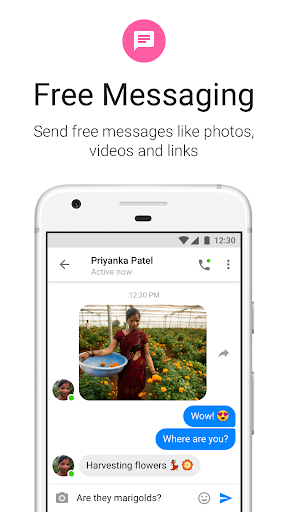
In-depth review
Messenger Lite makes its case in the first few minutes. Install it, log in, open a conversation, send a message, and you immediately understand the appeal: it gets out of the way. The app feels built around a simple promise—open quickly, show your chats, let you reply without delay—and in day-to-day use that straightforwardness is its biggest strength. After spending time with it as a primary messaging tool, what stood out most was how light it feels compared with many modern chat apps. On a phone that is not especially powerful, that matters. Screens open quickly, the interface is readable, and routine actions like checking threads, typing replies, and sending photos feel direct rather than bloated. There is very little sense of excess here. If your priority is staying in touch without asking your phone to do too much, Messenger Lite feels practical in a way many messaging apps no longer do. That lightweight approach also helps the app in everyday reliability. When I used it in short bursts throughout the day—answering a message while walking, checking a group chat between tasks, sending a quick response when I only had a few seconds—it stayed focused on the basics. There is something refreshing about a messenger that does not constantly compete for your attention with layers of extras. The layout is simple enough that even first-time users should be able to find their inbox, open chats, and reply with almost no learning curve. That ease of use is a real advantage, especially for older devices, casual users, or anyone who simply wants messaging to remain a utility instead of an ecosystem. A second strength is clarity. Messenger Lite does not bury the core communication flow under too many visual distractions. Conversations are front and center. Text is easy to scan. Navigation is uncomplicated. In practice, that means less friction when you just want to deal with your messages and move on. Over a full week of use, I found myself appreciating this more than expected. The app creates a calmer, more efficient rhythm than heavier messaging clients. It is the kind of software that quietly earns trust by not wasting your time. The third major strength is accessibility in the broad, practical sense. Because it is free and positioned as a lighter version of a well-known messaging platform, it serves people who may not have the newest hardware or the fastest connection. You do not need a premium device to get usable performance. That matters more than flashy features for a lot of people. If your phone is older, storage is tight, or you simply prefer apps that respect system resources, Messenger Lite is easy to appreciate. That said, the same minimalism that makes the app appealing also defines its limits. The first weakness is that it can feel too stripped down depending on what you expect from your messaging app. If you are used to a richer, more visually polished communication experience, Messenger Lite can come across as plain. Functional is not always delightful. It works, but it does not always feel modern or expressive in the way some users may want from the app they open dozens of times a day. The second issue is that a lighter app inevitably asks you to accept compromises. Messenger Lite is strongest when you stick to straightforward communication. The more you expect it to serve as a full-featured social and messaging hub, the more you notice the boundaries of the experience. During testing, that translated less into outright failure and more into a recurring sense that this app is intentionally giving you the essentials and little beyond them. For some people that is ideal; for others it will feel limiting. The third weakness is polish. While the interface is clean, it is not especially rich or premium-feeling. There were moments where the app did exactly what I needed, but not with the refinement of a flagship messenger. The visuals are serviceable rather than elegant. That may sound minor, but messaging apps are intimate tools; we use them constantly, and design quality affects long-term comfort. If aesthetics, customization, or a sense of a fully rounded product matter a lot to you, Lite may feel more utilitarian than satisfying. So who is Messenger Lite for? It is for people who value speed, simplicity, and low overhead. It is for users on older Android phones, users with limited storage, and anyone tired of heavy apps that turn basic messaging into a cluttered experience. It is also a good fit for people who mainly need dependable one-to-one and group communication without extra ceremony. Who is it not for? It is not the best choice for users who want their messenger to feel feature-packed, highly polished, or especially expressive. If you like bells and whistles, richer media experiences, or a more premium presentation, Messenger Lite may feel like a compromise from the start. Overall, Messenger Lite succeeds because it knows what it wants to be. It is not trying to impress you with complexity. It is trying to help you send messages quickly and reliably, especially on devices where heavier apps can feel sluggish. In that mission, it works very well. The trade-off is obvious: you gain speed and simplicity, but you give up some richness and refinement. For the right person, that is not a sacrifice at all—it is the entire point. For everyone else, the app may feel more admirable than lovable. Even so, as a focused, practical messaging tool, Messenger Lite remains easy to recommend.