Apps Games Articles
Email Home - Email Homescreen
Yobi Mobi
Rating 4.2star icon
Editor's summary
Editor rating
star icon star icon star icon
half star icon
empty star icon
3.8

One-line summary Email Home is easy to settle into if you want your inbox closer to the front of your phone experience, but I’d hesitate to recommend it to anyone who prefers a clean, untouched Android home screen.

  • Installs

    10M+

  • Developer

    Yobi Mobi

  • Category

    Personalization

  • Content Rating

    Everyone

  • Latest version

    2.11.89

  • Package

    com.myhomescreen.email

Screenshots
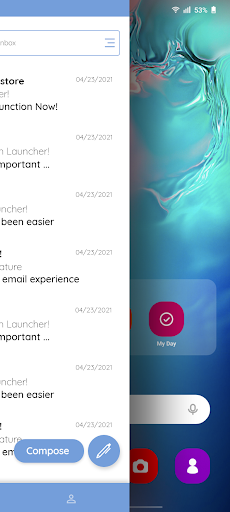
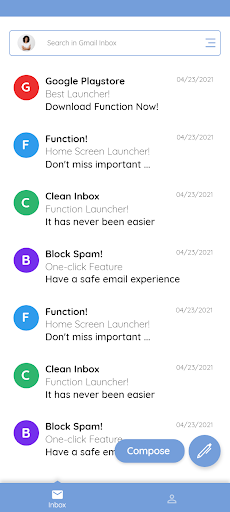
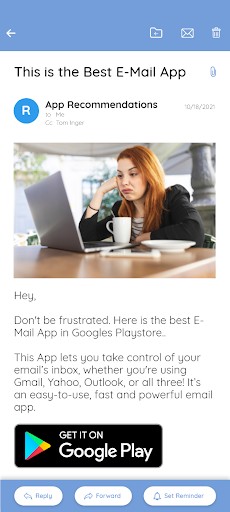
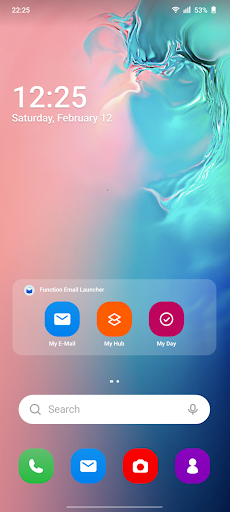
In-depth review
Email Home - Email Homescreen is one of those apps that makes the most sense the moment you understand what it is trying to do. This is not just another email tool asking for a spot in your app drawer. It is built around the idea that email should live closer to the center of your phone, and after spending time with it, that approach feels both practical and a little divisive. From the first stretch of use, the biggest thing that stood out was convenience. If you check email constantly throughout the day, there is something undeniably useful about having email access pushed closer to your home screen routine instead of buried behind a tap sequence. It changes the rhythm of using your phone. Rather than thinking, “I should open my mail app,” you are more likely to glance, act, and move on. In day-to-day use, that can save time in small but real ways. I found myself dealing with quick inbox checks more naturally, especially during those in-between moments when I only had a few seconds. That said, Email Home is not the sort of app that quietly slips into the background. It changes how your phone feels. For some people, that is the entire appeal. For others, it will be the main reason to avoid it. Using it for a few days, I kept coming back to this point: the app works best if you are comfortable letting it reshape your home-screen experience around communication. If you are someone who likes your launcher exactly the way it is, or you have already spent time customizing your phone, this app can feel less like a helpful add-on and more like a trade-off. In practical use, the interface generally felt approachable. Nothing about the app seemed designed for power-user complexity. The broad impression is that it tries to reduce friction, and in that sense it succeeds. You do not need to dig around too much to understand the main idea. The learning curve is low, and that matters for an app touching something as central as the home screen. There is value in software that makes its pitch quickly and then lets you decide whether that new workflow suits you. A second strength is that it feels purpose-built rather than overloaded. A lot of apps in this category can become messy because they try to become everything at once: launcher, cleaner, optimizer, widget center, assistant, and inbox replacement. Email Home feels more focused on its core identity. Even when the experience is not perfect, there is at least a clear sense of direction. I appreciated that. It made the app easier to judge on what it actually does instead of what it claims to do. The third thing I liked was accessibility for habitual email users. If your day is organized around incoming messages, quick glances, and staying responsive, Email Home can genuinely make your phone feel more aligned with how you work. It is easy to imagine this being especially attractive to users who live in their inbox and want less separation between their lock-screen-to-home-screen routine and their communication flow. But there are definite drawbacks. The biggest weakness is the level of commitment the app asks for. Because it is tied to the homescreen experience, this is not a casual utility you try for five minutes and forget. It changes your environment. During my time with it, that meant I was constantly asking whether the added convenience of surfacing email faster justified giving up some familiarity and control over the home screen. For me, the answer was mixed. The app’s core idea is good, but it is only good if you buy into that way of using your phone. Another issue is that any home-screen-centered app can start to feel intrusive if you are not fully on board. Even when the design is serviceable, there is a difference between opening an app when you want it and having that app’s purpose influence your phone every time you unlock it. After the initial novelty wore off, I noticed moments where I wanted my home screen to feel more neutral and less centered on one task. That feeling will vary by user, but it is important. Convenience can easily turn into visual or mental clutter if the app’s priorities are not the same as yours. The third weakness is that the overall experience, while functional, does not come across as especially premium or refined. It gets the job done, and the app is clearly useful to a large audience, but it does not always feel elegant in the way the very best Android experiences do. There is a slight utilitarian quality to it. Some users will not care about that at all. Others will notice that it feels more practical than polished. Who is this app for? It is for Android users who check email often, want quicker access from the home screen, and do not mind adjusting their phone setup for that convenience. It also suits people who like straightforward tools and are happy to trade a little customization freedom for a more communication-first layout. Who is it not for? It is not for users who already love their current launcher, keep a carefully organized home screen, or prefer email to remain just one app among many. It is also not ideal for anyone who wants the cleanest possible phone experience with minimal interference from task-focused overlays. In the end, Email Home - Email Homescreen is a competent, practical app with a very specific pitch. When that pitch matches your habits, it can feel genuinely useful. When it does not, the app feels like it is asking for too much space in your daily phone life. I came away thinking it is good at what it sets out to do, but only for the right kind of user. If email is central to your day, this app can make sense. If not, its homescreen-first approach may feel like more commitment than convenience.