Apps Games Articles
myAT&T
AT&T Services, Inc.
Rating 3.1star icon
Editor's summary
Editor rating
star icon star icon star icon
half star icon
empty star icon
3.6

One-line summary myAT&T is genuinely useful for paying bills, checking usage, and handling routine account chores fast, but its uneven polish and occasional clunky account/device management keep it from feeling as dependable as it should.

  • Installs

    100M+

  • Developer

    AT&T Services, Inc.

  • Category

    Productivity

  • Content Rating

    Everyone

  • Latest version

    22.05.2

  • Package

    com.att.myWireless

Screenshots
In-depth review
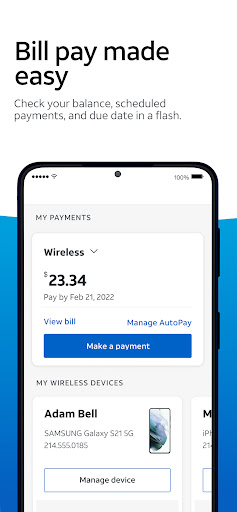
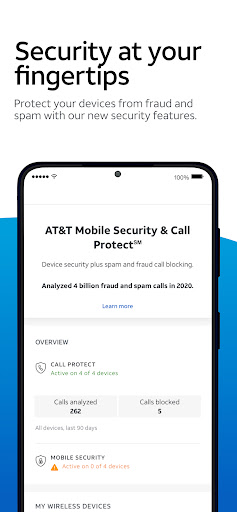
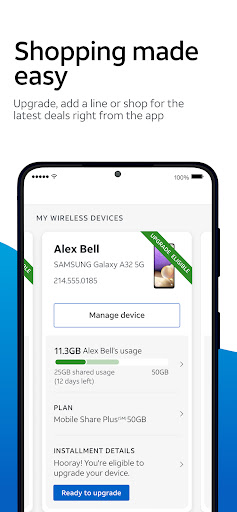
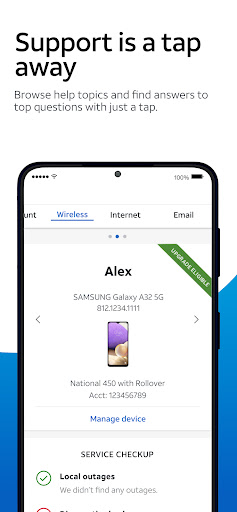
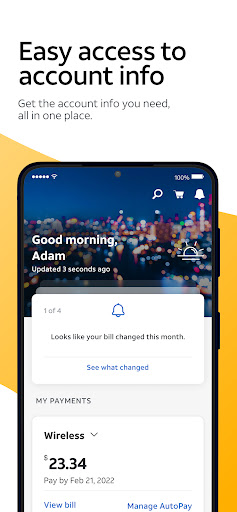
myAT&T is the kind of carrier app most people download out of necessity and then keep around only if it proves itself useful. After spending real time with it, that feels like exactly the right standard to apply here. This is not an app you open for fun; it is an app you open because you need to pay a bill, check data usage, manage a line, restart home internet equipment, or figure out what AT&T thinks is happening on your account. On that practical level, myAT&T does a lot right. It brings several common account tasks into one place, and when you are doing routine maintenance on a wireless or internet account, it can save a meaningful amount of time. The biggest strength of myAT&T is convenience. The app puts the most important customer actions near the center of the experience: billing, usage, line management, support, and shopping for upgrades or additional services. In day-to-day use, that makes a difference. If all you want is to check what is due, make a payment, or see how much data is being used, the app gets you there without demanding a phone call or a trip through a desktop browser. That sounds basic, but it is exactly what a carrier app should excel at, and myAT&T is at its best when it stays focused on those bread-and-butter account tasks. A second thing it does well is reduce friction around self-service. The app clearly wants to keep you from having to contact support for every little thing, and in many cases that is a good instinct. Features like payment management, plan changes, add-ons, and service troubleshooting make the app feel more useful than a simple billing portal. For households with multiple lines, that centralization is especially valuable. Checking usage across several devices and seeing account details in one place is far easier in an app than through scattered emails, text alerts, or automated phone systems. The third strength is that certain utility features make the app feel more tied to real hardware and real service rather than just billing. Being able to handle internet-related tasks such as changing a Wi-Fi password or restarting a gateway gives the app a practical edge. Those are exactly the kinds of tasks people end up needing at inconvenient moments, and having them available on a phone is genuinely helpful. Even a simple remote reboot option can be more convenient than physically unplugging equipment and waiting around. That said, myAT&T does not feel consistently polished. Its biggest weakness is that the experience can be slightly uneven, as though different parts of the app were built with different levels of care. The core account tools are useful, but navigation and presentation are not always as clean as they should be for an app of this size and importance. Some sections feel straightforward, while others can leave you poking around to confirm that the app is showing the right thing. That lack of total confidence matters in a carrier app, where people want clarity more than flair. Another issue is that account and device information does not always feel perfectly organized. In testing, the app gave off the familiar impression of trying to unify many services under one roof without always presenting them elegantly. When you are managing phones, internet service, connected devices, and account options all in one place, layout and labeling become crucial. myAT&T gets close, but not close enough to avoid occasional confusion. It is good at surfacing information, less good at making that information feel pristine and unmistakable. The third weakness is that the app sometimes feels like it is trying to be both a utility and a storefront, and the balance is not always ideal. There is obvious value in being able to add a line, upgrade a phone, or browse offers from the same interface where you pay your bill. But when you open a carrier app to solve a problem quickly, promotional or upsell-heavy areas can make the experience feel busier than it needs to be. The best parts of myAT&T are the parts that help you finish a task and move on. The less elegant parts are the ones that remind you this is also a channel for selling you more service. In everyday use, myAT&T lands somewhere between dependable tool and mildly frustrating necessity. I liked it most when I approached it with a specific task in mind. Need to check a bill? Good. Need to confirm usage? Usually quick. Need to manage a simple account task without calling support? This is where the app earns its keep. I liked it less when I expected a truly refined control center for every AT&T service attached to an account. It can do a lot, but it does not always make those capabilities feel seamless. Who is this app for? It is for current AT&T customers who want a reasonably capable self-service hub on their phone. Families managing multiple wireless lines, people who prefer paying bills in-app, and home internet customers who want quick access to gateway controls will get the most from it. It is also good for anyone who values having chat and account tools close at hand instead of sitting through support menus. Who is it not for? It is not for people who expect an especially elegant, perfectly streamlined app experience. If interface polish, crystal-clear device presentation, and a minimal sales footprint matter as much to you as functionality, this one may feel merely adequate rather than excellent. Overall, myAT&T succeeds because it handles enough important tasks well enough to justify its place on your phone. It is not the most graceful app in its category, and its middling rating makes sense once you spend time with it. But it is also more useful than that rating alone suggests. For routine account management, it gets the job done, and sometimes that is exactly what you need from a carrier app.
Alternative apps