Apps Games Articles
Clean Utility Toolkit
YINGRUN LIMITED
Rating 4.4star icon
Editor's summary
Editor rating
star icon star icon star icon
half star icon
empty star icon
3.9

One-line summary Clean Utility Toolkit is easy to pick up and genuinely handy for quick junk scans and basic phone checks, but it stops short of feeling essential if you want deeper control or a more premium, fully polished toolbox.

  • Installs

    50K+

  • Developer

    YINGRUN LIMITED

  • Category

    Tools

  • Content Rating

    Everyone

  • Latest version

    VARY

  • Package

    com.clean.utility.tooltbiat

Screenshots
In-depth review
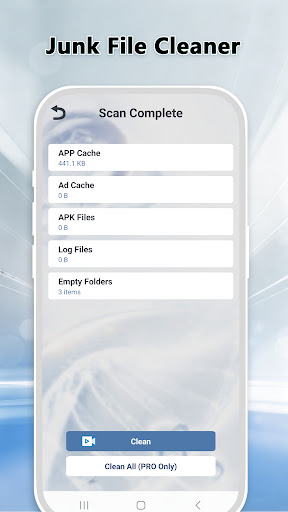
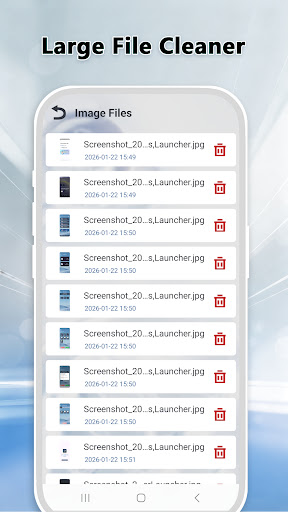
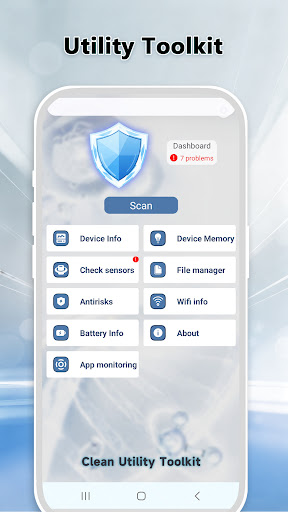
Clean Utility Toolkit is the kind of Android app that tries to win you over with convenience rather than novelty. After spending time with it as a day-to-day utility app, that approach mostly works. This is not a flashy all-in-one suite packed with advanced tuning options, nor does it pretend to be. Instead, it feels like a lightweight toolbox built for people who want a few practical maintenance features in one place: clear out junk, check on network status, and run some basic phone diagnostics without digging through Android settings menus. The first thing that stood out in use was how straightforward the app feels. The interface is simple, and that simplicity matters in a category where many tools drown you in gauges, aggressive warnings, and endless “optimize now” buttons. Clean Utility Toolkit is easiergoing than that. Moving between its main sections is quick, the layout is readable, and there is very little learning curve. Even if you are not especially technical, you can open it and understand what each section is trying to do. For an app aimed at everyday maintenance, that is a real strength. The junk cleaning side is probably the feature many people will open first, and in regular use it was reasonably satisfying. The app scans for cache and leftover files and presents the results in a way that feels approachable rather than intimidating. It gives the impression of tidying up the small mess that naturally accumulates on a phone over time. I liked that it seems built around quick cleanup sessions rather than forcing you into a long chain of menus. Open it, scan, review, clean, move on. That kind of low-friction experience is exactly what a utility app should offer. The Wi-Fi detection tools are also useful in a modest, practical way. This is not the sort of feature that completely changes how you use your phone, but it can be helpful when your connection feels unstable and you want a quick check of the current network environment. During testing, this part of the app felt like a nice bonus rather than a headline feature. It adds value because it is there when you need it, and it fits the app’s general philosophy of putting common maintenance tasks in one place. The phone diagnostics section is the third area that gives the app some identity. There is something appealing about being able to run through basic hardware-related checks inside one app instead of hopping between hidden menus or installing separate tools. For casual users, this can be one of the app’s most practical features. If you suspect something is off with the phone and want a simple sanity check, Clean Utility Toolkit offers a convenient starting point. That said, the app does have limits, and those limits become clearer the longer you use it. The biggest issue is that it feels more useful than powerful. It handles surface-level maintenance well, but it does not give the impression of deep control or especially advanced analysis. If you are the kind of Android user who likes detailed breakdowns, granular settings, or richer system information, the app may feel a bit thin after the first few sessions. It is handy, but not especially robust. Another weakness is that the experience can feel somewhat generic. The app is functional, but it does not always leave a strong sense of polish beyond the basics. The design is clean enough, yet it lacks the refined feel that makes a utility app pleasant to revisit over time. Nothing here is offensively bad, but there is a difference between “easy to use” and “memorable to use,” and Clean Utility Toolkit lands closer to the former. Ads are also part of the trade-off. Since the app is free and marked as containing ads, that is not surprising, but it does affect the overall feel. In a category centered on quick maintenance tasks, any interruption is more noticeable because users typically want to get in and out fast. The app remains usable, but the presence of ads keeps it from feeling as smooth and focused as the best utility tools. What I appreciated most overall was the app’s restraint. It does not come across as trying too hard to scare users into constant cleaning or diagnostics. Some Android maintenance apps rely on urgency and exaggerated system warnings to push engagement. Clean Utility Toolkit feels calmer. That makes it more approachable and less stressful to use. Combined with the claim that operations are performed locally, it creates a more reassuring tone than many apps in this space. Who is this app for? It is best for casual Android users who want a simple maintenance companion: something they can open once in a while to clean junk, look at network status, and run a few basic checks. It is also a decent fit for people who prefer an uncomplicated interface over a feature-heavy dashboard. Who is it not for? Power users, tinkerers, and anyone expecting a serious device management suite will probably outgrow it quickly. If you want deep analytics, extensive customization, or a highly polished premium utility experience, this app is unlikely to be your final stop. In the end, Clean Utility Toolkit is a solid, practical free app that gets the basics right more often than not. Its strongest qualities are its simplicity, its convenient mix of maintenance features, and its generally approachable design. Its biggest drawbacks are its limited depth, somewhat generic presentation, and the friction introduced by ads. I would not call it a must-install, but I would call it a respectable everyday toolbox for users who want basic phone upkeep without unnecessary complexity.