Apps Games Articles
Android System Update
Arum Communications
Rating 3.3star icon
Editor's summary
Editor rating
star icon star icon star icon
half star icon
empty star icon
3.6

One-line summary Android System Update is a handy maintenance companion for checking Play Services, WebView, and app-related updates, but the name promises more full-system magic than the app can realistically deliver on many phones.

  • Installs

    1M+

  • Developer

    Arum Communications

  • Category

    Tools

  • Content Rating

    Everyone

  • Latest version

    2.4.4

  • Package

    com.arumcomm.playservicesinfo

Screenshots
In-depth review
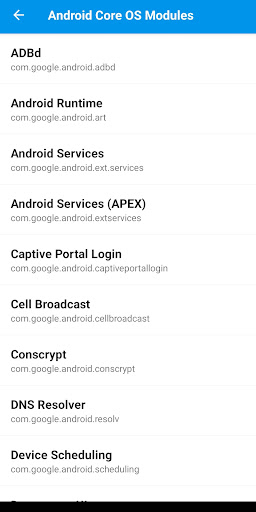
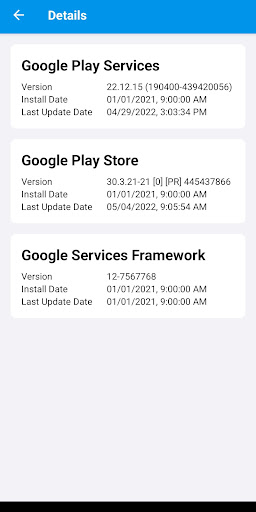
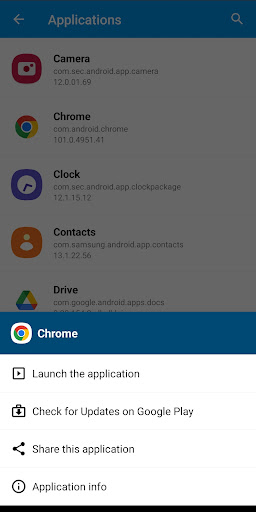
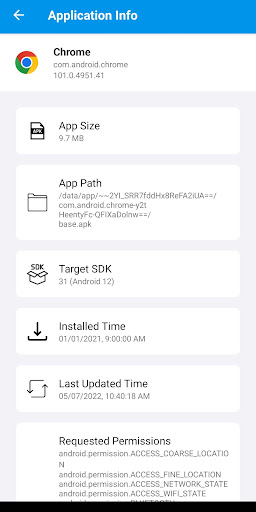
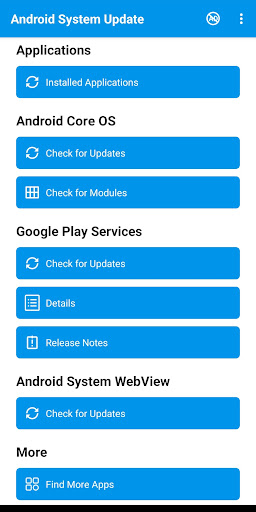
After spending time with Android System Update, my biggest takeaway is that this is not a miracle tool for forcing major Android upgrades onto old phones. It is, however, a genuinely useful utility for people who want a clearer view of what on their device can still be updated, especially the less obvious pieces like Google Play Services, WebView, and certain core Android modules. If you approach it with the right expectations, it can be helpful. If you install it hoping for a one-tap operating system upgrade, you are likely to come away disappointed. The first thing I noticed is that the app is trying to solve a real confusion point in Android. Most people know how to update apps from Google Play, but far fewer understand the scattered ecosystem of system components that affect security, stability, and app compatibility. Android System Update does a respectable job of pulling those threads together into one place. In day-to-day use, that centralization is its biggest strength. Instead of bouncing through multiple menus, I could quickly check the status of installed apps, Google Play Services, Android System WebView, and some Android core modules. That makes the app feel practical rather than gimmicky. The interface itself is fairly straightforward. I did not find it especially elegant or modern, but I also did not find it hard to use. The app is clearly built around utility first: open it, scan through categories, tap into details, and jump toward update checks. In practice, that blunt approach works. There is value in an app that does not bury basic maintenance functions under flashy design. One of the better aspects of the experience is that it surfaces detailed information without making you feel like you need to be an Android power user. That makes it accessible to regular users who simply want reassurance that key software components are current. A second strength is that it can be useful on devices that no longer receive frequent full OS updates. That is a crucial distinction. Even if your phone is not moving to the latest Android version, there are still components that can and should stay current. During testing, the app felt most worthwhile in exactly that scenario: older phones, budget phones, or handsets with spotty manufacturer support. In those cases, Android System Update serves as a decent checkpoint tool. It helps answer the question, “What can I still update right now?” A third strength is the extra app-management convenience. Being able to inspect installed applications, launch them, check their Play Store pages, and share links gives the app a little more everyday usefulness than a single-purpose updater. It is not a full device management suite, but it adds enough flexibility that the app feels less disposable once you install it. That said, the weaknesses are hard to ignore. The biggest one is right in the branding. “Android System Update” sounds like a direct path to major operating system upgrades, and the app simply is not that for most users. In actual use, it behaves more like an information hub and shortcut tool for update-related checks than a true system updater. That mismatch creates friction immediately. The app may be doing exactly what it intends to do, but the expectation it sets is much bigger than the experience it delivers. The second drawback is that support appears uneven when it comes to actual Android OS update checking. The store description itself is careful to say only some devices are supported, and that limitation matters. On one phone, that may be fine; on another, it may make the app feel partial or incomplete. If the feature you care about most is checking for full Android OS updates, this uncertainty is a real downside. The third issue is that the app includes ads and in-app purchases, and while that is hardly unusual for a free utility, it does affect the tone of the experience. Utilities like this work best when they feel lean and trustworthy. Ads can make the app feel a little less like a built-in companion and a little more like a third-party layer sitting between you and system information. It is not a deal-breaker, but it does chip away at the clean, no-nonsense feel that this kind of app should ideally have. There is also a more subtle frustration: because Android itself controls so much of the real update process, this app often feels like a guide rather than a fixer. Sometimes that is enough. Sometimes it is not. If your device has a genuine system update problem, this app is unlikely to perform miracles. It may help you identify what needs attention, and it may point you in the right direction, but it cannot override the limitations imposed by your device maker or Android’s own update framework. So who is this app for? It is for Android users who want a simple maintenance dashboard, especially those using older devices or anyone curious about hidden-but-important components like Play Services and WebView. It is also for people who like having app information and update shortcuts gathered in one place. Who is it not for? Anyone expecting unofficial Android version upgrades, advanced repair tools, or a polished premium utility experience will probably find it underwhelming. In the end, Android System Update is better understood as a helpful update assistant than as a true system updater. Used that way, it has value. It is easy enough to use, informative in the right places, and genuinely handy for checking key components that many people forget exist. But the app’s biggest obstacle is expectation management. If you install it for visibility and convenience, it earns its keep. If you install it for deep control over Android updates, it will feel like a promise only half kept.
Alternative apps