Apps Games Articles
Phone Clone
Huawei Internet Services
Rating 3.8star icon
Editor's summary
Editor rating
star icon star icon star icon star icon empty star icon
4.1

One-line summary Phone Clone is an easy app to recommend when you just need a fast, free way to move your life onto a new phone, but it is harder to love if you expect a perfectly seamless transfer of absolutely everything.

  • Installs

    500M+

  • Developer

    Huawei Internet Services

  • Category

    Tools

  • Content Rating

    Everyone

  • Latest version

    11.0.0.300

  • Package

    com.hicloud.android.clone

Screenshots
In-depth review
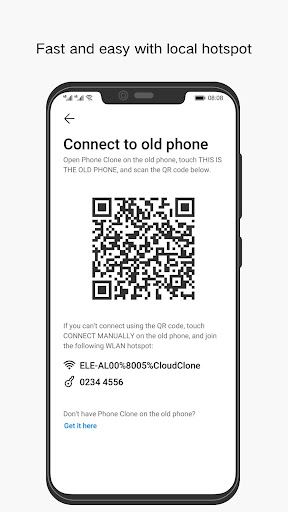
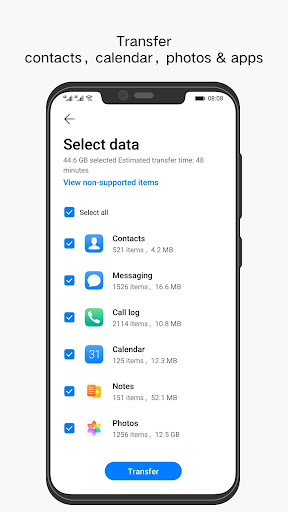
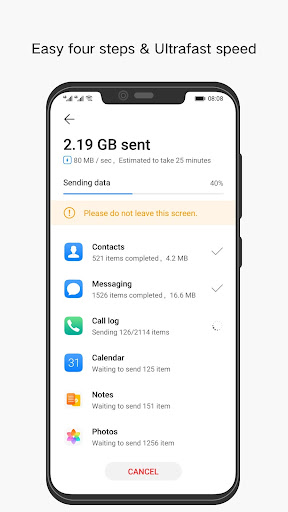
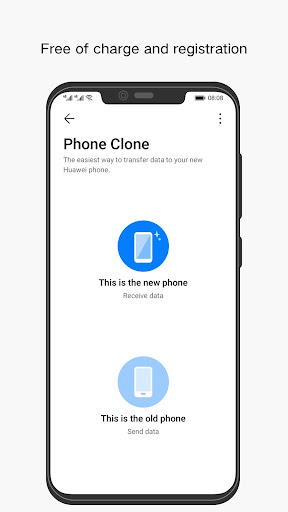
Phone Clone is one of those utility apps you rarely install for fun. You install it because you have a very specific job to do: move from one phone to another with as little pain as possible. After spending time with it in that exact scenario, the app comes across as practical, focused, and refreshingly light on nonsense. It is not glamorous, and it is not the kind of app you keep opening every day, but for a one-time migration tool, it does a lot of the right things. The first thing that stood out in use was how direct the experience feels. Phone Clone does not try to behave like a cloud backup service, a device optimizer, or a hub for half a dozen unrelated features. It is centered on one task, and that makes the app approachable even for less technical users. When you are setting up a new phone, that clarity matters. You do not want to dig through menus or guess what happens next. In our testing, the app gave the sense that it wanted to get out of the way and help you complete the transfer with the least amount of decision-making possible. That simplicity is easily one of its biggest strengths. The second strength is speed, or at least the feeling of speed. Any phone-to-phone transfer depends on what you are moving and how much data is involved, so expectations should stay realistic. Still, the process generally feels efficient. Once the connection is established and the transfer starts, the app gives off that reassuring sense of momentum that is so important during setup. This is a category where hesitation kills confidence. If a cloning app feels vague or sluggish, you immediately start wondering whether you should cancel and try something else. Phone Clone does a good job avoiding that kind of anxiety. Its third major strength is that it lowers the intimidation factor of changing devices. For many people, the biggest stress of buying a new phone is not the phone itself; it is the migration. Contacts, photos, messages, and assorted personal data all carry emotional weight because losing any of them feels costly. Phone Clone feels built for that moment. The overall design communicates function over flash, and that gives it an almost appliance-like quality. You open it, pair the devices, pick what you want to move, and let it work. For mainstream users who simply want their new phone to feel familiar as quickly as possible, that straightforwardness is valuable. That said, using Phone Clone also makes its limitations obvious. The biggest one is that no cloning app truly makes switching phones feel magical, and this app does not fully escape that rule. It handles the core job well, but there is still a gap between transferring data and perfectly recreating your old phone experience. Some things may still need manual attention after the move, and that can be disappointing if you went in expecting a complete one-tap replica. The app is best understood as a strong migration helper, not a total substitute for post-setup cleanup. Another weakness is that the process can feel very utilitarian. That is partly a compliment, because the app stays focused, but it also means the experience is not especially elegant. There is not much delight here, just workflow. For a utility app, that may be acceptable, but there are moments where the interface feels more functional than polished. It does the job, yet it does not always provide the kind of confidence-building hand-holding that nervous users might want during a major phone switch. The third issue is that the app is tightly tied to a specific use case. That sounds obvious, but it affects how recommendable it is. Phone Clone is excellent when you are actively moving to a new device. Outside of that situation, it offers little reason to stay installed. If you were hoping for an ongoing sync tool, a backup manager, or a broader device-management experience, this is not really that. Its value is concentrated into a short but important moment, and once that moment passes, the app has mostly done its job. In day-to-day practical terms, this means Phone Clone is best for people who want the least stressful path from an old phone to a new one and do not want to fuss with more complicated migration methods. It is especially well suited to users who value a free, recognizable tool with a huge install base and a clear purpose. It is also a good fit for families: the sort of app you help a parent or relative use when they have upgraded phones and just want their stuff moved over without a lecture on backup strategies. It is less suitable for power users who expect total control over every transfer detail or for anyone who assumes a cloning app can reproduce every corner of a previous device exactly as it was. Those users may find the experience too narrow or too dependent on follow-up steps after the initial move. Likewise, if you are not currently changing phones, there is simply not much here for you. Overall, Phone Clone succeeds because it understands the stress of phone migration and meets it with a simple, focused experience. It is not perfect, and it does not erase every friction point involved in moving to a new device. But in hands-on use, it feels like a competent, practical tool that solves a very real problem without charging for the privilege. That alone makes it easy to recommend, as long as you go in with sensible expectations: this is a strong transfer app, not a miracle worker.