Apps Games Articles
PhotoRescue Plus
Last Minute Flights Corp.
Rating 3.8star icon
Editor's summary
Editor rating
star icon star icon star icon
half star icon
empty star icon
3.5

One-line summary PhotoRescue Plus is worth a look if you want a simple, no-root recovery tool for deleted media, but its modest polish and only moderately convincing results keep it from being an easy must-install.

  • Installs

    100K+

  • Developer

    Last Minute Flights Corp.

  • Category

    Tools

  • Content Rating

    Everyone

  • Latest version

    1.24

  • Package

    com.photorescue.photoplus.photorecover

Screenshots

In-depth review
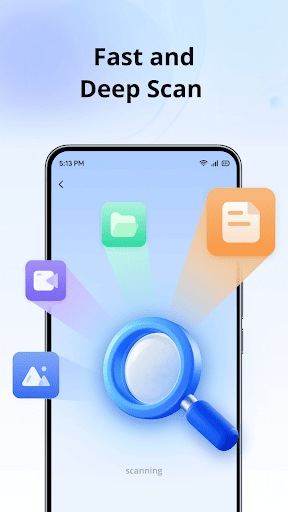
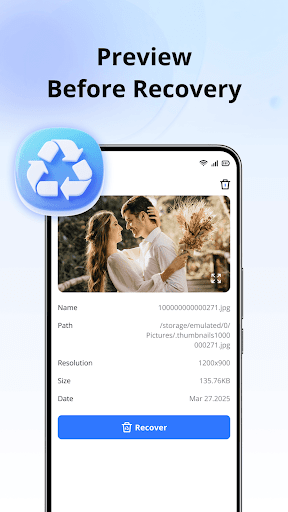
PhotoRescue Plus is one of those apps that targets a very specific moment of panic: you delete a photo, lose a video, or realize an important document is missing, and you want something—anything—that promises a quick way back. After spending time with it, my take is that it sits in the middle of the recovery-app pack. It is approachable, it does a decent job of guiding you through the process, and it feels less intimidating than many utility apps in the same category. At the same time, it never quite shakes the sense that recovery on Android is still hit-or-miss, and this app does not fully overcome that reality. The first thing PhotoRescue Plus gets right is its basic usability. A lot of recovery tools lean hard into technical language or clutter the screen with too many options too early. This app is easier going. The core promise is clear from the start: scan for deleted photos, videos, and documents, then preview what you can recover. In practice, that means you can launch the app and get moving without feeling like you need a tutorial. For a Tools-category app, that matters. If someone is using a recovery app, they are probably stressed already, and PhotoRescue Plus mostly stays out of the way. Scanning is the heart of the experience, and here the app feels reasonably fast and straightforward. It does not create much confusion about what it is doing, and the process is simple enough that even less technical users should be able to follow it. The app’s broad file support is another plus. It is not limited to photos alone; it also aims for videos and common document types, which makes it more useful than a narrowly focused gallery-only restore tool. If you are trying to recover not just memories but practical files—PDFs, text documents, downloads—there is real value in that wider net. I also appreciated the preview-before-recovery approach. That sounds like a small feature on paper, but it makes the app much more manageable in actual use. Recovery apps can surface lots of items, and being able to check what you are restoring helps avoid guesswork. It also makes the app feel a little more trustworthy, because you can verify results instead of simply tapping a blind “recover all” button and hoping for the best. Where PhotoRescue Plus becomes less convincing is in the gap between promise and confidence. Like many apps in this category, it presents recovery as something fast and easy, but the actual success rate can feel uneven. The app can find items and surface files, but whether those are truly the specific lost files you want, and whether they are fully recoverable in a useful form, is where the experience becomes less satisfying. In other words, the app is easy to use, but data recovery itself still feels uncertain. That is not entirely the app’s fault, but it absolutely affects whether you will trust it in a real emergency. The second issue is polish. PhotoRescue Plus is functional, but it does not feel especially refined. The description promises speed, safety, and simplicity, and I think it delivers simplicity better than the other two. Safety is presented clearly with the no-root, on-device angle, which is reassuring, but the overall app experience still has that lightweight utility feel rather than the confidence-inspiring finish of a top-tier Android tool. Some users will not care, especially if all they want is a quick scan, but if you are sensitive to interface quality or expect a cleaner, more modern flow, you may find it a little plain. Ads also hang over the experience simply because this is a free app that contains them. That does not automatically ruin things, but in a category where people are often using the app in a stressful moment, any interruption can feel more annoying than it would in a casual game or social app. PhotoRescue Plus is at its best when it keeps the process moving; anything that breaks that momentum works against it. Still, there are reasons to keep it on your shortlist. One strength is accessibility: it lowers the barrier for people who have never used a file-recovery app before. Another is breadth: it tries to cover photos, videos, and documents instead of treating recovery as a one-purpose task. A third is convenience: the preview and one-tap style approach make it easy to test whether your files are still within reach. In actual use, those strengths make the app feel practical rather than overly technical. Its weaknesses are just as clear. Recovery results can feel inconsistent, the app’s overall presentation lacks a premium level of polish, and the presence of ads undercuts the urgency of the task it is built for. None of those are fatal problems, but together they keep PhotoRescue Plus from feeling like a truly dependable rescue tool. Who is it for? It is best for casual users who accidentally deleted media or documents and want a quick, low-friction recovery attempt without rooting their phone or learning a complicated interface. It is also suitable for someone who wants to scan first and decide later based on previews. Who is it not for? If you need guaranteed recovery, a highly polished pro-grade utility, or a completely interruption-free experience, this app is likely to feel limited. In the end, PhotoRescue Plus is a decent first stop, not a definitive solution. I can see why someone would get value from it, especially when it manages to surface a missing photo or file you thought was gone for good. But I would go in with measured expectations. It is helpful, sometimes genuinely handy, yet not strong enough to be the only recovery tool I would trust blindly.
Alternative apps