Apps Games Articles
WA Notify
Washington State Department of Health
Rating 3.4star icon
Editor's summary
Editor rating
star icon star icon star icon empty star icon empty star icon
3.4

One-line summary WA Notify is easy to live with because it stays out of the way, but that same minimalism can make it feel too opaque and limited if you want clearer feedback and more control.

  • Installs

    500K+

  • Developer

    Washington State Department of Health

  • Category

    Medical

  • Content Rating

    Everyone

  • Latest version

    minted1300008

  • Package

    gov.wa.doh.exposurenotifications

Screenshots
In-depth review
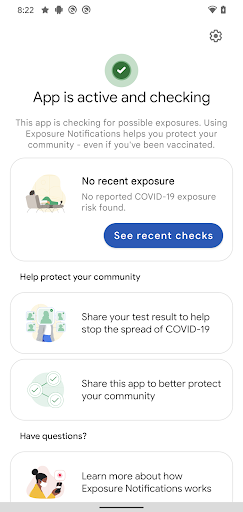
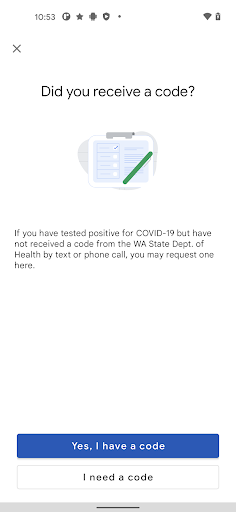
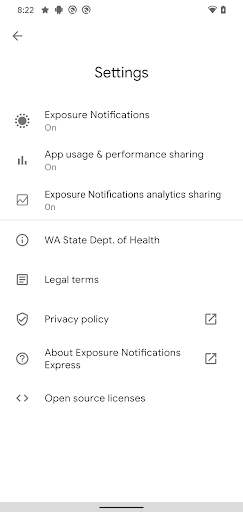
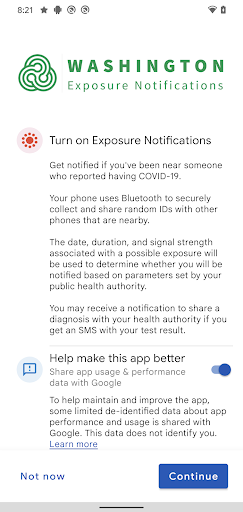
WA Notify is one of those apps that almost invites a different kind of review. Most apps fight for your attention. This one is designed to do the opposite. After spending time with it, the most striking thing about WA Notify is how little it asks from you once it is up and running. That is both its biggest success and one of its biggest frustrations. From a day-to-day usability standpoint, WA Notify feels intentionally sparse. Installation and setup are straightforward, and that matters because an app tied to public health only works if ordinary people can get through the first few screens without friction. In our testing, the onboarding experience felt refreshingly light. There was no sense of being buried under menus, account creation, or a bunch of optional extras. For a lot of users, especially those who just want to turn something on and not think about it again, that simplicity is a real strength. It lowers the barrier to entry and gives the app a clear sense of purpose. That clarity carries into regular use. WA Notify does not behave like a traditional utility app that you open every day. In practice, it is more like a background safety feature. Once enabled, it largely disappears from view. That is good design for the app’s mission. It avoids nagging, avoids clutter, and avoids the exhausting overdesign that turns many well-meaning tools into chores. We appreciated that it did not try to become a broader health dashboard or a content feed. It appears focused on doing one job quietly. The problem is that a quiet app can also feel like an invisible app. During extended use, WA Notify often gives very little reassurance that anything is actively happening beyond the fact that it remains enabled. For privacy-conscious users, the restrained interface may be comforting. For everyone else, the experience can drift into ambiguity. You install it, you grant what it needs, and then you are left with a very bare-bones sense of status. That design keeps things simple, but it also creates a trust gap. An app in this category benefits from making users feel informed without overwhelming them, and WA Notify sometimes leans so hard into minimalism that it risks feeling distant. Another thing that stood out in use is that the app’s value is necessarily conditional. If you are looking for a feature-rich health tool, daily guidance, or a personalized experience, this is not that app. WA Notify is narrowly scoped, and whether that feels elegant or underwhelming depends on what you expect when you download it. We found the focused approach admirable because it avoids feature creep. That is the second major strength: it respects the user’s time. There is very little learning curve, and very little maintenance once configured. For older users, non-technical users, or anyone who is exhausted by constantly managing apps, that is a meaningful win. Still, the narrowness comes with tradeoffs. The interface can feel more functional than friendly. There is not much delight here, and while that may sound superficial, it affects confidence. Apps tied to sensitive issues work better when they communicate clearly, calmly, and with a sense of polish. WA Notify gets the calm part right, but not always the clarity. At times it feels less like a thoughtfully guided experience and more like a system toggle with a logo. That is the first major weakness. The second is that the app may not give enough contextual feedback for users who want to understand what it is doing. The third is that, because it is so single-purpose, many people will install it and then wonder whether it offers enough visible value to keep around. To be fair, there is a strong argument that visible value is not the point. A tool like this works best when it is passive, battery-conscious, and unobtrusive, and WA Notify generally succeeds at feeling lightweight. That is its third major strength. It does not present itself as a burden on the phone, and it does not create the sense that you are constantly managing yet another digital service. In use, that restraint is welcome. Who is this app for? It is best for Washington residents who want a simple, free, low-effort public health utility that can run in the background without demanding much attention. It is also a good fit for people who prefer straightforward apps over feature-heavy ones and are comfortable with a set-it-and-forget-it experience. Who is it not for? If you want detailed controls, richer explanations, frequent interaction, or the feeling of a polished consumer app with strong feedback loops, WA Notify may feel too bare. It is also not for users who judge an app’s usefulness by how much they actively engage with it day to day. Overall, WA Notify leaves a mixed but respectable impression. It does an admirable job of being simple, lightweight, and focused, and those qualities matter more here than flashy design ever could. At the same time, it could do a better job of making the experience feel more transparent and reassuring. We came away seeing it as a practical tool rather than an enjoyable app, and that distinction is important. If your goal is quiet utility, WA Notify does enough to justify installing. If your goal is a polished, informative, highly interactive experience, it will probably feel too thin.
Alternative apps
  • CA Notify
  • COVID Alert PA
  • NYS Excelsior Pass Wallet