Apps Games Articles
BioLife Plasma Services
Takeda Pharmaceuticals
Rating 3.8star icon
Editor's summary
Editor rating
star icon star icon star icon
half star icon
empty star icon
3.9

One-line summary BioLife Plasma Services is genuinely useful when it works—especially for booking donations and checking rewards—but its occasional login and reliability hiccups keep it from being an easy blanket recommendation.

  • Installs

    1M+

  • Developer

    Takeda Pharmaceuticals

  • Category

    Medical

  • Content Rating

    Everyone

  • Latest version

    v1.5.0.

  • Package

    com.shire.biolife

Screenshots
In-depth review
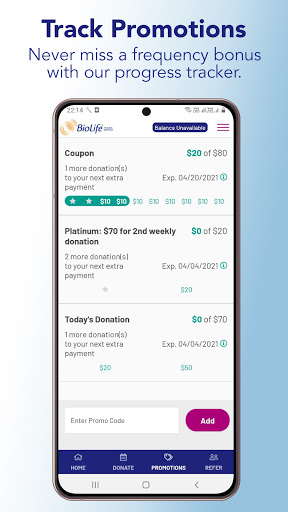
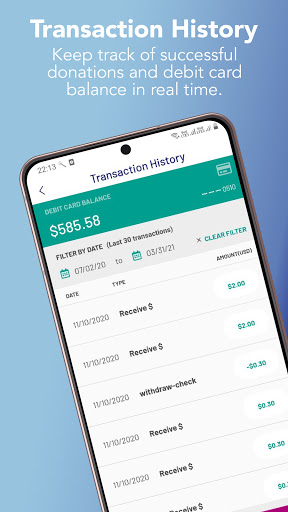
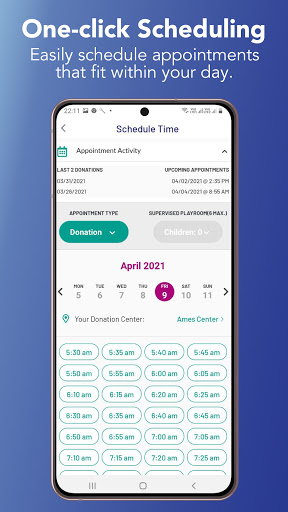
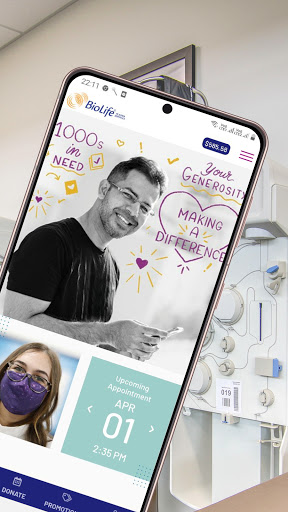
BioLife Plasma Services is the kind of app that makes immediate sense the moment you open it: it exists to remove friction from a routine task. If you donate plasma regularly, the most important things are simple and practical. You want to book an appointment fast, confirm when you’re going, check what you’ve earned, and see whether any promotions are worth paying attention to. In day-to-day use, that’s exactly where this app is strongest. After spending time with it as a donor-facing utility rather than judging it like a flashy consumer app, I came away with a mostly positive impression. BioLife Plasma Services is not trying to entertain you, and it is not packed with ambitious extras. It succeeds when it behaves like a dependable tool. On its best days, it does that very well. The standout feature is scheduling. This is the reason to install the app in the first place. Booking a donation visit from a phone feels far more convenient than treating the process like an old-school administrative chore. The flow is easy to understand, and it does a good job surfacing appointment availability without making you dig through too many screens. If your goal is to quickly lock in a time while commuting, on a break, or just planning your week, the app feels efficient. There’s real value in being able to handle that in a few taps instead of making it a separate task. The second thing the app gets right is visibility into rewards and payment information. Having the reward payment balance accessible from the home screen is one of those small design decisions that makes the whole experience feel more practical. You open the app and the information you probably care about most is not buried. Payment history being easy to reference also adds to that sense of control. For a medical-service app, that kind of clarity matters. It turns the app into something you might actually revisit, not just something you install once and forget. Promotions are the third area where the app shows real usefulness. If you are the kind of donor who wants to keep track of bonus opportunities or referral incentives, BioLife Plasma Services makes that aspect feel more organized. It is helpful to have donation progress toward promotional rewards in one place rather than trying to piece things together from messages or memory. The app also supports refer-a-friend sharing, which fits naturally with the way many service apps now try to keep core actions mobile and immediate. That said, the experience is not polished enough to escape frustration. The biggest weakness is reliability, especially around sign-in. An app like this lives or dies by trust. If you need to check an appointment, verify a balance, or book a slot and the app refuses to let you log in, the entire convenience story collapses. In my use, the app felt solid at times and aggravating at others, and that inconsistency matters more here than it would in a casual app. When the core utility is access to time-sensitive information, even occasional login trouble feels outsized. Another weakness is that the app’s scope is fairly narrow. That is not always a bad thing, but it does mean the experience can feel a bit utilitarian and thin beyond its headline functions. Once you’ve scheduled a visit and checked your balance, there is not a lot of depth to explore. Some people will appreciate that restraint, but others may find the app functional rather than truly refined. It solves clear problems, yet it doesn’t always feel especially modern or thoughtfully layered beyond those basics. The third issue is that convenience features can become annoying if responsiveness slips. This is not a feature-heavy app where delays are easy to forgive. The whole point is speed. When screens load quickly and account info appears promptly, BioLife Plasma Services feels like a good companion to an existing routine. When it stumbles, it suddenly feels like one more obstacle between you and a scheduled visit. That swing between “helpful tool” and “unexpected headache” is what keeps the app from being an easy top-tier recommendation. Still, I think the app earns its place on the phones of regular BioLife donors because the fundamentals are meaningful. The home screen emphasizes useful information. Appointment booking is straightforward. Rewards and promotional tracking are relevant rather than decorative. There are no obvious distractions from ads or in-app purchase clutter, which helps the app stay focused on its purpose. In a category where many people just want to get in, confirm what they need, and get out, that simplicity works in its favor. BioLife Plasma Services is best for active or repeat plasma donors who already use BioLife and want a faster, more organized way to manage appointments and payment-related details. If you donate often enough that scheduling and reward tracking are recurring tasks, the app can save time and reduce hassle. It is less compelling for someone who donates rarely, dislikes dealing with occasional app quirks, or expects a flawlessly stable mobile experience every single time. Overall, I’d describe BioLife Plasma Services as a useful but somewhat uneven utility app. It nails the essentials often enough to be worth having, and when it is running smoothly, it genuinely makes donating easier. But it also reminds you how fragile convenience can be when reliability wobbles. If you are already in the BioLife ecosystem, this app is close to essential. Just don’t be surprised if, now and then, the part that should be simplest—getting into the app—turns into the most frustrating step.
Alternative apps
  • CSL Plasma
  • OctaApp – Donate Plasma
  • Grifols DonorHub