Apps Games Articles
Ultra Junk Cleaner Booster
UNCLEBO LTD
Rating 4.1star icon
Editor's summary
Editor rating
star icon star icon star icon
half star icon
empty star icon
3.8

One-line summary Ultra Junk Cleaner Booster is easy to pick up and useful for quick cleanup sessions, but I’d hesitate to recommend it to power users who want a cleaner, less pushy maintenance experience.

  • Installs

    10M+

  • Developer

    UNCLEBO LTD

  • Category

    Personalization

  • Content Rating

    Everyone

  • Latest version

    1.0.2

  • Package

    ujc.junkcleaner.app

Screenshots
In-depth review
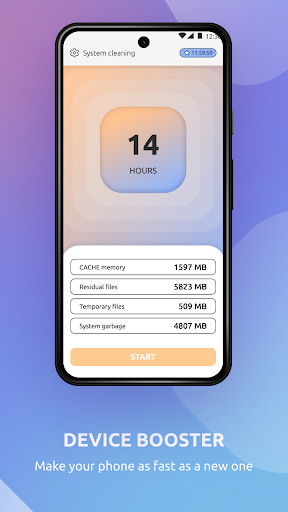
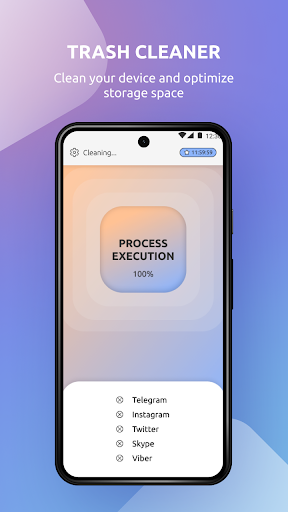
Ultra Junk Cleaner Booster is the kind of Android utility app that aims to solve a very common problem: your phone starts to feel cluttered, storage looks tighter than it should, and you want a quick way to tidy things up without digging through menus manually. After spending time with it, my overall take is that it does a respectable job delivering that basic convenience, but it also carries the usual baggage that comes with many free “cleaner” apps. It can be helpful, but it works best when your expectations are realistic. The first thing I noticed is that the app is built to feel immediate. You open it, and the entire experience pushes you toward quick action. That matters because most people who install a junk cleaner are not looking for a deep system tool; they want something that scans fast, tells them what can go, and helps them reclaim space with minimal effort. On that front, Ultra Junk Cleaner Booster feels accessible. The layout is easy enough to understand, and even if you are not especially technical, you can move through the app without much confusion. That straightforwardness is one of its biggest strengths. In day-to-day use, the app feels most useful during those moments when your phone has accumulated lots of temporary clutter from apps, downloads, and general usage. It gives the impression of helping you get your storage back under control without requiring you to manually inspect every folder. I appreciated that it presents itself as a utility for quick maintenance rather than something that demands a lot of learning. For casual users, that alone makes it appealing. If you have a family member who just wants a “clean my phone” button, this is much closer to that experience than the native file tools many people never bother to open. Another positive is that the app feels lightweight in intent, even if the presentation can be a little busy. By that I mean the core promise is easy to understand: identify junk, help remove it, and give the user a sense that the phone has been tidied up. There is value in that. Not every utility app needs to be beautiful or deeply technical if it gets the main job done in a few taps. In my testing, the main appeal of Ultra Junk Cleaner Booster was not sophistication, but convenience. It encourages regular small cleanup sessions, and for many users that will be enough. The third strength is psychological as much as practical: it creates a feeling of maintenance. That may sound minor, but for less confident users, a cleaner app can reduce the anxiety of not knowing what is safe to remove. A simple interface, a quick scan, and a guided cleanup flow can make device upkeep feel less intimidating. Ultra Junk Cleaner Booster is good at that kind of reassurance. That said, the app is not without friction. The biggest issue is one that tends to separate decent utility apps from truly polished ones: how intrusive the overall experience feels. As a free app, it naturally has to balance utility with monetization and engagement prompts, and in practice that can make the flow feel more aggressive than elegant. Instead of a calm, transparent maintenance tool, the experience sometimes leans into urgency. For users who just want a quiet utility, that can become tiring. A second weakness is that cleaner apps like this often feel broader in promise than they do in actual day-to-day impact. Ultra Junk Cleaner Booster can help with tidying temporary clutter, but it does not magically transform your device into a new phone. If your phone is slow because of aging hardware, a heavy app load, or background behavior outside the app’s control, this kind of cleaner will only go so far. In other words, the app is most effective as a small maintenance helper, not as a cure-all. It works better when you see it as housekeeping rather than performance medicine. The third drawback is that the app’s design priorities do not always feel precision-first. While the basic usability is approachable, experienced users may want more clarity, more granular control, and a more restrained presentation. If you are the type who already manages storage through Android settings, reviews your files manually, and prefers to know exactly what is being removed, Ultra Junk Cleaner Booster may feel a little too generalized. It is tuned more for ease than for transparency-heavy control. That distinction really defines who this app is for. I would point Ultra Junk Cleaner Booster toward casual Android users, especially those with crowded phones who want a simple cleanup routine and do not want to poke around in file management tools. It is also a reasonable pick for someone who values convenience over technical depth. If your ideal experience is opening an app, running a scan, and handling maintenance in a few taps, this fits that use case well enough. On the other hand, this is not the app I would recommend to enthusiasts, privacy-sensitive users who dislike pushy utility design, or anyone expecting dramatic speed improvements from a cleaner alone. Those users will likely find the category’s usual compromises more noticeable here. They may prefer to rely on Android’s built-in storage management or seek a cleaner app with a more restrained style. My final impression is that Ultra Junk Cleaner Booster is useful, but not essential. It succeeds where many people need it to succeed: quick cleanup, low learning curve, and a generally accessible experience. At the same time, it carries enough friction that I would not call it an automatic install for every Android user. If you want a free, straightforward phone-cleaning app and can tolerate a somewhat pushy utility-app personality, it is a fair option. If you want a subtle, highly transparent, precision-focused tool, you will probably feel its limits pretty quickly.