Apps Games Articles
Mint: Budget & Track Bills
Intuit Inc
Rating 4.3star icon
Editor's summary
Editor rating
star icon star icon star icon star icon empty star icon
4.3

One-line summary Mint is easy to recommend if you want a free, all-in-one snapshot of your money, but it is less appealing if you prefer a simpler, more private, or more hands-on approach to budgeting.

  • Installs

    10M+

  • Developer

    Intuit Inc

  • Category

    Finance

  • Content Rating

    Everyone

  • Latest version

    8.36.1

  • Package

    com.mint

In-depth review
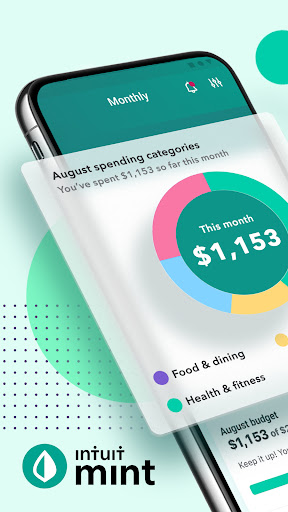
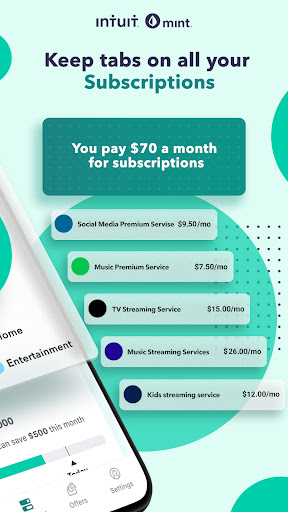
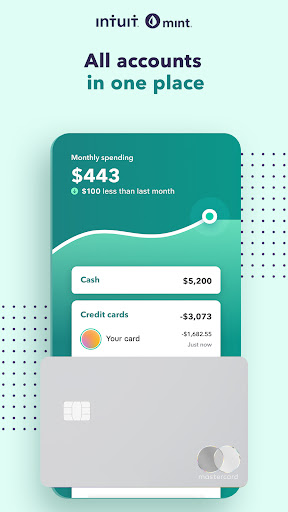
Mint: Budget & Track Bills is the kind of personal finance app that tries to become your financial dashboard rather than just your budget notebook, and that distinction matters the moment you start using it. After spending time with it as a daily money-tracking tool, what stood out most is how quickly it gives you a broad view of your finances. Instead of treating budgeting as a chore you do once a week with a calculator and a spreadsheet, Mint feels built to keep your accounts, spending, and bills visible in one place so you can check in briefly and still feel informed. That broad visibility is the app’s biggest strength. The core experience feels less like manual bookkeeping and more like financial monitoring. Open the app, and the appeal is immediate: you can move from account balances to recent transactions to budget status without feeling like you are digging through menus. For people who want to know where their money is going without building an elaborate system from scratch, that convenience is a real win. It lowers the barrier to paying attention, and with budgeting apps, that often matters more than feature depth on paper. In everyday use, Mint generally feels polished in the way good mainstream finance apps do. The layout is approachable, the terminology is familiar, and the app rarely makes you feel as though you need a personal finance background to navigate it. That ease of use is its second major strength. You can recommend it to someone who is new to budgeting and feel fairly confident they will understand the basics quickly. The app is also good at turning financial data into something readable rather than intimidating. If your main goal is to build awareness, spot spending patterns, and keep bills from slipping through the cracks, Mint makes a strong first impression. The third thing it does well is motivation through visibility. Seeing transactions collected into one place, budgets framed in a more digestible way, and bills surfaced together creates a subtle accountability loop. We found ourselves checking in more often simply because the app made that process frictionless. That matters. The best budgeting app is often not the most advanced one, but the one you will actually open several times a week. That said, Mint’s strengths come with trade-offs, and they become more noticeable the longer you use it. The first weakness is that an all-in-one finance app can sometimes feel crowded. When an app tries to track balances, monitor spending, organize budgets, and keep tabs on bills, the experience can edge toward information overload. There were moments when the dashboard felt more busy than calm, especially if what you wanted was one clear answer to a simple question like, “How much have I spent this month?” The app is useful, but it is not always minimal. The second friction point is that budgeting through a connected finance app can feel slightly indirect compared with a manual system. Mint is best when you want automated awareness, not necessarily when you want to micromanage every spending choice with intention and detail. If you are the type of user who enjoys assigning every dollar a job or adjusting categories obsessively, Mint can feel a little more like it is observing your financial life than actively shaping it with you. That is not a deal-breaker, but it does define the experience. The third weakness is simply the emotional side of using a finance tracker that is always showing you everything at once. This is not unique to Mint, but Mint’s dashboard-forward approach means it can occasionally feel more exposing than empowering, especially if your finances are messy or in transition. Some users will love the honesty of that. Others may find it stressful enough that they stop opening the app. Good budgeting tools need discipline from the user, and Mint does not magically remove that challenge. Who is this app for? Mint is a very good fit for people who want a free, widely accessible starting point for budgeting and bill tracking, especially those who prefer convenience over manual precision. It is also well suited to users who want a quick financial snapshot at a glance and appreciate having money-related information centralized in one app. If your biggest struggle is simply staying aware of your spending and upcoming obligations, Mint makes that process easier. Who is it not for? It is less ideal for users who want a stripped-down budgeting experience with very little visual clutter, or for those who prefer complete manual control over every category and every plan. It is also not the best match for someone who dislikes linking financial tools into one central app or who finds highly visible money tracking more stressful than helpful. Overall, Mint earns its popularity because it gets the fundamentals right: it is accessible, practical, and genuinely helpful in day-to-day financial awareness. We came away feeling that it succeeds best as a personal finance command center for ordinary users, not as an enthusiast tool for budget perfectionists. If you meet it on those terms, it is easy to see why so many people keep it in their routine. It is not the cleanest or most focused budgeting experience possible, and it occasionally asks you to tolerate a little complexity in exchange for convenience. But for a free app that helps turn scattered financial information into something usable, Mint remains a strong recommendation.
Alternative apps
  • YNAB
  • PocketGuard
  • Goodbudget