Apps Games Articles
Fiverr - Freelance Service
Fiverr
Rating 4.7star icon
Editor's summary
Editor rating
star icon star icon star icon star icon
half star icon
4.5

One-line summary Fiverr is one of the most convenient freelance marketplaces to use on a phone, but inconsistent notifications and a few desktop-only rough edges keep it from feeling fully complete.

  • Installs

    10M+

  • Developer

    Fiverr

  • Category

    Business

  • Content Rating

    Everyone

  • Latest version

    3.5.6.2

  • Package

    com.fiverr.fiverr

In-depth review
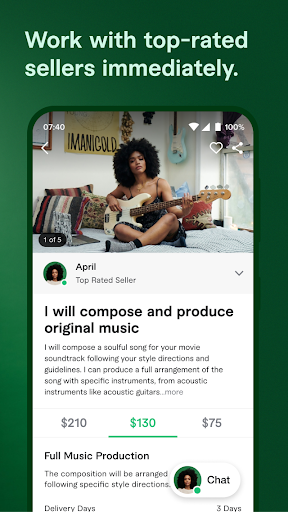
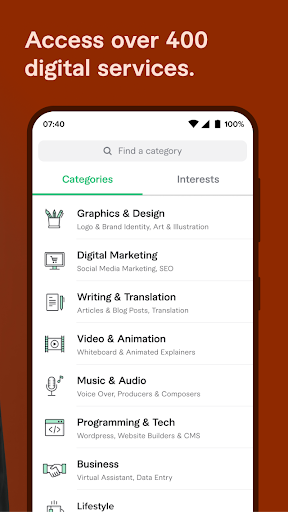
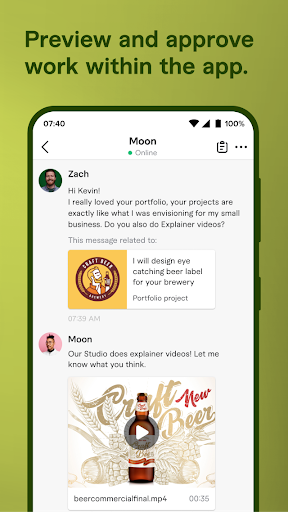
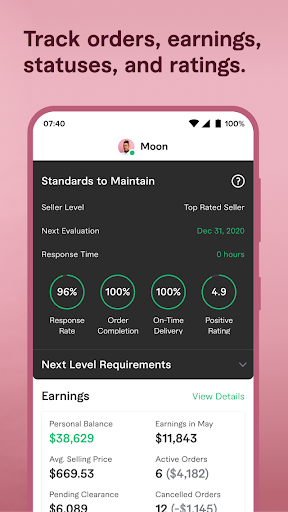
Fiverr’s Android app succeeds at the thing a mobile freelance marketplace absolutely has to get right: it makes staying on top of work feel easy. After spending real time with it from both the buyer and freelancer side of the experience, what stood out most was not some flashy feature, but how naturally it fits into the day. You can browse services, check conversations, respond to questions, place orders, review deliverables, and keep projects moving without feeling like you are trapped in a shrunk-down website. That matters more than it sounds. A lot of marketplace apps technically let you do everything, but the workflow feels cramped, cluttered, or buried under too many taps. Fiverr is generally better than that. The interface is clean, the navigation is straightforward, and most of the core actions are where you expect them to be. Searching through categories is simple enough, and the app does a good job of making a large service catalog feel manageable rather than overwhelming. For buyers, that means it is easy to go from “I need this done” to comparing options and opening a conversation. For freelancers, it means messages, orders, and account activity are accessible quickly, which is exactly what you want when timing affects response rate and client confidence. The app’s biggest strength is communication. Fiverr works best when deals move quickly, expectations are clarified fast, and small decisions do not sit waiting until you get back to a desktop. On mobile, messaging is fast and mostly smooth, and that alone makes the app valuable. It is genuinely useful for keeping client conversations alive during the workday, while commuting, or outside office hours. If you are a freelancer, the app makes it much easier to stay responsive. If you are a buyer, it is convenient to review updates and answer seller questions without interrupting your whole day. A second strength is accessibility. Fiverr has a lot going on under the hood as a platform, but the app rarely feels intimidating. Newer users can figure out the basics without much friction, and experienced users can move through routine tasks quickly. I especially liked that it does not drown the experience in ads or obvious distractions. The app stays focused on discovery, communication, ordering, and delivery. That gives it a more professional feel than many marketplace apps that constantly try to pull attention sideways. The third strength is trust-building through structure. Fiverr’s workflow is clear: conversations lead to orders, deliverables are easy to track, and the process feels organized. For buyers hiring creative or technical help remotely, that sense of structure makes a real difference. It is much easier to commission work when timelines, revisions, and delivery feel contained inside a system rather than scattered across email threads and chat apps. That said, the app is not flawless, and the weaknesses become obvious the longer you rely on it. The most frustrating issue is notifications. In daily use, they are not always as dependable as they should be. For an app built around time-sensitive messages and orders, even occasional missed or delayed alerts can be a big problem. When a client message or seller response does not reliably surface the moment it should, the app loses some of the confidence it otherwise earns. If you depend on Fiverr for active work, this is the kind of issue that nudges you into checking email as a backup, which should not really be necessary. Another weak spot is feature completeness. The app covers the essentials well, but it still gives the impression that some advanced account management is more comfortable on the web. Parts of the experience feel lighter than the desktop version, especially when you want deeper control over profile or gig management. It is not broken, but it can feel like the mobile app is excellent for maintaining momentum and only good, not great, for heavier administrative tasks. The third complaint is that some interactions still feel rough around the edges. Small things matter in a work app: buttons that do not always behave as expected, chat handling that could be smarter, or moments where finding the right conversation takes more effort than it should. None of these issues ruin the app, but they chip away at the otherwise polished experience. This is especially noticeable if you handle many simultaneous chats or need to move quickly between clients. There is also a more general platform-level annoyance that does show up in the app experience: fees and checkout nudges can make hiring feel less clean than it first appears. The app itself is easy to use, but the final payment flow is one of the few places where the smoothness gives way to friction. So who is Fiverr for? It is a very good fit for freelancers who need to stay reachable and manage active work from their phone, and for entrepreneurs or small teams who regularly hire creative, technical, writing, marketing, or admin help on demand. It is especially strong for people who value convenience, quick communication, and a structured order process. Who is it not for? If you want every advanced workflow to feel just as powerful on mobile as on desktop, or if your work depends on absolutely bulletproof push notifications, Fiverr may still feel a little too dependent on the web and a little too inconsistent in the background. It also is not ideal for anyone who dislikes service fees or wants a more personal, less platform-shaped hiring experience. Overall, Fiverr’s app is one of the better marketplace apps I have used because it understands the most important mobile truth: speed matters. It keeps freelance work moving, it feels approachable, and it turns a sprawling service marketplace into something genuinely practical from a phone. It still needs sharper notifications and a few usability refinements, but for most buyers and freelancers, it is easy to recommend.
Alternative apps