Apps Games Articles
Lyft Driver
Lyft, Inc.
Rating 4.0star icon
Editor's summary
Editor rating
star icon star icon star icon star icon empty star icon
4.1

One-line summary Lyft Driver is easy to like because it makes accepting work and seeing trip details feel fast and clear, but I’d hesitate if you have low tolerance for navigation hiccups, flaky network behavior, or awkward no-show handling.

  • Installs

    5M+

  • Developer

    Lyft, Inc.

  • Category

    Business

  • Content Rating

    Everyone

  • Latest version

    1003.70.3.1655274176

  • Package

    com.lyft.android.driver

Screenshots
In-depth review
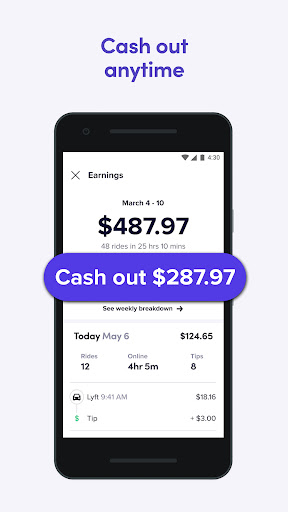
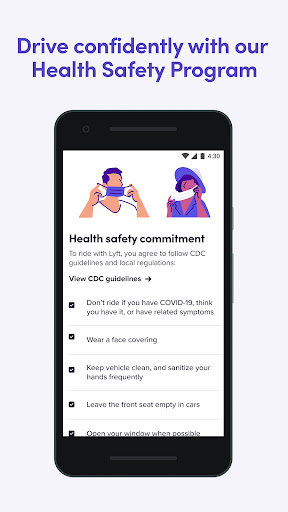
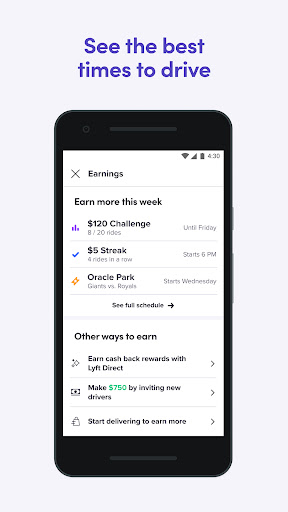
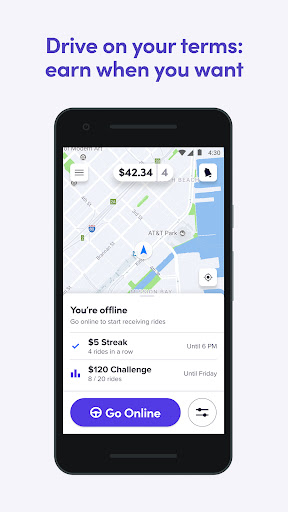
Lyft Driver is one of those work apps that makes a strong first impression because it understands the most important thing a driver app needs to do: stay out of the way until it matters, then surface the right information quickly. After spending time with it in regular on-road use, that is still the main takeaway. This is a polished, mostly intuitive driver companion that does a lot right in the day-to-day flow of going online, reviewing requests, navigating pickups, and managing rides. It is also an app that can become intensely frustrating the moment something goes wrong, because the rough edges tend to show up during exactly the moments when a driver is already under pressure. The best part of Lyft Driver is its general usability. The interface is clean, the core controls are easy to reach, and the app usually does a good job of presenting ride information in a way that feels actionable rather than cluttered. Seeing earnings and trip details before accepting a ride makes a real difference in how confident the experience feels. Instead of blindly reacting to every incoming request, you feel like you have at least some context. That makes the app feel more respectful of the driver’s time, and it helps reduce the sense that you are operating inside a black box. I also came away impressed by how approachable the app is for drivers who want flexibility rather than complexity. Going online, filtering where you want to drive, checking payout options, and moving through the basic workflow all feel fairly straightforward. There is very little of the interface bloat that often creeps into gig work apps over time. Even after extended use, the app remains readable and organized, which matters more than it sounds when you are glancing at a phone between traffic lights, pickups, and route changes. On that front, Lyft Driver generally feels mature. Another genuine strength is that the app tries to support real driving conditions rather than pretending the phone screen exists in isolation. Android Auto support is a meaningful quality-of-life feature, and when paired with in-car navigation it can make the whole experience feel less scattered. Keeping directions, ride details, and media closer together is exactly the kind of practical integration a driver app should prioritize. Even outside the car display environment, Lyft’s mapping and trip flow are often good enough that you can focus more on the road and less on fighting the software. That said, the weak spots are hard to ignore because they hit operational basics. Navigation is the biggest one. In normal use it is serviceable, but there are moments where route guidance feels unreliable or simply not smart enough. Pickup directions can be odd, and location guidance can steer you toward awkward access points rather than obvious ones. In a job where seconds matter and where bad routing can create rider confusion, that inconsistency chips away at trust. It is not a constant failure, but it happens often enough to be memorable. The second issue is network behavior and responsiveness. Lyft Driver can sometimes feel slower than it should when loading directions or processing the next step in a ride. That kind of lag is easy to dismiss on paper, but behind the wheel it becomes stressful fast. If an app throws a poor-connection style warning or hesitates when you are trying to orient yourself on a highway or in a busy pickup zone, the experience immediately feels less professional. You want a driver app to be boringly dependable. Lyft Driver is usually competent, but not always dependable. The third problem is how the app handles exceptions and edge cases. In ideal trips, the workflow is smooth. In messy trips, the cracks show. No-show situations in particular can feel more cumbersome than they should, and there are moments where declining or escaping a stream of incoming requests is not as graceful as it ought to be. These are not glamorous features, but they matter because gig driving is full of interruptions, rider mistakes, bad pickup pins, and split-second decisions. A good driver app should reduce that friction. Lyft Driver sometimes adds to it. Support and safety tools are a welcome part of the package, and the app does feel designed with driver reassurance in mind. The ability to get help from within the app adds a layer of confidence, especially for newer drivers. Cash-out flexibility is also valuable in practical use, because getting paid quickly can be as important as how much you earn on paper. Those features do not make the app exciting, but they make it more livable. Battery impact is another thing worth mentioning. Like any app that leans heavily on GPS and background activity, Lyft Driver can drain your phone faster than casual apps do. That is not unusual for this category, but it is noticeable enough that a charger feels less like an accessory and more like part of the required setup. So who is Lyft Driver for? It is best for drivers who want a relatively clean, easy-to-learn app with useful upfront trip visibility, flexible scheduling, and a generally polished workflow. If you value being able to jump in, understand the interface quickly, and work without wrestling with a chaotic dashboard, Lyft Driver has a lot going for it. It is not ideal for drivers who need ultra-consistent navigation, have little patience for app lag, or expect exception handling to be flawless when rides go sideways. Overall, Lyft Driver is a strong app with a real sense of product maturity. When everything is working, it feels efficient, well-organized, and driver-friendly. But the moments when it stumbles are too important to overlook, because they tend to happen in the exact situations where drivers need the app to be smartest. I would recommend it, especially to drivers who prioritize ease of use and trip transparency, but I would do so with a clear warning: this is a good tool, not an infallible one.