Apps Games Articles
Duo Mobile
Duo Security LLC
Rating 3.0star icon
Editor's summary
Editor rating
star icon star icon star icon star icon empty star icon
4.2

One-line summary Duo Mobile is one of the smoother, less annoying authenticator apps to live with day to day, but it still inherits the usual 2FA friction and can be frustrating when notifications or setup expectations don’t line up perfectly.

  • Installs

    10M+

  • Developer

    Duo Security LLC

  • Category

    Business

  • Content Rating

    Everyone

  • Latest version

    4.51.0

  • Package

    com.duosecurity.duomobile

Screenshots
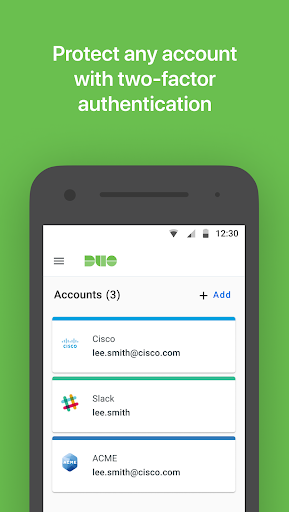
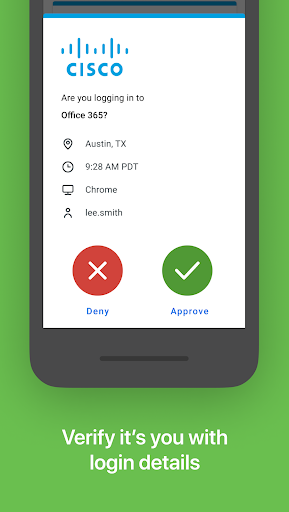
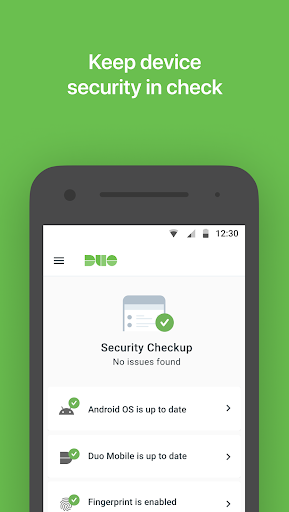
In-depth review
Duo Mobile is the kind of app most people install because they have to, not because they wake up excited to add another layer of login security to their lives. After spending real time with it in everyday use, I came away thinking that is actually one of its biggest compliments: it does a good job of getting out of the way. For an app centered on two-factor authentication, that matters more than flashy design or feature creep. The core experience is straightforward. When linked to a supported account, Duo Mobile can handle push approvals for one-tap sign-ins, and when push is not the right tool or is unavailable, it can generate passcodes. In practice, that gives the app a nice balance between convenience and reliability. The best moments with Duo are almost invisible ones: you attempt a login on a laptop, your phone buzzes, you approve it, and you move on. When that flow works well, it feels fast and modern rather than like a security tax. What impressed me most during hands-on use was how little mental overhead the app adds once it is properly set up. The interface is not trying to be cute. It is focused, clean enough, and built around a simple idea: show me the accounts I need, let me approve access quickly, and let me get a code when necessary. That sounds obvious, but many security apps manage to make simple tasks feel oddly fussy. Duo Mobile mostly does not. I found it easy to check a code, easy to recognize what account I was approving, and easy to understand what the app wanted from me at each step. A second major strength is that Duo Mobile works well in less-than-ideal conditions. Because passcodes are available even when a push is not practical, the app doesn’t collapse the moment connectivity gets messy. In day-to-day use, that makes it feel dependable rather than fragile. Security tools need a fallback, and Duo Mobile’s passcode workflow gives it one. It also reduces the panic factor when you are in a poor-signal area or dealing with a temporary notification delay. The third thing Duo gets right is account continuity. Moving to a new phone is one of the most stressful moments for any authenticator app because it exposes how much of your digital life is tied to that little code generator. Duo Mobile makes this less painful than some alternatives. Restoration and migration are not magical in every situation, but the app clearly understands that device changes are a normal part of life and not some edge case. That alone gives it practical value beyond the login screen. That said, Duo Mobile is not friction-free, and some of its weaknesses are exactly the sort of things that can sour people on authentication apps in general. The first is that the setup experience can be confusing if you expect it to work as a standalone security solution for everything immediately. For Duo-protected accounts, it has to be activated and linked as part of an enrollment process, which means your first encounter with the app may depend heavily on how clearly your workplace, school, or service explains the steps. If that surrounding process is messy, Duo can feel more complicated than it really is. The second weakness is notifications. When they arrive promptly, Duo is excellent. When they do not, the app instantly feels less elegant. I did not find it unusable, but this is one of those categories where even a small hiccup stands out because the whole promise is speed. Having to manually open the app to approve something that should have appeared instantly is not catastrophic, but it breaks the seamlessness that makes push authentication so appealing in the first place. The third complaint is that while the interface is functional, it is not especially flexible or delightful. Duo Mobile is more polished than clunky, but there are moments where it feels designed by security people first and usability people second. Organization for multiple accounts could feel more graceful, and the visual presentation is efficient rather than refined. If you only use it for one employer login, this hardly matters. If you are managing a larger set of third-party accounts, the app can start to feel a little plain and a little rigid. Who is Duo Mobile for? It is a strong fit for employees, students, administrators, and anyone who needs a dependable authentication app that emphasizes quick approvals and practical account recovery over bells and whistles. It is especially good for people who want an authenticator that does not require much training once the initial link-up is done. It is also a sensible choice for those who value having both push and passcode options inside one familiar app. Who is it not for? If you dislike any extra login step on principle, Duo will not convert you to the joys of 2FA. It also may not satisfy power users who want extensive customization, richer organization tools, or a more feature-packed experience around account management. And if your tolerance for notification inconsistency is low, you may find the occasional hiccup more annoying here than the otherwise smooth design can compensate for. Overall, Duo Mobile succeeds where this kind of app needs to succeed: it is usually fast, generally reliable, and easy enough to trust as part of a daily routine. It does not make authentication fun, but it makes it manageable, which is the more important achievement. I would recommend it to most people who are required to use it and to many who simply want a capable, low-drama authenticator. My hesitation is not about security or core functionality; it is about the small but real rough edges that become noticeable precisely because the app spends so much of its time being competent.