Apps Games Articles
Google Meet (original)
Google LLC
Rating 4.0star icon
Editor's summary
Editor rating
star icon star icon star icon star icon empty star icon
4.0

One-line summary Google Meet is easy to trust when you need a quick, no-fuss video call, but it can feel a little too plain and occasionally clunky if you want a more flexible meeting experience.

  • Installs

    500M+

  • Developer

    Google LLC

  • Category

    Business

  • Content Rating

    Everyone

  • Latest version

    VARY

  • Package

    com.google.android.apps.meetings

In-depth review
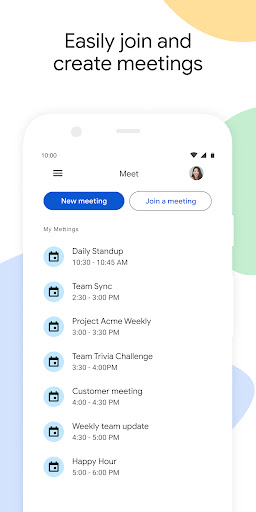
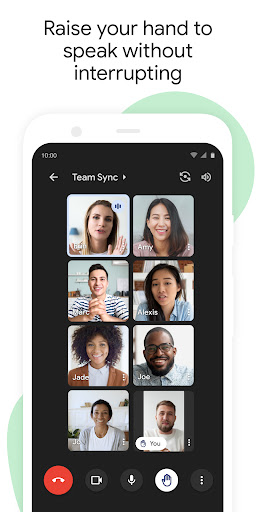
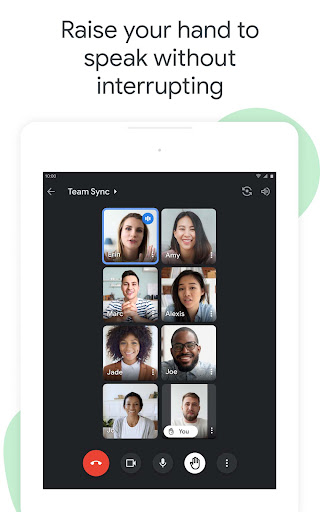
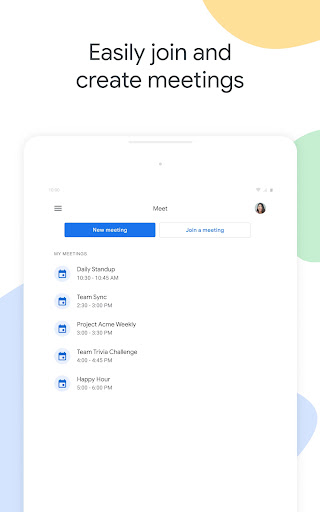
Google Meet (original) feels like the kind of app designed to get out of your way. After spending time using it for routine calls, quick check-ins, and longer scheduled meetings, what stands out most is not flash or novelty, but steadiness. It aims for a straightforward meeting experience, and most of the time it delivers exactly that. If your priority is joining a video call quickly, seeing and hearing people clearly, and not fighting the interface along the way, Meet makes a strong case for itself. The first thing that impressed me was how little friction there is in getting started. The app feels familiar almost immediately, especially if you are already comfortable with Google’s broader design language. Joining a meeting is generally simple, and the overall layout stays readable even when you are moving quickly. There is very little “where do I tap next?” confusion here. That matters more than it sounds, because video calling apps tend to be used in rushed moments: before class, before work, while walking between rooms, or right when a meeting is about to begin. Meet understands that kind of pressure well. This is easily one of its biggest strengths. Once inside a call, the experience is mostly clean and controlled. The app does a good job of keeping the focus on the people in the meeting rather than burying everything under too many layers of controls. Core actions are where you expect them to be, and the interface generally avoids looking crowded. On a phone, that restraint is especially valuable. Some meeting apps overload the screen with buttons, side panels, and constant prompts; Meet usually feels calmer than that. For everyday use, this makes it less mentally tiring. A second clear strength is that Meet feels dependable in the way a communication app should. During my time with it, I came away with the sense that it was built for routine use rather than showmanship. Calls feel organized, the flow from opening the app to entering a meeting feels mature, and there is a practical consistency to the whole thing. That reliability is hard to glamorize in a review, but in real life it is often the reason people stick with an app. You want the tool that behaves predictably when you are already juggling a dozen things. There is also a third strength that is easy to overlook: Meet is approachable for mixed levels of tech confidence. Not everyone joining a call wants to explore settings, learn special workflows, or understand advanced collaboration tools. Meet works best when someone simply wants to tap in and talk. I can comfortably recommend it to students, families, remote workers with basic meeting needs, and anyone who values simplicity over experimentation. That said, the app’s restraint can also become one of its weaknesses. The biggest hesitation I have in recommending Google Meet without qualification is that it sometimes feels almost too stripped back. The minimalism is welcome when you just need a call, but it can make the app feel a bit plain if you want a richer or more customizable meeting environment. Power users, frequent hosts, or people who expect a lot of room to tailor the experience may find it less satisfying than its polished appearance initially suggests. Another issue is that the interface, while clean, is not always as fluid as it wants to be. There are moments where actions feel just a touch less intuitive than they should, especially when moving around the app quickly or trying to manage the little details of a call from a small screen. Nothing here is disastrous, and I would not call the app difficult, but there is a slight stiffness at times. It is one of those things you notice only after repeated use: the app is simple, but not always effortlessly elegant. My third complaint is more about personality than raw function. Meet does its job, but it can feel utilitarian to a fault. There is not much delight in using it. Some people will love that because it keeps meetings focused. Others will interpret it as the app feeling generic or lacking warmth. After several sessions, I appreciated the discipline, but I also felt that the experience rarely rose above “perfectly fine.” For a communication app you may use daily, that matters a little more than it would for a tool you open once a month. Who is Google Meet (original) for? It is for people who want a stable, recognizable, low-hassle video calling app that does not demand much learning. It is especially well suited to users who value convenience, a tidy interface, and a dependable routine for joining meetings. It is not the best fit for someone who wants an especially feature-rich, personality-heavy, or deeply customizable calling platform. If you are the kind of user who likes to tune every part of your workflow, Meet may feel somewhat constrained. Overall, Google Meet (original) earns respect by being competent in the places that matter most. It is easy to enter, easy to understand, and generally pleasant to use. Its weaknesses are real: it can feel plain, occasionally a bit rigid, and not especially exciting. But for many people, those are acceptable trade-offs for an app that keeps meetings simple and mostly stress-free. I would recommend it to anyone who wants a practical video meeting app first and foremost, and who is happy to trade a bit of flexibility for clarity and consistency.