Apps Games Articles
Pixel Shimeji - Desktop Pet
LAMBDA TECHNOLOGY CO., LIMITED
Rating 3.9star icon
Editor's summary
Editor rating
star icon star icon star icon
half star icon
empty star icon
3.8

One-line summary Pixel Shimeji - Desktop Pet is easy to like if you want a playful little character living on your screen, but it is harder to wholeheartedly recommend if you expect that charm to stay delightful all day instead of turning into background clutter.

  • Installs

    10M+

  • Developer

    LAMBDA TECHNOLOGY CO., LIMITED

  • Category

    Personalization

  • Content Rating

    Teen

  • Latest version

    2.1.9

  • Package

    com.coolguy.desktoppet

Screenshots

In-depth review
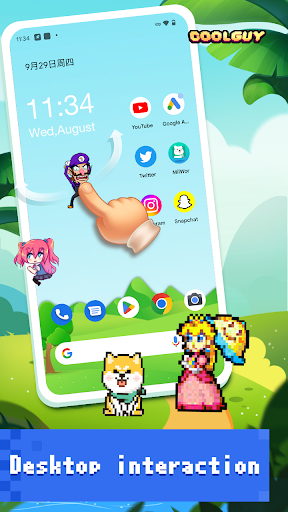
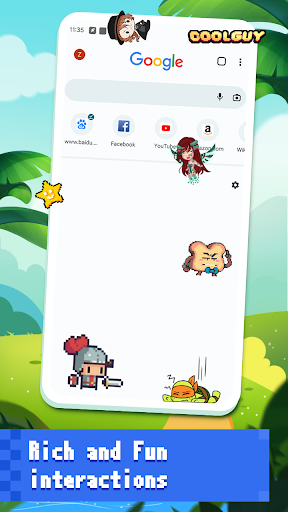
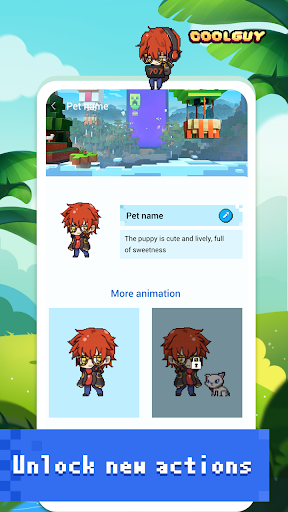
Pixel Shimeji - Desktop Pet is the kind of Android app that knows exactly what it is selling: a tiny hit of personality on your phone screen. After spending time with it, that simple promise remains the app’s biggest strength. It is not trying to be a productivity tool, a game, or some elaborate virtual companion with layers of systems to manage. It is basically there to make your phone feel a little less sterile, and on that level it genuinely works more often than not. The first impression is easy to understand. You install it because the idea is charming: small pixel-style characters wandering around your screen like desktop pets from another era. That novelty lands quickly. The pixel art look gives the app an immediate identity, and it taps into a certain retro-cute appeal that feels lighter and less overdesigned than many modern customization apps. In use, the pets add a surprising amount of personality to an otherwise ordinary home screen. If you are the sort of person who enjoys wallpapers, widgets, icon packs, and any little tweak that makes your phone feel more personal, Pixel Shimeji fits naturally into that routine. What I liked most during everyday use is that the app delivers its core gimmick right away. There is no long onboarding process to sit through, and no complicated setup needed to understand the point. Once the pet is active, the effect is immediate: your screen feels animated, playful, and just a little sillier in a good way. That low barrier to enjoyment matters. A lot of customization apps ask for too much patience before they become fun. Pixel Shimeji gets to the fun part quickly. Another thing the app gets right is tone. It does not feel overly serious or self-important. The whole experience is built around light amusement, and the visual style supports that. The pixel aesthetic is the right choice here because it keeps the pets visually readable without feeling too noisy. On a crowded phone screen, that matters. A more detailed art style could have turned the pets into visual mess; the simpler look helps them stay cute rather than distracting most of the time. The third real strength is accessibility. This is not an app that demands a niche audience to understand it. Kids will immediately get the appeal. Teens who like anime-style mascots, desktop toys, or general phone customization will probably enjoy it. Even adults who grew up with digital pets or old-school desktop companions may get a nostalgic kick out of it. The app’s appeal is broad because the concept is broad: it is decoration with motion. That is easy to appreciate. That said, living with Pixel Shimeji for more than a few minutes also reveals why a playful idea like this has limits. The biggest issue is that the charm can wear off faster than expected. During the first day or two, the pet feels fresh and amusing. After that, the novelty depends heavily on your tolerance for persistent screen activity. If you like a clean interface, or if moving elements on your display tend to annoy you, the pet can start to feel less like a companion and more like visual interruption. This is not a flaw unique to this app, but it is absolutely part of the real experience. The second weakness is practical: anything that sits on top of your phone interface risks becoming mildly inconvenient. In regular use, there were moments when the pet felt cute and moments when it simply felt in the way. That tension defines the app. A desktop pet has to be visible enough to matter, but once it is visible enough, there is always a chance it becomes distracting. If you spend a lot of time messaging, browsing, or switching quickly between apps, you may find yourself noticing the pet at exactly the wrong moments. The third weak point is depth. Pixel Shimeji succeeds as a novelty customization app, but it does not transform into something much richer than that. If you are hoping for a more interactive relationship, a sense of progression, or a stronger feeling that the pet is evolving into part of your daily phone use, this app may feel shallow after the initial excitement fades. It is best understood as a light cosmetic layer, not a deep companion experience. That balance is really what defines my time with the app. At its best, Pixel Shimeji is cheerful, harmless fun. It adds a bit of life to a phone that might otherwise feel generic, and it does so with a visual style that is immediately appealing. At its worst, it reminds you why many people keep their devices minimal: because even adorable distractions are still distractions. So who is this app for? It is for users who enjoy playful personalization, especially anyone who likes cute pixel art and wants their phone to feel a little more expressive. It is also a good fit for people who understand exactly what they are getting: a decorative companion that exists mainly to entertain and decorate, not to serve some deeper function. Who is it not for? If you are sensitive to clutter, easily distracted by motion on screen, or looking for a highly interactive pet simulation with lots of depth, this probably is not your app. Likewise, if your ideal Android setup is sleek, efficient, and visually quiet, Pixel Shimeji may wear out its welcome quickly. In the end, I came away liking Pixel Shimeji - Desktop Pet, but with reservations. It absolutely succeeds at being cute, approachable, and instantly understandable. It also runs into the classic problem of every novelty overlay app: what feels delightful in short bursts can feel unnecessary in daily use. If the idea itself already makes you smile, there is a good chance you will enjoy it. If you are on the fence, that same idea probably tells you everything you need to know.
Alternative apps