Apps Games Articles
FPL
NextEra Energy, Inc
Rating 4.2star icon
Editor's summary
Editor rating
star icon star icon star icon star icon
half star icon
4.5

One-line summary FPL is an unusually polished utility app that makes bills, outages, and energy tracking genuinely useful, though it still feels more like a smart account dashboard than a full-featured home-energy control center.

  • Installs

    1M+

  • Developer

    NextEra Energy, Inc

  • Category

    Business

  • Content Rating

    Everyone

  • Latest version

    6.14.0

  • Package

    com.nee.fpl

Screenshots
In-depth review
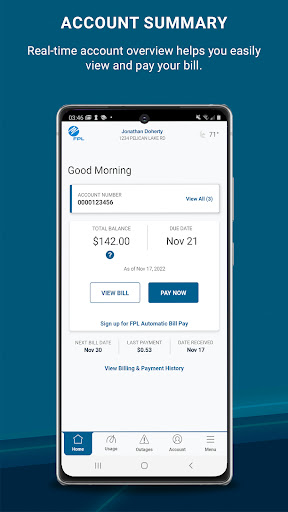
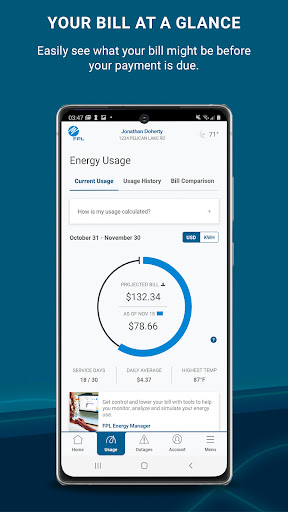
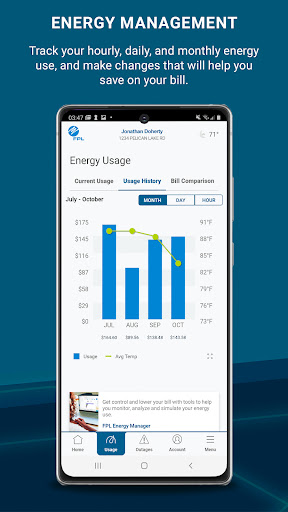
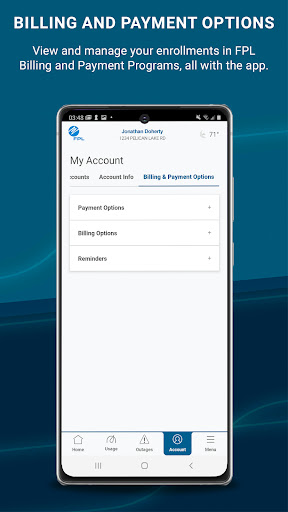
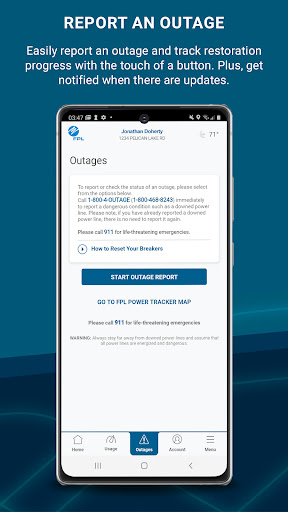
Most utility apps aim low: let you log in, glance at a bill, maybe pay it, and then get out of the way. FPL goes further than that. After spending time with it as a day-to-day companion rather than a once-a-month payment tool, what stood out most is that it treats electricity usage as something you can actually observe and respond to, not just a number waiting at the bottom of a bill. The first good sign is that the app feels built for repeat use. Signing in and getting back into the account is quick, and the fingerprint login option makes a real difference because this is exactly the kind of app people open in short bursts: check the projected bill, confirm a due date, see whether usage spiked during a heat wave, or report an outage without wanting to type a password every time. There is a welcome sense of directness here. The app does not bury the practical stuff. Balance information, due dates, bill access, payments, and energy data all feel close enough to the surface that the app earns a spot on your phone instead of becoming something you reinstall during storm season. Where FPL becomes more than merely competent is in energy-use visibility. The projected monthly bill is one of the most useful features in the app, especially if you are the kind of person who prefers adjusting habits before the bill arrives rather than reacting after the damage is done. During regular use, that projection creates a feedback loop: run the AC harder for a few hot days, check the app, notice the trend, and decide whether to scale back. The daily, weekly, and monthly usage views make the service feel much less opaque than many utility relationships usually do. Instead of a single monthly total, you get something closer to a living picture of consumption. That said, this visibility comes with an important limitation: the app is informative, not transformational. It gives you data and reminders, but it does not magically turn energy management into a push-button experience. If you want a deep automation platform or appliance-level control, this is not that. The app works best for people who are willing to look at patterns and make their own decisions. In my use, it was at its best as a guide. You can learn from it, spot trends, and better understand your home’s energy rhythm, but you still have to do the interpreting. For engaged households, that is enough. For anyone hoping the app itself will optimize everything in the background, it may feel more passive than expected. The outage tools are another strong point, and probably the most emotionally important part of the app. In a utility app, trust matters most when something goes wrong, not when everything is normal. FPL gives you a straightforward path to report an outage and check status updates, and push notifications are genuinely useful here. This is the sort of feature that turns a utility app from “nice to have” into “essential to keep installed.” During stressful moments, clarity beats flair, and the app generally understands that. Still, the app is not entirely friction-free. One annoyance is that some of its better features depend on buying into FPL’s digital-first account workflow. If you are not already on email billing, the app nudges you in that direction, and while paperless billing is convenient for many people, it can feel less like a choice and more like the expected path. That will not bother everyone, but users who prefer traditional billing may find the experience a little too opinionated. Another weakness is that the app’s usefulness varies depending on how interested you are in your own consumption habits. If you only want to pay the bill once a month and move on, some of the usage screens can feel more analytical than necessary. They are well-presented, but they still ask for attention. FPL is strongest when used frequently; it is less impressive if you approach it as a bare-minimum utility portal. The third issue is subtler: while the app does a good job surfacing trends, turning those trends into action is not always seamless. You can see that usage has changed, and in some cases compare it with previous periods, but insight does not always equal explanation. There are moments where you understand that your bill is moving, but not precisely which behavior mattered most. That is not a failure of design so much as the natural ceiling of utility-level data, but it does mean the app can sometimes feel one step short of truly actionable advice. Even with those reservations, I came away impressed. FPL is cleaner, more useful, and more thoughtfully built than many apps in this category. The combination of secure access, bill management, projected costs, and outage reporting covers the practical essentials, while the energy tracking gives it a layer of everyday usefulness that many utility apps never reach. I especially liked that it rewards curiosity: the more often you check in, the more the app starts to feel like a useful instrument panel instead of an administrative form. This app is for FPL customers who want convenient account access, faster outage communication, and a better grasp of how their daily habits affect their bill. It is especially good for homeowners or renters who actively monitor energy use and want to make adjustments over the course of the month. It is not for people outside the FPL service ecosystem, obviously, and it is also not ideal for anyone expecting a smart-home automation experience or a deeply coached energy-optimization tool. In the end, FPL succeeds because it respects the realities of utility use: most people want speed, clarity, and fewer surprises. It delivers those well. Its best trick is making a boring category feel genuinely helpful.