Apps Games Articles
iSyncr: iTunes to Android
JRT Studio Music Players
Rating 4.2star icon
Editor's summary
Editor rating
star icon star icon star icon star icon empty star icon
4.3

One-line summary If your music life still revolves around iTunes, iSyncr is one of the few Android apps that genuinely preserves playlists and metadata well, but its setup quirks and free-version limits make it less appealing for anyone who just wants a dead-simple drag-and-drop solution.

  • Installs

    5M+

  • Developer

    JRT Studio Music Players

  • Category

    Audio

  • Content Rating

    Everyone

  • Latest version

    7.0.5

  • Package

    iTunes.Sync.Android

Screenshots
In-depth review
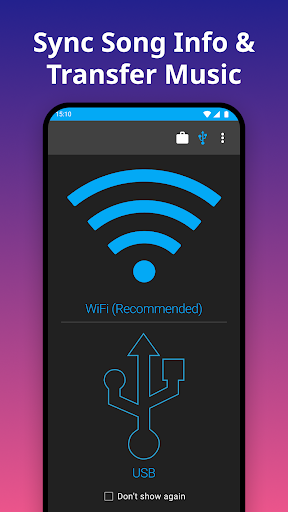
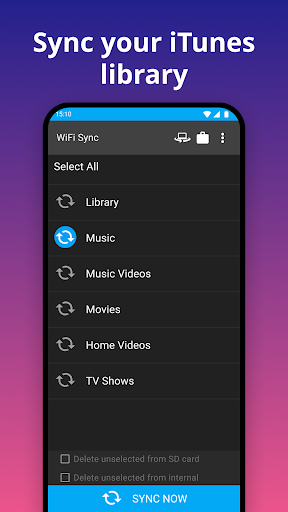
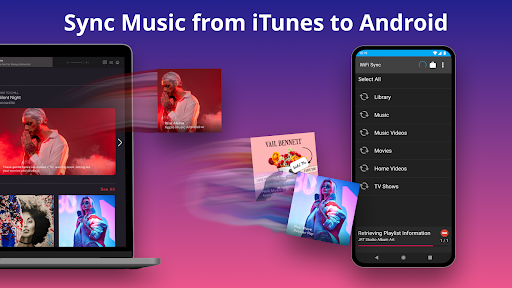
iSyncr: iTunes to Android solves a very specific problem, and after spending time with it, that focus turns out to be both its greatest strength and its biggest limitation. This is not a general music player trying to do a little bit of everything. It is a bridge for people who still manage their library in iTunes and want that library, especially playlists and song data, to make the jump to Android without falling apart in the process. That distinction matters, because plenty of apps can move music files. Far fewer can bring over the structure that makes a big music collection usable: playlists, album art, ratings, play counts, and the sense that your library still behaves like your library after you leave the Apple ecosystem. In actual use, that is where iSyncr feels valuable. Once connected properly to the desktop companion, it does a commendable job of moving not just songs but the logic of an iTunes collection. The first thing we noticed is that the app is not trying to be flashy. The interface is functional, and the experience depends heavily on the desktop side of the setup. That means your impression of iSyncr will be shaped in the first 20 minutes by how patient you are with setup. If you expect a one-tap cloud miracle, this is not it. You need the desktop component, you need iTunes on your computer, and you need to work through the initial sync method, whether that is USB or Wi-Fi. None of that is especially elegant by modern app standards. Still, once we got past that hurdle, the app became much easier to appreciate. Our test library transferred with the important details intact, and that is the difference between a novelty utility and a genuinely useful migration tool. Album art came across properly, playlists were preserved, and the synced content showed up where we expected it to. For anyone moving from an iPhone or years of iTunes library management to an Android phone, that alone feels like a small rescue operation. The second major strength is that iSyncr respects how people actually use a long-built music collection. It is not just about copying MP3s; it is about bringing over the library intelligence attached to them. Ratings, play behavior, and playlist organization are the kinds of things casual listeners may ignore, but for devoted music collectors they are essential. In practice, iSyncr handles those details better than many “just transfer your music” tools, and that makes the app feel like it was built by people who understand what gets lost when you leave Apple’s ecosystem. We were also pleasantly surprised by the day-to-day sync reliability after the initial setup was sorted out. Wi-Fi syncing, in particular, felt smoother than expected. USB still has its place, but in our testing, wireless syncing often ended up feeling less fussy than a cable-based approach. That is not something we would assume going in, but it became one of the app’s most practical conveniences once everything was paired correctly. That said, iSyncr is not frictionless. The biggest weakness is the onboarding. The app does not hold your hand particularly well, and if your desktop environment has any oddities, like firewall interference or finicky device detection, setup can become more trial-and-error than it should be. This is the sort of app where a technically confident user will shrug and work through it, while a less patient user may give up before seeing the payoff. The second issue is the free version’s limitation. For testing compatibility, it is fair enough, but for anyone with a real iTunes library, the cap quickly becomes restrictive. You can tell almost immediately whether the app works, but you can also tell that full, comfortable use pushes you toward the paid unlock. That is not unusual, but it does mean the “free” label is only partially true for serious use. The third complaint is polish around library visibility after syncing. In everyday use, we ran into the occasional moment where content was present but not immediately organized the way we expected inside Android music apps. Playlists may need to be imported explicitly, and there can be a little bit of a disconnect between “files transferred successfully” and “everything looks perfect instantly.” It is not a deal-breaker, but it does make the experience feel a bit more utility-like than seamless. Who is this app for? It is for the person who has spent years curating an iTunes library and now owns an Android phone but does not want to abandon that investment. If your playlists matter, your metadata matters, and you still manage music locally on a PC or Mac, iSyncr makes a compelling case for itself. It is also a good fit for people who prefer owning and syncing their music rather than depending entirely on streaming services. Who is it not for? If you do not use iTunes, if you want a modern streaming-first experience, or if you are looking for the simplest possible file transfer tool, this app is probably more specialized than you need. It is also not ideal for users who get frustrated by desktop setup steps and occasional sync tinkering. In the end, iSyncr succeeds because it addresses a niche that still matters. It is not the prettiest or most effortless app in the category, but it is unusually effective at preserving the shape of an iTunes library on Android. For the right user, that makes it far more than a file transfer app. It becomes a practical way to keep years of music organization alive after switching platforms. If you are that user, iSyncr remains one of the more useful tools available on Google Play.