Apps Games Articles
FreeStyle LibreLink - US
Abbott Diabetes Care Inc.
Rating 3.4star icon
Editor's summary
Editor rating
star icon star icon star icon
half star icon
empty star icon
3.6

One-line summary FreeStyle LibreLink - US is easy to like when your phone and sensor behave, because scanning glucose from the device already in your pocket feels genuinely liberating, but its compatibility quirks and uneven reliability make it harder to recommend without reservations.

  • Installs

    500K+

  • Developer

    Abbott Diabetes Care Inc.

  • Category

    Medical

  • Content Rating

    Everyone

  • Latest version

    2.5.3

  • Package

    com.freestylelibre.app.us

Screenshots
In-depth review
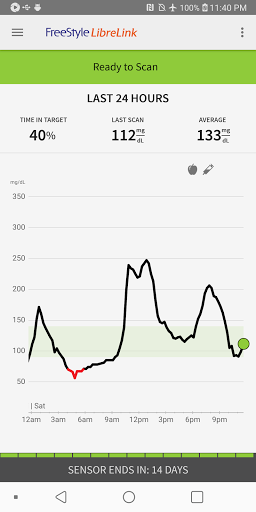
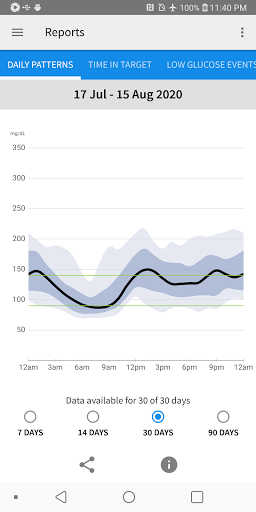
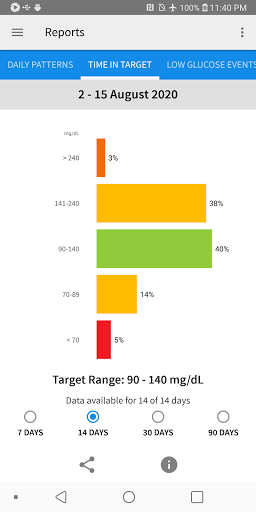
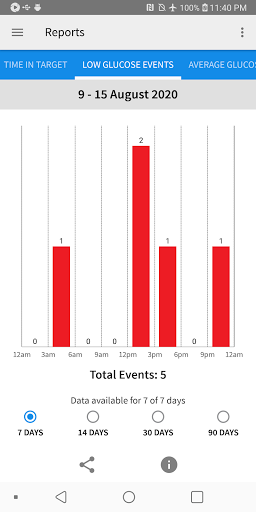
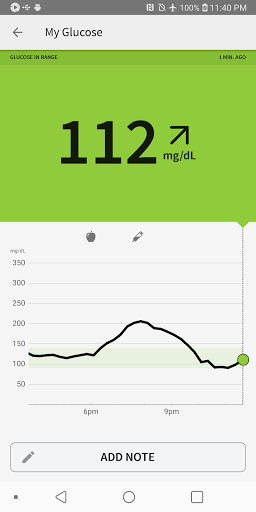
FreeStyle LibreLink - US is one of those medical apps that immediately makes sense the moment you use it in real life. The core appeal is simple: instead of carrying a separate reader everywhere, you can check your glucose with the phone that is already in your hand. In day-to-day use, that convenience is not a small perk. It changes how naturally the system fits into your routine. Pull out your phone, scan the sensor, get your number, glance at the trend arrow, and move on. When the app works smoothly, it feels modern in exactly the way health tech should. That first impression is strong. The scan process itself is refreshingly straightforward, and the app does a good job of surfacing the information that matters most without making you dig through menus. Current glucose reading, recent history, and trend direction are what most people will want to see first, and LibreLink keeps those essentials front and center. I also appreciated having logging tools for food, insulin, and exercise close at hand. They are not flashy, but they add context to the numbers and make the app feel more useful than a simple scanner. Over time, those bits of context help turn isolated readings into something you can actually learn from. The reporting side is another genuine strength. Being able to review glucose patterns and broader trends from the app makes it easier to spot recurring highs, lows, and time-of-day problem areas. This is where LibreLink starts to feel like more than a convenience play. It is not just replacing a dedicated reader; it is making the data easier to live with and understand. The connection to LibreView also gives the app a practical role beyond personal tracking, especially for people who want to share data with healthcare professionals. That part of the experience feels purposeful rather than bolted on. Still, this is not an app I can praise without qualification. The biggest issue is that FreeStyle LibreLink lives and dies by device compatibility and dependable sensor interaction. Abbott is very clear that compatibility varies by phone and operating system, and that warning matters. In a category like medical software, any uncertainty around whether your specific phone will behave properly is a real concern, not a footnote. An app like this does not get judged by how elegant it is on a good day; it gets judged by whether it works consistently when you need it. That makes the compatibility story feel more fragile than it should. There is also some friction in the setup and device-sharing logic. If you want to use both the app and a separate reader with the same sensor, there are rules to follow, including the need to start the sensor with the reader first. That is manageable once you know it, but it is not exactly intuitive. Even after you understand the process, the fact that the app and reader do not directly share data creates a slightly fragmented experience. For a product meant to simplify glucose tracking, that split can feel old-fashioned. Another weakness is that the app experience can feel a little more clinical than friendly. That is not surprising for a medical tool, and in some ways it is appropriate, but there are moments where the software comes across as functional rather than polished. The essentials are handled well, yet the overall feel is less refined than the best consumer health apps. I never found it confusing enough to be unusable, but I did notice that it prioritizes utility over comfort. For some users that will be perfectly fine. Others may wish it felt smoother and more reassuring, especially given the importance of the job it is doing. The app is best suited for people with diabetes who are already using a compatible FreeStyle Libre sensor and want the freedom of checking glucose from their phone instead of carrying another device. It is especially appealing for anyone who values quick scans, immediate trend visibility, and the ability to log context around readings in one place. If you like reviewing patterns and making practical sense of your data, this app gives you useful tools without drowning you in complexity. It is less suitable for people who expect broad device support without hassle, or who are easily frustrated by setup caveats and ecosystem rules. It is also not for anyone who wants the app alone to replace every other piece of diabetes management equipment, since the product information makes clear that fingersticks are still required in certain situations and that the app is not a total substitute for a blood glucose monitoring system. What stayed with me after using FreeStyle LibreLink - US is that it delivers a genuinely better everyday experience than carrying a separate scanner, and that matters. When I could check a reading discreetly with my phone and immediately view trends, the app felt like exactly the kind of practical upgrade digital health promises. At the same time, the rough edges keep it from feeling fully dependable and universally recommendable. This is a useful, often impressive companion app built around a very strong idea, but one that still asks users to tolerate compatibility concerns and a few workflow annoyances that should ideally be invisible by now.
Alternative apps