Apps Games Articles
Healthy Benefits+
Solutran, Inc.
Rating 3.8star icon
Editor's summary
Editor rating
star icon star icon star icon
half star icon
empty star icon
3.9

One-line summary Healthy Benefits+ is genuinely useful when you need to check balances and scan items before checkout, but I’d hesitate to fully trust it if you have zero patience for occasional login hiccups and loading glitches.

  • Installs

    1M+

  • Developer

    Solutran, Inc.

  • Category

    Medical

  • Content Rating

    Everyone

  • Latest version

    3.8.1

  • Package

    com.solutran.otc

Screenshots
In-depth review
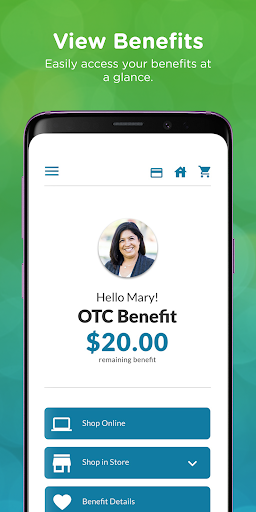
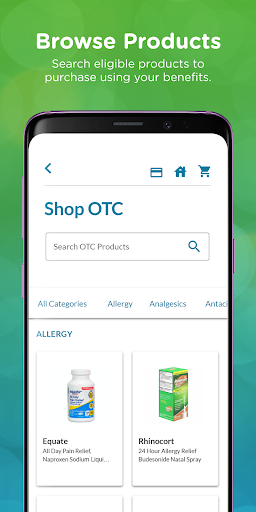
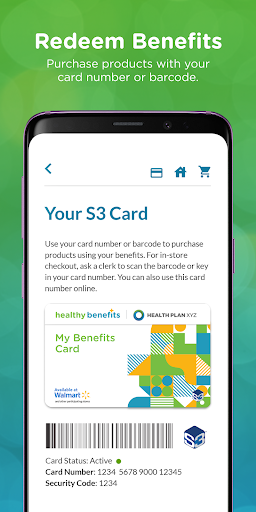
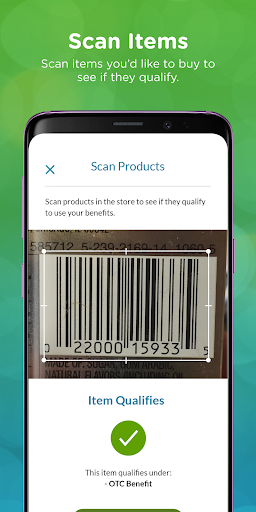
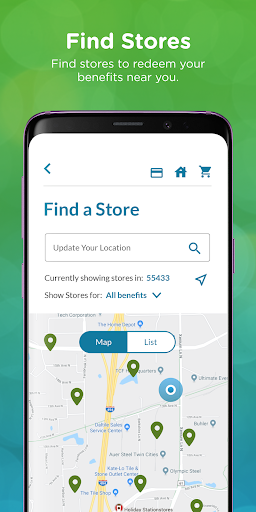
Healthy Benefits+ is one of those apps that is easy to underestimate until you actually need it in a store aisle. On paper, it sounds very simple: log in, check your benefit balance, browse eligible products, and redeem with a barcode or card number. In practice, the app lives or dies on whether it saves you from the most frustrating part of benefit shopping: getting to the register and finding out something you picked is not covered. After spending time with it, that is exactly where Healthy Benefits+ is at its best. The strongest part of the experience is the app’s practical, everyday usefulness. I found myself opening it for three reasons more than anything else: checking the current balance, scanning or browsing products to see what qualifies, and pulling up the barcode when I didn’t want to dig around for a physical card. Those are not glamorous features, but they are the right features. When an app is tied to essential purchases, convenience matters more than flashy design, and Healthy Benefits+ generally understands that. The balance view is especially important because it reduces guesswork. Instead of treating your benefit like a mystery amount that you only discover at checkout, the app gives you a quick read on what is available. That sounds basic, but it changes how you shop. It makes it much easier to plan a trip, decide whether to split purchases, and avoid the awkward moment where you have to pay out of pocket unexpectedly. The second big win is item discovery. Browsing qualifying products is helpful, but the real standout is the in-store scanning use case. This is where the app feels less like an account portal and more like a shopping tool. If you are standing in Walmart or another participating retailer trying to figure out whether a product is eligible, having an app that can help answer that question before checkout is a real quality-of-life upgrade. It turns a potentially stressful trip into something more manageable. Even when I wasn’t actively scanning, just having the option changed how confident the shopping experience felt. The third strength is that the app does a decent job of consolidating benefit tasks in one place. Transaction history, account details, shopping options, and the redemption barcode are all useful to have under one roof. For eligible members, that all-in-one convenience is the app’s core appeal. It is not trying to be a wellness app, a telehealth app, or a giant healthcare dashboard. It is focused on access and redemption, and that narrower focus mostly works in its favor. That said, Healthy Benefits+ is not polished enough to feel completely dependable all the time. My biggest hesitation with recommending it without reservation is that parts of the experience still feel fragile. The app can be smooth one day and irritating the next. Login reliability appears better than it once was, and biometric sign-in helps make repeat access faster, but there are still enough signs of occasional sign-in friction that I never felt comfortable calling it bulletproof. For an app tied to benefits, any authentication stumble feels bigger than it would in a casual shopping app. I also ran into the kind of loading behavior that makes utility-style apps feel more brittle than modern. Certain features can hang or take longer than they should, and that matters because these are often moments when you are trying to complete a task quickly. If you are checking out, comparing products in a store, or trying to handle a payment-related task, “just wait a bit” is not a satisfying answer. The app is best when it is quick and direct; it is noticeably more annoying when it stalls. The overall design is functional rather than elegant, which is fine, but it does mean Healthy Benefits+ rarely feels especially refined. Navigation is straightforward enough, yet the app gives off more of a utility portal vibe than a thoughtfully crafted mobile product. That is not a deal-breaker, but it contributes to the sense that you are using a necessary tool rather than a genuinely polished app. In a category like this, dependability can compensate for plain design, but when glitches creep in, the lack of polish becomes harder to ignore. Who is this app for? It is for eligible members who want a practical way to manage sponsored benefits on the go, especially those who shop in-store and want to verify products before reaching the register. It is also useful for anyone who tends to forget the physical card and would rather keep everything accessible on their phone. If your main needs are balance checks, product eligibility, and quick redemption, this app is worth having. Who is it not for? It is not for anyone expecting a universally available health shopping app, since registration depends on being part of an eligible sponsored program. It is also not ideal for users who get frustrated quickly with intermittent app issues. If you need absolute reliability every single time, Healthy Benefits+ may still test your patience more than it should. My overall impression is that Healthy Benefits+ succeeds where it most needs to: reducing confusion around benefit shopping. When it works well, it feels genuinely helpful and can save both money and hassle. But it also carries enough rough edges that I would call it useful before I would call it excellent. For eligible members, it is easy to recommend as a practical tool to keep installed. Just go in expecting convenience, not perfection.
Alternative apps