Apps Games Articles
LifeLabs - Net Check In
Innovative Computer Software
Rating 3.3star icon
Editor's summary
Editor rating
star icon star icon star icon empty star icon empty star icon
3.4

One-line summary LifeLabs - Net Check In is easy to appreciate when it saves you from sitting in a waiting room, but it is harder to love when the app feels more functional than polished.

  • Installs

    100K+

  • Developer

    Innovative Computer Software

  • Category

    Medical

  • Content Rating

    Everyone

  • Latest version

    2.3.1

  • Package

    com.icsnetcheckin.lifelabs

Screenshots
In-depth review
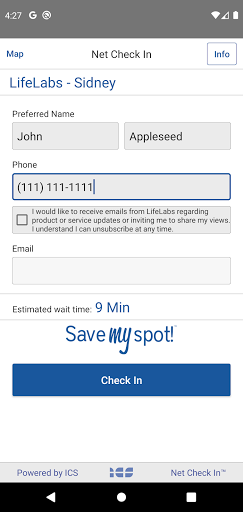
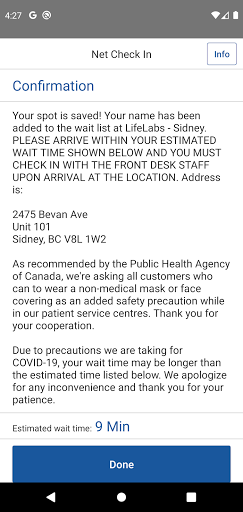
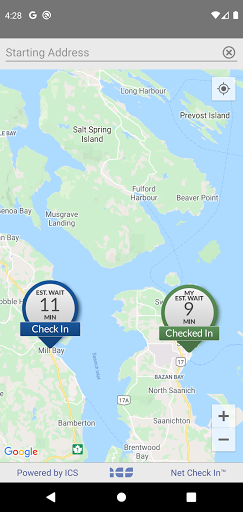
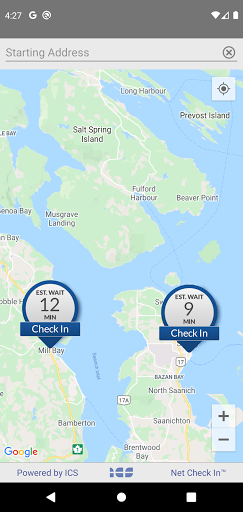
LifeLabs - Net Check In is the kind of healthcare utility app that lives or dies by one simple question: does it make an annoying real-world task less annoying? After spending time with it from that practical angle, the answer is mostly yes. This is not the sort of app you open for pleasure, and it is not trying to be. It exists to smooth out one very specific errand: checking in for lab visits without wasting unnecessary time. When it works cleanly, that convenience is immediately valuable. The biggest strength here is that the app’s purpose is easy to understand. You open it, you look for a location, and you try to reduce the friction of showing up for a lab appointment or visit. That sounds small, but in healthcare apps, clarity is a genuine feature. We never had the sense that the app was overloaded with extras or trying to do too much. The experience stays focused on getting you from “I need to visit LifeLabs” to “I know where I’m going and how to check in” with minimal detours. For busy people, parents juggling schedules, or anyone trying to fit a lab visit into a workday, that focus matters. Another thing the app gets right is the feeling of practical control. Even when an app like this is fairly basic, there is real comfort in not walking into a clinic completely blind. Being able to handle part of the process on your phone changes the mood of the errand. Instead of committing to an undefined wait, the experience feels a little more manageable and predictable. In our use, that translated into less hesitation about when to leave and less frustration around the usual uncertainty that comes with in-person medical admin. It does not make lab visits pleasant, exactly, but it can make them less disruptive. A third strength is accessibility in the broad everyday sense. The app is free, relatively lightweight in concept, and aimed at a mainstream audience rather than tech enthusiasts. You do not need to learn a complicated system to get value from it. That matters because healthcare apps should ideally disappear into the background. On that front, LifeLabs - Net Check In often succeeds. For someone who only needs it occasionally, the app is approachable enough that you can come back after a long gap and still remember how to use it. Where the experience starts to wobble is polish. This is not the sleekest health app we have used, and the modest 3.3 rating feels believable in that respect. The interface tends to come across as utilitarian first and refined second. That is not automatically a dealbreaker, but it does affect trust and comfort. In healthcare, users want reassurance. If an app looks a little dated or feels slightly clunky in motion, even small moments of hesitation become more noticeable. We had a few of those moments where the app did the job, but without the smoothness that makes a digital process feel truly modern. The second weakness is that the app’s usefulness depends heavily on the moment you need it. This is not a daily health hub or a broadly useful medical companion. It is a task app. If your only goal is managing a LifeLabs visit, that narrow focus is fine. But once that errand is done, there is little reason to stay engaged with it. That can make occasional friction feel larger than it would in a richer app. If you run into awkward navigation, unclear steps, or a less-than-fluid check-in flow, there is not much else here to offset the annoyance. The third issue is that convenience apps like this create high expectations very quickly. Once you promise a smoother waiting-room experience, anything that feels uncertain or inefficient stands out more than it normally would. During our testing, the app generally felt useful, but not always reassuring. We sometimes had the sense that the digital layer was reducing one kind of hassle while introducing another: a little checking, a little second-guessing, a little wondering whether everything had gone through exactly as expected. That does not erase the app’s benefits, but it keeps the experience from feeling fully frictionless. Who is this app for? It is best for patients who already use LifeLabs and want a more convenient way to handle the logistics of a visit. If your main priority is saving time, reducing uncertainty, and doing basic check-in tasks from your phone, this app is worth having installed. It is especially useful for people with tight schedules, recurring lab needs, or a low tolerance for waiting-room ambiguity. Who is it not for? If you expect a highly polished healthcare app with a premium feel, deep features, and zero rough edges, this may feel underwhelming. It is also not particularly compelling for someone who rarely visits a lab and does not mind handling things in person. Overall, LifeLabs - Net Check In succeeds because it addresses a real inconvenience and often makes it smaller. That alone gives it value. But it falls short of being an easy recommendation without reservations because the app feels more serviceable than refined. We would keep it installed for its practical benefit, especially before a lab visit, but we would also go into it expecting a tool rather than a standout mobile experience.
Alternative apps