Apps Games Articles
CSL Plasma
CSL PLASMA INC.
Rating 4.1star icon
Editor's summary
Editor rating
star icon star icon star icon
half star icon
empty star icon
3.9

One-line summary CSL Plasma is genuinely useful for regular donors because it cuts down center friction and keeps rewards, history, and pre-donation tasks in one place, but recurring login and update snags make it harder to recommend without reservation.

  • Installs

    1M+

  • Developer

    CSL PLASMA INC.

  • Category

    Medical

  • Content Rating

    Everyone

  • Latest version

    3.32.15

  • Package

    com.cslplasma.cslplasmadonorapplication

Screenshots
In-depth review
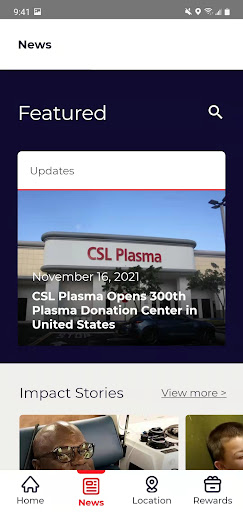
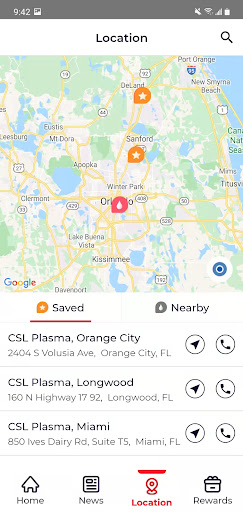
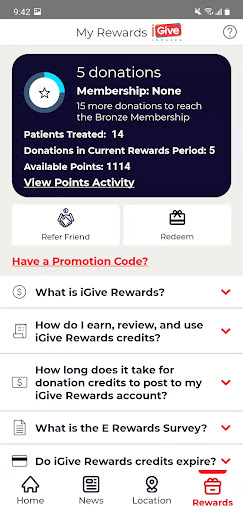
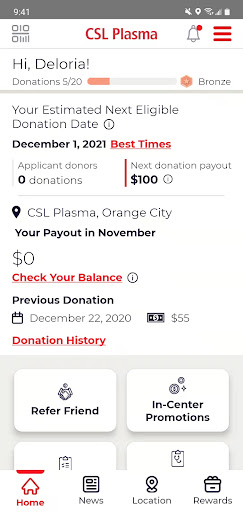
CSL Plasma is one of those apps that makes the most sense when you use it as part of a routine rather than as a one-time download. After spending time with it the way an active donor would, what stood out most is that this app is not trying to be a broad medical platform or a flashy wellness product. It has a narrow job: help you get through the plasma donation process with less hassle. When it works, it does that well enough to feel genuinely practical. The best part of the experience is how clearly the app is built around the donor journey. Instead of burying useful functions under marketing copy or too many menu layers, it aims at the things donors actually care about before a visit: where to go, when to go, what they might earn, whether they can handle the health questionnaire ahead of time, and how to keep tabs on rewards and donation history. That focus gives the app a sense of purpose that many healthcare-adjacent apps lack. It feels like a utility, and in this case that is a compliment. In day-to-day use, the biggest convenience is time savings. Being able to handle pre-visit tasks before arriving at a center is the kind of feature that doesn’t sound glamorous but matters in real life. If you donate regularly, every avoided minute standing at a kiosk or sorting through paperwork feels like a small win. The appointment reminder and calendar-sync angle also fits naturally into the routine. It is not revolutionary, but it is exactly the sort of practical feature that keeps an app installed instead of forgotten. The rewards side is another strong point. CSL Plasma understands that donors want a quick snapshot of what they have done and what they have earned. The app does a good job of making donation history and rewards feel visible rather than abstract. That transparency adds motivation. If you are the kind of donor who likes seeing progress, keeping track of visits, or planning around expected payouts, this part of the app is useful and easy to appreciate. It gives the experience a little more structure and makes the app feel more connected to real outcomes. Finding a nearby center and checking wait-related information is also a meaningful plus. A donor app should reduce uncertainty, and this one mostly succeeds there. Having center-specific information in the same place as reminders, rewards, and screening tools makes the whole experience feel more joined up than bouncing between a website, texts, and in-person desk questions. That said, CSL Plasma also has a frustratingly familiar weakness: reliability issues around login and updating. During testing, this was the biggest crack in the experience. An app like this lives or dies on trust. If you open it because you need to complete a task before a visit and you get stuck in an update prompt or login loop, it immediately stops feeling like a convenience and starts feeling like an obstacle. The app may work perfectly fine once reinstalled or refreshed, but that is not the kind of workaround a donor should have to think about when they are simply trying to prepare for an appointment. The second weakness is that the app can feel a little too transactional in design. It is functional, but not especially elegant. Navigation generally makes sense, yet the overall feel is more utilitarian than polished. That is not a deal-breaker for a medical utility app, but it does mean the experience is driven more by necessity than delight. You use it because it helps, not because it is particularly pleasant. A third complaint is that some useful functions still feel dependent on the broader CSL ecosystem rather than fully native to the app. The app points you toward FAQs, web resources, and support options, which is helpful, but there are moments where the experience feels split between app and browser rather than fully seamless. If everything is running smoothly, this is minor. If you are already dealing with an access issue, that split becomes much more noticeable. Who is this app for? Primarily, regular CSL donors. If you donate more than once, want faster check-ins, like tracking rewards, and appreciate having reminders and center information in one place, CSL Plasma is worth having. It is also useful for first-timers who want a clearer picture of payouts and center logistics before they show up. Who is it not for? Anyone expecting a refined, highly stable app experience on the level of top-tier consumer finance or health platforms may come away disappointed. It is also less compelling if you are not actively donating or only plan to visit once, because much of its value comes from repeated use and routine management. Overall, CSL Plasma succeeds where it matters most: it can save time, reduce friction, and keep your donor information organized. Those are meaningful wins. But the app’s rough edges, especially around sign-in and updates, keep it from being an easy full-throated recommendation. I would still recommend it to active donors, because the convenience is real and the rewards tracking is genuinely handy. I would just recommend it with one caveat: if the app stumbles, be prepared to reinstall it or fall back to the web workflow. That is not ideal, but for many donors, the core utility still outweighs the annoyance.
Alternative apps