Apps Games Articles
Jersey Mike's
Jersey Mike's Subs
Rating 4.8star icon
Editor's summary
Editor rating
star icon star icon star icon star icon
half star icon
4.5

One-line summary Jersey Mike’s is an unusually polished fast-food app that makes repeat ordering and customization genuinely painless, though a few small navigation quirks and store-selection gotchas keep it from perfection.

  • Installs

    5M+

  • Developer

    Jersey Mike's Subs

  • Category

    Food

  • Content Rating

    Everyone

  • Latest version

    2.45.0

  • Package

    com.seattleapplab.jerseymikes

Screenshots
In-depth review
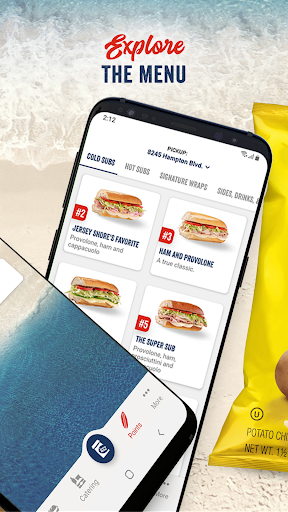
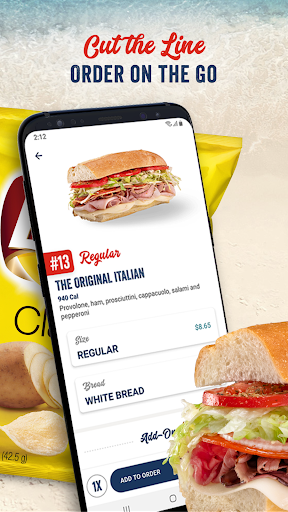
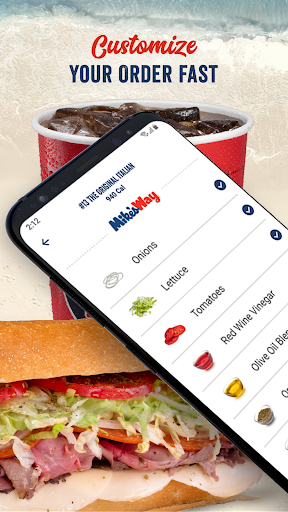
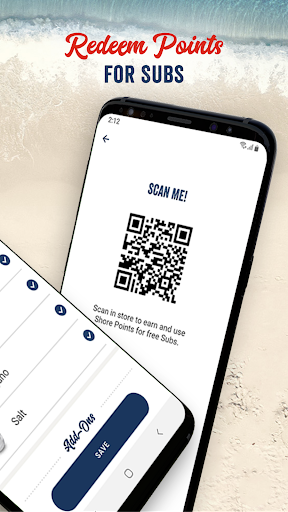
Jersey Mike’s gets something right that a surprising number of restaurant apps still fumble: it respects your time. After spending real time using it for browsing, building custom subs, checking rewards, and placing pickup orders, my biggest takeaway is that this app is built around momentum. You open it, find a store, put together an order, and get out. There are very few moments where it feels like the software is slowing you down, and that alone puts it ahead of a lot of food-ordering apps. The first thing I noticed is how clean and understandable the ordering flow feels. The menu is easy to browse, the visual hierarchy is sensible, and customization does not become a chore. That matters more here than it might in some other food apps, because a sandwich order is rarely just one tap and done. Bread, size, toppings, oils, add-ons, notes, special preferences—there are enough variables that bad design can turn lunch into data entry. Jersey Mike’s mostly avoids that trap. Building a sub feels direct and forgiving, and I appreciated being able to go back and edit items in the cart without feeling like I was starting over. That flexibility is one of the app’s best qualities. If you are the kind of customer who wants a standard sub done exactly the same way every time, the app supports that well. If you are the kind of customer who wants something slightly tweaked—light oil, a swap here, a note there—it handles that too. The ability to add notes is especially useful because it gives the whole experience a more practical, real-world feel. Not every preference fits neatly inside a preset toggle, and Jersey Mike’s seems to understand that. Another feature that stands out in actual use is how well the app handles repeat and group ordering. Saving favorites makes a meaningful difference once you have a usual order, and it turns the app from merely convenient into something you may actually prefer over ordering in person. Reordering can be very fast. I also liked the ability to label individual subs with names. That sounds minor until you are ordering for two, three, or four people and trying to avoid the classic unwrap-and-guess routine at pickup. Small touches like that make the app feel tested by people who actually use it. The rewards integration is also smartly done. Shore Points are not buried under layers of account menus, and the app makes it easy to understand where you stand and when you can redeem. That visibility matters because rewards systems often feel abstract until the moment you can use them. Here, the progression is clear enough that it becomes part of the experience rather than an afterthought. If you order Jersey Mike’s with any regularity, the app gives you a practical reason to keep using it. That said, the app is not flawless, and its weaknesses are the kind you notice more over time than in the first five minutes. The biggest one is that a few features are not always placed where you instinctively expect them to be. Favorites and repeat-order tools are useful once you find them, but parts of the navigation can still feel just a little less obvious than the rest of the experience. This is not a confusing app overall, but there are moments where its polish slips from “effortless” to “slightly hunt-and-peck.” Store selection is another area where I would be careful. The location finder works, and it is useful for discovering nearby stores, but it also demands a little more attention than it should. If you travel or order from multiple locations, it is worth double-checking the selected store before submitting an order. In an app that is otherwise designed to encourage speed, that particular detail can trip you up if you move too fast. The final weakness is less dramatic but still worth mentioning: some order options appear to be more complete than others depending on what you are trying to add. The core sandwich experience is excellent, but there are little signs that the menu system is not always as elegantly exhaustive as it could be. That does not ruin the experience, but it can create occasional friction when you expect every in-store choice to map perfectly to the app. Still, the overall impression is very strong. Performance feels stable, the interface is approachable, and the app is unusually good at the practical details that matter in everyday use: finding a store, customizing food, paying quickly, and getting a clear pickup expectation. I especially liked that the app feels usable by both kinds of customers: the one who wants to build a meticulous custom order, and the one who simply wants to tap a saved favorite and be done in under a minute. This app is for regular Jersey Mike’s customers, busy lunch-orderers, families, and anyone who values skipping the line without losing control over customization. It is also a good fit for people ordering for a group, because the naming and organization features reduce confusion at pickup. It is less ideal for people who dislike account-based rewards systems, rarely eat at the chain, or expect every possible in-store variation to be perfectly represented in the app at all times. In the end, Jersey Mike’s is one of those restaurant apps that does not need to be flashy because it is focused on something better: competence. It makes ordering ahead easy, repeat ordering even easier, and customization smooth enough that you are not tempted to give up and just walk in. It is not perfect, but it is polished where it counts, and that makes it one of the better food-ordering apps on Google Play.
Alternative apps