Apps Games Articles
Arby's Fast Food Sandwiches
Arby's Restaurant Group, Inc.
Rating 4.7star icon
Editor's summary
Editor rating
star icon star icon star icon star icon empty star icon
4.3

One-line summary Arby’s app is easy to recommend if you want a clean, straightforward way to order pickup or delivery, but it’s harder to love if you expect standout deals or much reason to keep opening it between meals.

  • Installs

    1M+

  • Developer

    Arby's Restaurant Group, Inc.

  • Category

    Food

  • Content Rating

    Everyone

  • Latest version

    4.25.9

  • Package

    com.arbys.android.arbysapp

Screenshots
In-depth review
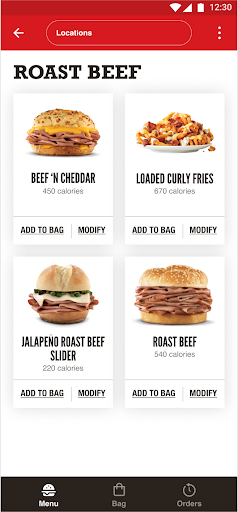
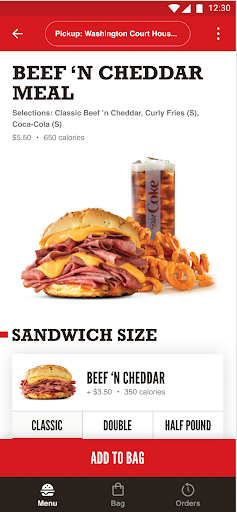
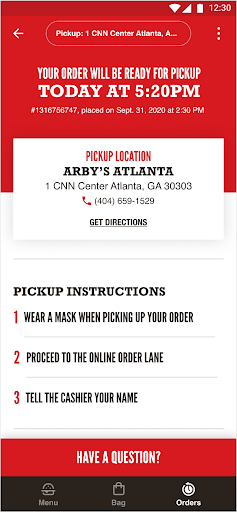
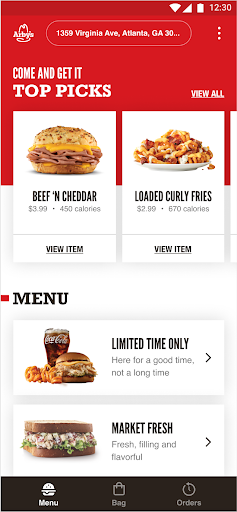
Arby’s Fast Food Sandwiches is the kind of restaurant app that succeeds by doing the core job well: getting you from craving to checkout without much friction. After spending time with it as an ordering app rather than just a digital menu, my impression is that Arby’s has built something practical, mostly polished, and finally useful in the way a fast-food app needs to be useful. It is not trying to reinvent mobile food ordering, and in some ways that is its biggest strength. The first thing that stands out is how approachable the app feels. The menu layout is easy to scan, and that matters more than it sounds. Fast-food apps often collapse under the weight of too many banners, too many reward prompts, and too many clicks before you can actually start building an order. Arby’s keeps the experience comparatively simple. Browsing sandwiches, sides, and other menu categories feels natural, and putting together an order doesn’t require a learning curve. If you already know what you want, the app gets out of your way. If you are still deciding, it is clean enough that browsing doesn’t become a chore. That ease of use carries over into checkout. During my time with the app, the ordering flow felt clear and readable, which is exactly what you want when you are trying to place a quick lunch order or line something up for pickup. Store selection, menu browsing, cart review, and checkout all follow a familiar pattern, and Arby’s generally avoids the clutter that makes some restaurant apps feel more like ad platforms than tools. This is one of the app’s biggest wins: it respects urgency. You open it because you want food, not because you want to dig through a maze. Another plus is that the app now feels meaningfully functional in a way some restaurant apps take too long to achieve. Ordering for pickup or delivery is the headline feature, and it gives the app a real reason to exist. Earlier versions of many restaurant apps can feel like little more than branded brochures, but Arby’s now does what customers expect: it lets you actually place an order. That makes the app much more than a menu browser. If your local participating restaurant supports it, this is a legitimate convenience tool and not just a placeholder on your phone. The app also benefits from generally strong day-to-day usability once you are signed in and moving through a normal order. In regular use, it feels stable enough and intuitive enough to trust for repeat orders. That trust is important. A food-ordering app does not need to be exciting; it needs to be dependable. Arby’s gets closer to dependable than flashy, and for this category, that is a compliment. That said, the app is not without its frustrations, and the biggest one is that it can still feel thin on reasons to come back when you are not actively ordering. If you are hoping for an app that showers you with app-exclusive deals, rotating coupons, or loyalty-driven urgency, Arby’s may underwhelm you. The overall value layer does not feel especially aggressive or exciting. There are deals and account-based benefits in the broader experience, but the app does not consistently create that “I should check the app first” habit the strongest fast-food apps manage to build. A second weakness is that the app’s past account and login flow appears to have had enough rough spots to leave an impression, and even though the current experience feels improved, sign-in reliability is one of those things users never fully forget. In my use, the app was workable and functional, but account access is foundational. If login or verification acts up, even briefly, the whole app starts to feel less dependable than its otherwise straightforward design deserves. It is a lot easier to forgive a missing coupon than a shaky authentication flow. The third issue is more subtle: beyond ordering, there is not a lot of delight here. That may sound unfair for a food app, but it matters. The app is efficient, not especially engaging. If you already like Arby’s and simply want to order roast beef sandwiches, fries, or whatever your usual lineup is, that simplicity is a strength. But if you are looking for a richer loyalty ecosystem, stronger personalization, or more reasons to browse beyond the immediate task, this app can feel a bit utilitarian. So who is this app for? It is for regular Arby’s customers who want a smooth mobile ordering option for pickup or delivery and who value simplicity over gimmicks. It is especially good for people who know what they want and want to place an order quickly without wrestling with a bloated interface. It is also a reasonable install for anyone who occasionally checks for menu updates or wants direct access to ordering without going through a browser. Who is it not for? It is not ideal for bargain hunters who expect constant in-app promotions, and it is not the best fit for users who only keep restaurant apps if they provide strong rewards momentum or lots of exclusive perks. If your only question is “What does this app offer me beyond the website?”, the answer is better than it once was, but still not overwhelmingly compelling unless you actively use mobile ordering. Overall, Arby’s Fast Food Sandwiches is a good fast-food app because it focuses on the basics and mostly gets them right. The menu is easy to navigate, the ordering flow is clean, and the app now has a genuine practical purpose. Its shortcomings are just as clear: limited excitement outside ordering, less-than-stellar incentive value, and some lingering concern around account smoothness. Even so, for the person who wants to order Arby’s from their phone with minimal fuss, this app does the job well enough to earn a recommendation.
Alternative apps