Apps Games Articles
Melon Playground
TwentySeven
Rating 4.6star icon
Editor's summary
Editor rating
star icon star icon star icon star icon empty star icon
4.4

One-line summary Melon Playground is easy to recommend if you want a chaotic sandbox to mess around in for hours, but it is much harder to recommend if you need structure, goals, or a particularly refined interface.

  • Installs

    10M+

  • Developer

    TwentySeven

  • Category

    Simulation

  • Content Rating

    Mature 17+

  • Latest version

    12.2

  • Package

    com.TwentySeven.MelonPlayground

Screenshots
In-depth review
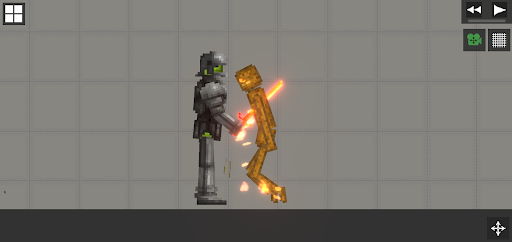
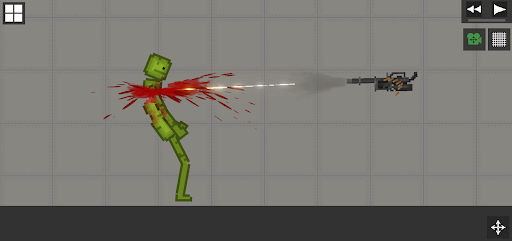
Melon Playground is the kind of app that makes its appeal obvious within minutes: it gives you a toy box, lets you throw things into it, and trusts you to find your own fun. After spending time with it, that freedom is still the biggest reason to install it. This is not a game that tries to guide you with heavy storytelling, strict progression, or a constant stream of objectives. Instead, it leans into open-ended experimentation, and when that clicks, it is genuinely entertaining in a low-pressure, “just one more try” sort of way. What stood out most in regular play was how immediate the app feels. You open it, drop in objects or characters, start interacting with the environment, and the fun begins almost instantly. There is very little ceremony before you are making something ridiculous happen on screen. That makes Melon Playground especially good for short sessions. It works when you have a few spare minutes and just want to poke at systems, but it can also stretch into longer sessions once you start testing ideas and seeing how different setups play out. That pick-up-and-play quality is one of the app’s strongest traits. The second major strength is the sandbox itself. Melon Playground succeeds because it gives players room to be curious. The best moments come from asking simple questions—what happens if I combine this with that, what if I change the setup, what if I push things further than I probably should—and then watching the result unfold. The app does not need a complicated objective system to stay engaging because the experimentation is the point. There is a satisfying sense of cause and effect to the interactions, and that keeps the play loop interesting even when you are technically “doing nothing” beyond tinkering. A third thing it gets right is its broad accessibility. You do not need to be especially skilled, patient, or genre-savvy to understand the appeal. If you like physics-driven chaos, digital toys, or games that let you invent your own scenarios, it is easy to settle into. There is a playful, slightly absurd energy to the whole experience that helps it feel approachable rather than intimidating. Even when you are not building anything especially clever, the app still gives you enough feedback and visual payoff to make casual experimentation enjoyable. That said, Melon Playground is not polished in every way that matters. The biggest weakness, at least from a day-to-day usability standpoint, is that the experience can start to feel repetitive if you are not naturally creative with sandbox games. The app offers freedom, but freedom cuts both ways. If you need clear goals, unlock-driven progression, or a reason to keep moving beyond your own curiosity, you may hit a wall sooner than expected. After the initial novelty wears off, some sessions can feel like you are circling the same kinds of interactions again and again. The interface is another area where the app feels more functional than elegant. It is usable, and after some time with it I got comfortable enough to move around without much friction, but it does not always feel especially streamlined. In a sandbox app, menus and item management matter a lot because they are the bridge between your idea and the action on screen. Here, that bridge works, but not always gracefully. There were moments where getting exactly what I wanted set up felt slower than it should have, which can interrupt the playful rhythm that the app otherwise does well. Performance and general smoothness can also become part of the experience in a not-so-great way, especially in sandbox apps where players naturally want to pile on more objects and interactions. Melon Playground is most enjoyable when it feels responsive and dynamic, but the more chaotic your scene becomes, the more likely it is that the experience starts to feel less tidy. That does not erase the fun, but it does remind you that this is a toy box best enjoyed with some patience. It is not the sort of app I would call sleek. So who is this for? It is for players who enjoy experimentation, emergent chaos, and making their own fun without needing much direction. If you like apps that feel like a digital physics playground, Melon Playground is easy to sink into. It is also a good fit for people who appreciate games that can be funny simply because systems collide in unpredictable ways. Who is it not for? If you prefer tightly designed levels, strong onboarding, mission-based structure, or a more premium sense of refinement, this will probably feel thin after a while. Likewise, if you get bored when a game asks you to bring your own imagination, Melon Playground may seem more like a collection of tools than a compelling game. Overall, I came away impressed by how well Melon Playground delivers on its core promise. It is fun because it understands that messing around can be the feature, not a distraction from it. The app does not always smooth out the rough edges that separate a good sandbox from a truly excellent one, and it can feel aimless if you are not in the right mood for open-ended play. But when you meet it on its own terms, it is hard not to enjoy. For a free app, it offers a lot of room for experimentation, plenty of chaotic entertainment, and a strong “what happens if I do this?” hook that keeps pulling you back.
Alternative apps