Apps Games Articles
Shimeji
Digital Cosmos
Rating 4.7star icon
Editor's summary
Editor rating
star icon star icon star icon star icon
half star icon
4.5

One-line summary Shimeji is one of the most charming customization apps on Android thanks to its lively on-screen pets and surprisingly flexible controls, but you should skip it if you want deep interaction or a huge, easily searchable character library.

  • Installs

    10M+

  • Developer

    Digital Cosmos

  • Category

    Personalization

  • Content Rating

    Everyone

  • Latest version

    5.1

  • Package

    com.digitalcosmos.shimeji

Screenshots
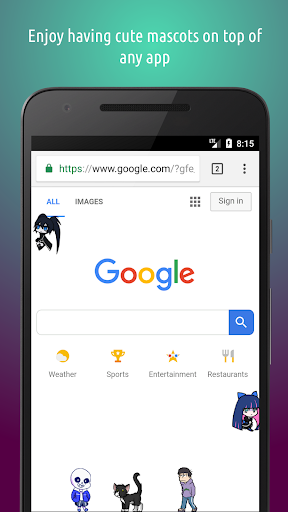
In-depth review
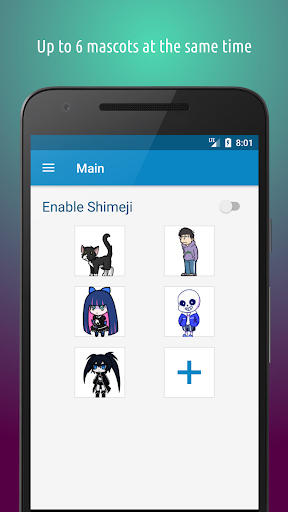
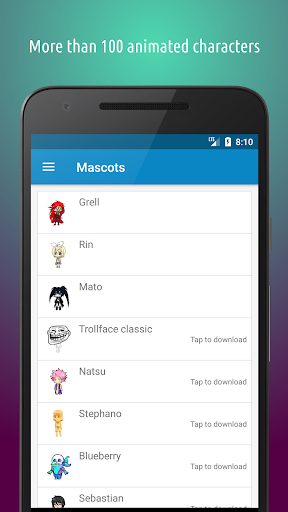
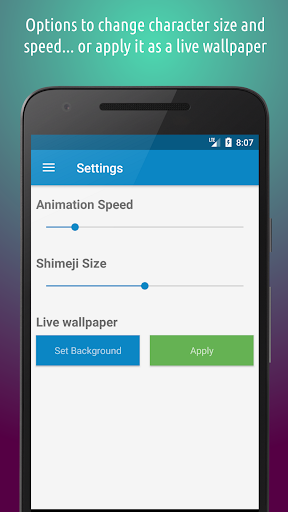
Shimeji is the kind of app that sounds frivolous until you actually live with it for a few days. On paper, animated mascots wandering around on top of your apps feels like pure novelty. In practice, it is still novelty—but very good novelty, delivered with enough polish that it becomes part toy, part decoration, and part mood booster. After spending time with it as an everyday personalization app, the biggest surprise was how quickly the little characters stop feeling like a gimmick and start feeling like ambient company. They climb the edges of the display, tumble around, sit, idle, and generally make your phone feel less sterile. There is something inherently fun about unlocking your screen and seeing a tiny animated buddy already halfway through some pointless acrobatic routine over your messaging app or browser. Shimeji understands that its main job is not productivity or utility; it is delight. And for long stretches, it nails that brief. The first strength is simply the quality of the core effect. The animation style is expressive enough to feel alive without becoming overwhelming, and the app gives you enough control over size, speed, and behavior that you can tune the experience to your tolerance level. On a smaller screen, shrinking the characters a bit helps them feel playful instead of intrusive. Slowing them down can make them blend into the background more naturally, while speeding them up makes the whole thing feel more chaotic in a way some people will absolutely love. That flexibility matters, because an app like this lives or dies on whether it can adapt to the user rather than forcing one fixed version of cuteness. The second strength is that Shimeji is easier to live with than many overlay-based apps. A persistent concern with this category is that it will interfere with taps, typing, or general navigation. Here, the app does a respectable job of giving you quick ways to manage that. Ghost Mode is especially useful because it lets the mascots remain visible without constantly hijacking touches. During messaging, gaming, or any app where precision matters, that option makes the difference between “fun companion” and “please get off my screen.” There is also a pleasing sense that the app wants to be controlled casually rather than micromanaged. You can turn it on, ignore it for a while, and call it back when you want a bit of visual personality. The third strength is the creative side. The built-in editor and the ability to customize or import your own mascots give Shimeji more longevity than a simple sticker-like app. Even if you start with the default library, the app nudges you toward making the experience your own. That opens it up not just to anime and character fans, but also to artists, tinkerers, and anyone who likes the idea of building a personalized screen pet. It is one thing to choose a mascot; it is another to shape it. That said, Shimeji is not flawless, and its weaknesses become clearer the more often you use it. The biggest recurring issue is that the character library can feel awkward to browse. There is personality in the selection, but organization does not always keep up with the growing number of mascots. When you want something specific, the process can feel more like rummaging than selecting. A stronger search system, favorites management, or better sorting would make a noticeable difference. For an app built around collecting and choosing characters, discovery should feel effortless; right now, it is merely serviceable. The second weakness is that the interaction model is charming but shallow. You can tap, drag, toss, and watch the characters react, and that is entertaining for a while. But after the first wave of delight, you start to notice the limits. These are screen buddies, not virtual pets in the deeper simulation sense. They do not offer much in the way of meaningful progression beyond the light idle-style systems and unlocks. If you come in hoping for rich behavior, intricate character interactions, or the more elaborate antics associated with older desktop-pet memories, the mobile version can feel constrained. The third drawback is simple: no matter how well implemented, floating mascots are still floating mascots. They can get in the way. Even with touch settings and temporary hiding options, there are moments when you will disable them because they are one layer of visual noise too many. That does not make the app bad; it just defines its ceiling. Shimeji works best in bursts or as light decoration, not as something every user will want active all day. If your ideal phone experience is clean, minimal, and distraction-free, this app will wear out its welcome quickly. I also found the progression and unlock structure mostly fair in spirit, but it still nudges you to decide how invested you really are. The app is generous enough to be enjoyable for free, yet some users will bump into limits around how many characters they want active or how quickly they want to unlock extras. Fortunately, it does not feel aggressively hostile in use, which is crucial for an app in this category. So who is Shimeji for? It is for people who genuinely enjoy playful customization, animated companions, fandom-adjacent collecting, or turning a phone into something more expressive than a plain slab of icons. It is especially good for younger users, anime and chibi-art fans, and anyone who misses the weird joy of desktop pets. It is also a surprisingly nice fit for artists who want to experiment with custom creations. Who is it not for? Minimalists, productivity purists, and anyone who gets irritated by overlays should keep walking. If you want functional personalization like widgets, automation, or information density, Shimeji is solving a different problem entirely. In the end, that is why Shimeji works. It never pretends to be essential. It is a small, cheerful layer of nonsense for your screen, polished enough to be lovable and controlled enough to avoid becoming a complete nuisance. It could use better browsing, deeper interactivity, and a broader sense of discovery, but as a screen-buddy app, it is easy to recommend. Few apps in this niche feel this cute, this configurable, and this easy to keep around.