Apps Games Articles
Uber Eats: Food and Grocery
Uber Technologies, Inc.
Rating 4.6star icon
Editor's summary
Editor rating
star icon star icon star icon star icon
half star icon
4.5

One-line summary Uber Eats is easy to recommend for its broad selection and polished tracking, but the convenience starts to feel expensive once delivery fees, service charges, and subscription nudges pile up.

  • Installs

    100M+

  • Developer

    Uber Technologies, Inc.

  • Category

    Food

  • Content Rating

    Everyone

  • Latest version

    6.313.10001

  • Package

    com.ubercab.eats

Screenshots
In-depth review
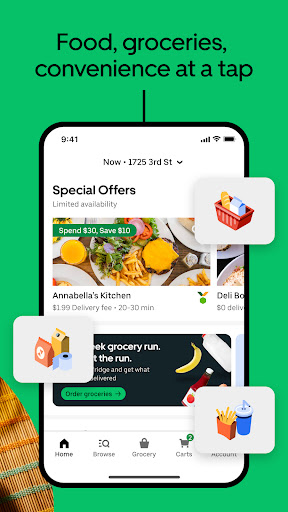
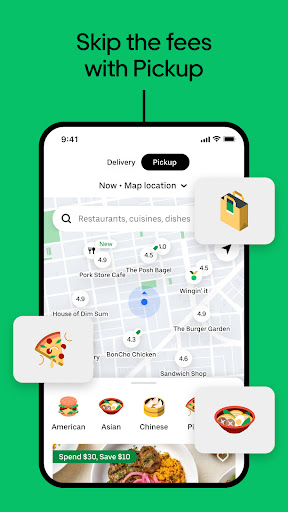
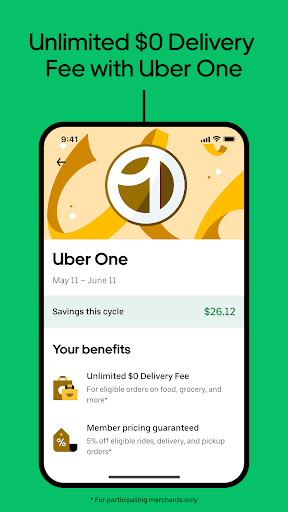
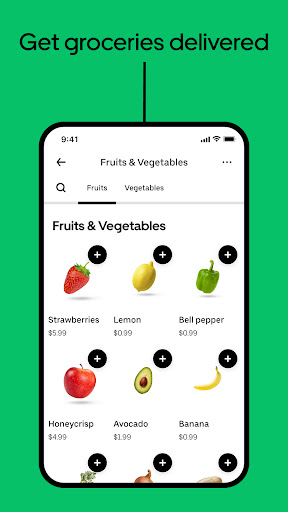
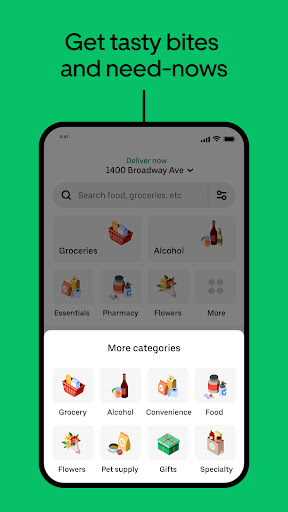
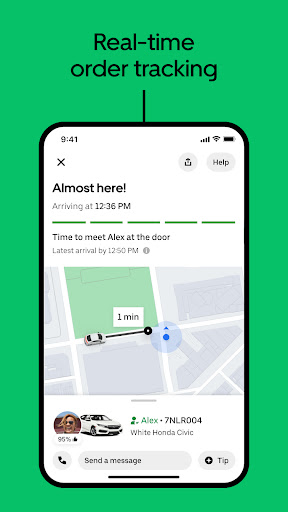
Uber Eats: Food and Grocery feels like one of those apps that has grown far beyond its original job. What started as a straightforward food delivery tool now tries to be a general-purpose local shopping app, and after spending time with it, that expansion mostly works in its favor. The app is at its best when you just want something handled quickly: dinner from a familiar chain, a few grocery staples, or a last-minute convenience store run without leaving the couch. The first thing that stands out in daily use is how polished the browsing experience feels. Finding a restaurant is usually fast, and the search is practical rather than flashy. You can look by cuisine, restaurant name, or the specific kind of meal you want, and that matters more than it sounds. In real use, people rarely browse in a leisurely way; they open the app hungry, tired, or in a hurry. Uber Eats understands that mood. Menus are easy to scroll through, items are simple to add to the cart, and the path from opening the app to placing an order is generally short and friction-free. That smoothness is one of its biggest strengths. The second major advantage is the sheer range. This app is not limited to takeout cravings. On the same platform, you can order burgers one day, pharmacy basics the next, and groceries when the fridge looks bleak. That flexibility makes Uber Eats feel less like a single-purpose app and more like an everyday utility. If you live in an area with strong merchant coverage, it becomes genuinely convenient to use one app for restaurant meals, pickup orders, and household essentials. The breadth of participating national brands and local options also makes it easier to find something familiar, which is especially useful when you do not want to gamble on an unknown restaurant. Its third clear strength is tracking. Uber Eats has long treated real-time order tracking as a central part of the experience, and it still matters. Watching the route on a map, checking the estimated arrival time, and getting notified as the order approaches removes a lot of the uncertainty that makes delivery frustrating. This is particularly helpful for grocery or pharmacy orders, where timing can matter more than it does for a late-night snack. The app gives a reassuring sense that the process is moving, and that transparency goes a long way. That said, Uber Eats is not hard to like, but it is easy to find annoying in small, recurring ways. The biggest issue is cost visibility versus final cost reality. The app itself is easy to use, but the total bill can climb quickly once fees are added. Uber One may soften that if you order often enough, but the app definitely nudges you toward the subscription, and if you are only an occasional user, that can feel like being steered toward a solution for a problem the app helped create. The convenience is real; so is the sense that every tap comes with an upsell attached. Another weakness is that abundance can turn into clutter. Uber Eats offers restaurants, groceries, convenience items, retail goods, pickup, delivery, scheduled orders, deals, memberships, and promotions all in one place. On one hand, that makes it powerful. On the other, it can make the home experience feel a little too busy. If you know what you want, this is manageable. If you are browsing casually, the app can feel crowded with options, banners, and reasons to spend more. It is polished clutter, but still clutter. The third frustration is consistency. Not with the app’s design, which is generally solid, but with the overall experience from order to order. Because Uber Eats sits between you and a large network of restaurants and stores, quality can vary depending on the merchant and the order type. Pickup tends to be more predictable because you control the final handoff. Delivery, especially for groceries or more complex orders, can feel less uniform. The app does a good job organizing the transaction, but it cannot fully smooth over every variable in food prep, item availability, or handoff timing. In actual day-to-day use, I found Uber Eats strongest when I treated it as a convenience engine rather than a value app. If the priority is speed, selection, and low-friction ordering, it performs very well. Ordering ahead for pickup is especially nice when you want to skip the line without paying full delivery overhead. For delivery, the app is most satisfying when you already know the restaurant or store you trust and simply want a reliable way to place and track the order. Who is this app for? It is ideal for busy people who order in regularly, want access to both meals and groceries, and appreciate being able to handle everything in one polished app. It also makes sense for anyone who values order tracking and easy pickup options. Who is it not for? If you are highly price-sensitive, dislike memberships, or get irritated by promotional nudges and layered fees, Uber Eats can wear on you quickly. And if you prefer a simpler, more focused app experience, its all-in-one approach may feel a bit overbuilt. Overall, Uber Eats: Food and Grocery is one of the most complete delivery apps on Android, and it earns that reputation through convenience, breadth, and a slick core experience. It makes ordering food and essentials feel easy, sometimes impressively so. But it also reminds you, often, that convenience is rarely the cheapest option. If you go in with that understanding, it is a strong app and an easy one to keep installed.