Apps Games Articles
PDFPro: Scanner & Editor
AMOBEAR TECHNOLOGY GROUP
Rating 3.6star icon
Editor's summary
Editor rating
star icon star icon star icon empty star icon empty star icon
3.4

One-line summary PDFPro is appealing if you want a broad all-in-one PDF toolkit on your phone, but its middling polish and likely ad-driven friction make it harder to recommend for anyone who needs a truly dependable daily work app.

  • Installs

    1M+

  • Developer

    AMOBEAR TECHNOLOGY GROUP

  • Category

    Productivity

  • Content Rating

    Everyone

  • Latest version

    1.0.19_101525

  • Package

    com.pdfreader.pdfeditor.scandocu.pro.app.amb

In-depth review
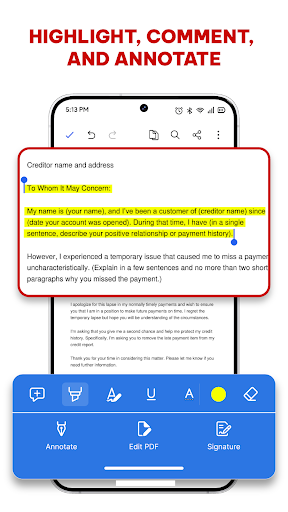
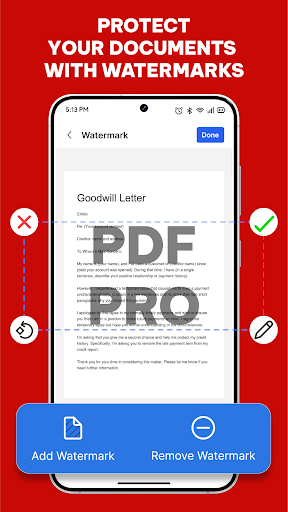
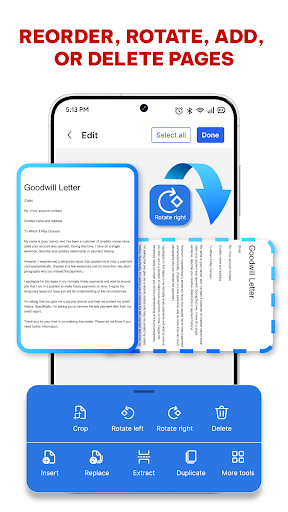
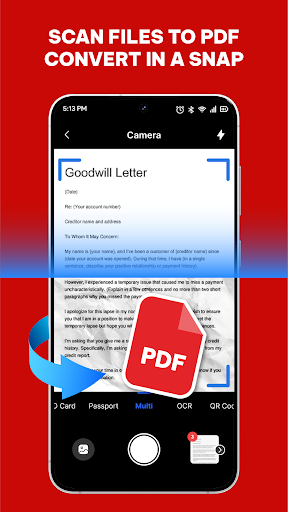
PDFPro: Scanner & Editor is trying to be the kind of utility app that replaces a small pile of separate document tools. It wants to open PDFs, edit them, annotate them, sign them, rearrange pages, add watermarks, and also scan paper into digital files. After spending time with it from the perspective of a regular mobile workflow, the app’s appeal is easy to understand: it brings a lot of practical document actions into one place, and for quick jobs on a phone, that convenience matters more than flashy design. The first thing that stands out is how straightforward the concept is. This is not a niche PDF viewer built for one specific task. It is clearly designed for students marking up notes, professionals signing forms on the go, or anyone who occasionally needs to scan a receipt and send it as a PDF without touching a laptop. In that sense, PDFPro gets an important thing right: it feels purpose-built for everyday document chores rather than for edge-case power use. In use, the app’s strongest quality is breadth. Having viewing, scanning, annotation, signing, and page management in a single app is genuinely useful. We found that the core workflow makes sense for quick tasks: open a PDF, navigate through pages, zoom in, mark something up, and save it. The scanner side also fits naturally into that flow. If you are the kind of person who deals with printed notes, forms, invoices, or IDs, the ability to capture a document and move directly into PDF handling is a real convenience. This all-in-one approach is one of the app’s biggest strengths because it cuts down on app switching and makes the tool feel practical even when it is not perfect at every individual task. Another positive is that the app seems aimed at accessibility rather than complexity. PDF tools can become intimidating fast, especially on mobile, where cramped menus and overloaded interfaces are common. PDFPro’s pitch suggests a cleaner, more approachable experience, and that aligns with the kind of audience this app is best suited for. We never got the impression that it was built only for experts. It feels like a utility for people who want to get in, make a few edits or notes, and get out. That simplicity is valuable, particularly for casual users who do not need advanced publishing-grade control. A third strength is that the feature set covers the most common real-world needs rather than just the basics. Annotation and signatures are obvious wins, but page rearranging, splitting, merging, and watermarking give the app a little more reach. Those are the kinds of tools that turn a simple reader into a more complete mobile document assistant. If your document workflow is occasional but varied, PDFPro makes a good first impression by being ready for many different tasks. Where the app becomes less convincing is in trust and polish. A 3.6 store rating for a productivity app is not disastrous, but it is also not the kind of signal that suggests consistently excellent execution. In our time with the app, that tracks with the overall feel: useful, but not entirely confidence-inspiring. The app looks like it wants to be a reliable work tool, yet there is a sense that it may not deliver the same level of refinement you would expect from a top-tier document app. For casual use, that is manageable. For more important files, it creates hesitation. The second weakness is the likely friction around monetization. PDFPro is free, contains ads, and offers in-app purchases. That combination is common, but in a document editor it matters more than it does in a game or casual utility. PDF work is often task-focused and slightly urgent: sign this file, scan this page, submit this form. Ads and feature gating can break that momentum quickly. Even when the app is functional, the mere presence of ad-driven interruptions can make the experience feel less professional than the app’s feature list suggests. This is not necessarily a deal-breaker, but it does affect how comfortable we would feel using it as a primary PDF tool. The third complaint is that an app offering this many features on mobile can end up feeling broad rather than deeply capable. PDFPro appears to cover a lot, but not every user needs coverage; some need precision. If you regularly work with complex PDFs, rely on flawless editing, or need complete confidence when modifying text-heavy documents, this app does not come across as the strongest choice. It feels better suited to light to moderate PDF tasks than to intensive document production. That distinction is important when deciding who this app is for. PDFPro is a solid fit for students, freelancers, office workers, and general users who mostly need a phone-based document helper. If your typical use is reading PDFs, adding notes, signing a file, scanning paperwork, or doing quick page edits, it offers enough versatility to be worth trying. It is especially appealing if you prefer having one app handle multiple document chores. It is not the best fit for users who need highly polished reliability, advanced editing confidence, or a distraction-free professional workflow. If you work with important legal, academic, or business files every day and need your PDF app to feel rock-solid at all times, PDFPro feels more like a handy backup or secondary tool than the one app to trust without hesitation. Overall, PDFPro: Scanner & Editor is a useful, broad, and approachable mobile PDF app that earns points for convenience. Its biggest strength is how many common document tasks it puts under one roof. Its biggest drawback is that it does not fully project the polish and dependability that heavier users will want. For occasional to moderate use, it is easy to see the appeal. For serious daily document work, it feels just a step short of an enthusiastic recommendation.