Apps Games Articles
Xfinity
Comcast
Rating 3.8star icon
Editor's summary
Editor rating
star icon star icon star icon star icon empty star icon
4.2

One-line summary Xfinity is one of the better carrier utility apps because it puts billing, Wi‑Fi controls, diagnostics, and support in one genuinely useful place, but it’s still easiest to love if you’re already deep in the Xfinity ecosystem.

  • Installs

    10M+

  • Developer

    Comcast

  • Category

    Productivity

  • Content Rating

    Everyone

  • Latest version

    5.71.1-2

  • Package

    com.xfinity.digitalhome

Screenshots
In-depth review
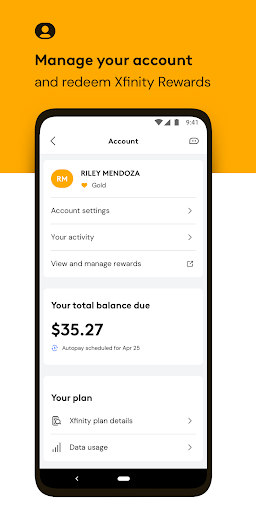
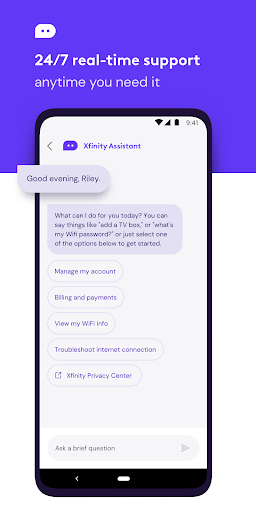
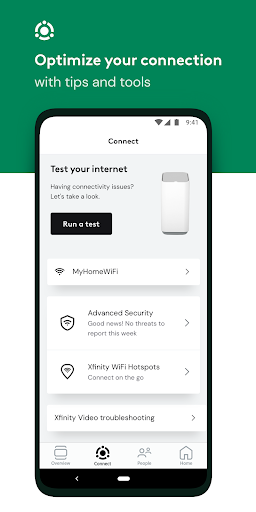
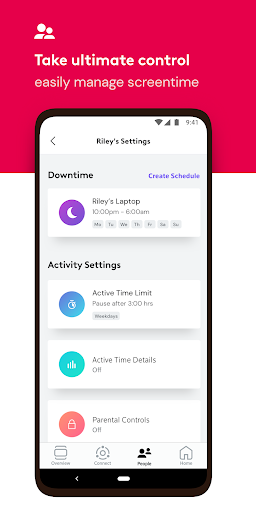
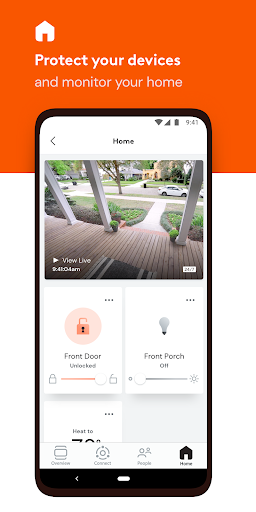
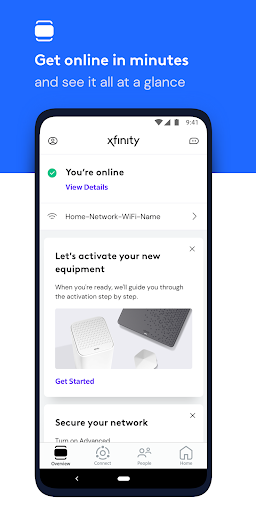
Xfinity is the kind of app most people download out of necessity and keep around because it turns out to be more useful than expected. After spending time with it as an everyday account-management and home internet companion, my main takeaway is simple: this is not a flashy app, but it is a practical one. When it works the way it’s supposed to, it saves time, reduces friction, and gives you a level of control over your home network that many provider apps still struggle to deliver cleanly. The best thing about Xfinity is that it brings together the parts of the service people actually need. Billing, plan details, equipment setup, internet diagnostics, support, Wi‑Fi settings, device management, and security tools all live under the same roof. In day-to-day use, that matters more than any redesign or marketing language. If your internet starts acting up, you can jump into the app, run through troubleshooting, check your equipment, and often get to a sensible next step without digging through a website or waiting on hold. That convenience is the app’s strongest selling point. In practice, the app feels most valuable when you’re using rented Xfinity equipment and want more control over your home network. The device management tools are genuinely handy. Being able to see connected devices, organize them, and manage aspects of access makes the app feel more substantial than a simple billing portal. If you have a house full of phones, laptops, TVs, game consoles, and smart home gear, this becomes especially useful. It gives you a clearer picture of what is actually on your network, and that visibility is one of the app’s biggest strengths. Another thing Xfinity gets right is the self-service experience. I tested it with the mindset of someone who does not want to call support unless absolutely necessary, and the app is clearly designed for that kind of user. Running diagnostics and resetting things from the app is straightforward, and the flow generally keeps you moving instead of burying you in jargon. This is where the app feels more polished than many telecom utilities: it understands that the average person wants reassurance, not a networking lecture. For common issues, that approach works. The app also deserves credit for making sensitive household functions feel accessible. Password access, profile assignment, parental-style controls, and security-related features are presented in a way that doesn’t require advanced technical knowledge. You don’t need to read labels off the back of hardware every time you need basic information. That reduction in hassle is a real quality-of-life win. For families or less technical users, this alone can justify keeping the app installed. That said, the app is not without friction. Its first weakness is that it can feel a little too tied to the broader Xfinity service structure. If you are already an Xfinity customer with compatible equipment, the app makes sense quickly. If you are not fully inside that environment, or if you expect a universally flexible network tool, the experience is less compelling. This is a utility built to serve an account relationship first and a broader tech audience second. The second weakness is that there is a lot going on. Xfinity tries to be account center, support hub, network controller, rewards portal, and security dashboard all at once. The upside is convenience; the downside is occasional clutter. Some sections feel more essential than others, and the app can come across as busy when all you want to do is complete one simple task. It’s not unusable, but it does sometimes remind you that large service-provider apps tend to accumulate features faster than they simplify them. The third weakness is that support-by-app still won’t satisfy everyone. Xfinity clearly wants the app to be the front door for getting help, and while that works well for diagnostics and routine fixes, it can feel impersonal if you are the kind of customer who prefers speaking to a human right away. The tools are effective, but the experience leans heavily toward guided self-service. Some people will see that as efficient; others will see it as one more layer between them and an actual person. Visually, the app is competent more than memorable. It is readable, mostly intuitive, and designed around tasks rather than aesthetics. I wouldn’t call it elegant, but I also rarely felt lost. Important actions are usually where you expect them to be, and the overall navigation makes sense after a short adjustment period. That may sound like faint praise, but in this category, not being confusing is a significant achievement. Who is Xfinity for? It is for current Xfinity customers who want one control panel for their account and home internet setup, especially households using Xfinity equipment and anyone who values quick troubleshooting over phone support. It is also a good fit for families who want easier oversight of devices and Wi‑Fi access. Who is it not for? People outside the Xfinity ecosystem, users who want a clean minimalist utility with no extra service layers, and anyone who strongly prefers traditional customer support over app-based problem solving. Overall, I came away more positive than skeptical. Xfinity is not the rare telecom app you install for fun, but it is one of the few you may actually keep using. It delivers real convenience in the moments that matter most: when your internet is unstable, when you need account info fast, or when you want better visibility into your home network. It has some bloat, and it occasionally feels like a gateway to the company rather than just a tool for the customer. Even so, it succeeds where it counts. For existing Xfinity users, especially those with rented equipment, this is a genuinely useful app and a worthwhile part of the service experience.
Alternative apps