Apps Games Articles
Cleaner Launcher for Android
Putul Host IT Dev
Rating 3.4star icon
Editor's summary
Editor rating
star icon star icon star icon empty star icon empty star icon
3.2

One-line summary Cleaner Launcher for Android is easy to pick up and genuinely handy for quick cleanup and simple home-screen use, but the middling polish and ad-supported feel make it hard to recommend over more refined launchers or cleaner tools.

  • Installs

    500K+

  • Developer

    Putul Host IT Dev

  • Category

    Tools

  • Content Rating

    Everyone

  • Latest version

    1.0

  • Package

    com.clean.forandroid.vidawe

Screenshots
In-depth review
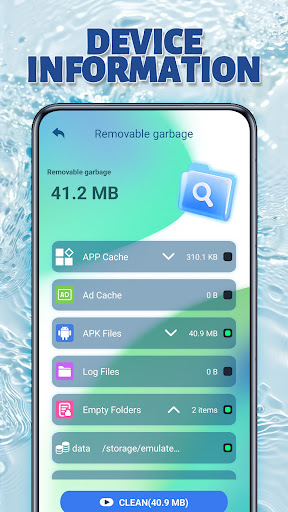
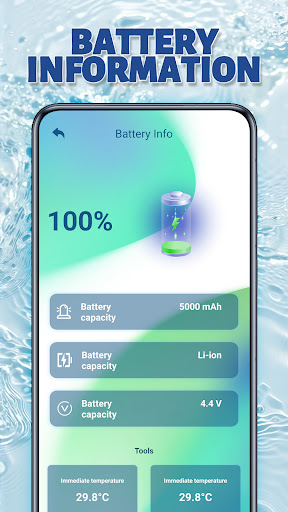
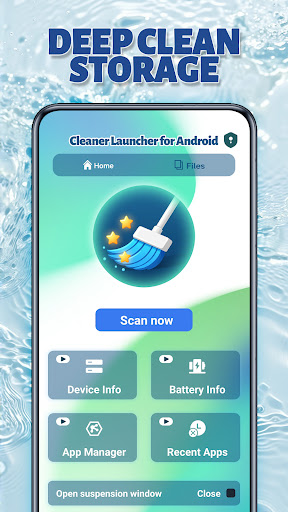
Cleaner Launcher for Android is trying to do two jobs at once: it wants to be your launcher and your lightweight phone-cleaning assistant. After spending time with it, that split identity is both the app’s biggest appeal and its biggest limitation. On first launch, the app makes a decent impression. The interface is straightforward, the overall layout is easy to understand, and it doesn’t overwhelm you with a maze of settings right away. That matters, because apps in this category often confuse basic users by mixing utility tools, shortcuts, and aggressive prompts into a cluttered dashboard. Cleaner Launcher for Android keeps things simpler than that. If you hand this to someone who just wants a cleaner-looking phone and a one-tap way to deal with junk files, they will probably understand it almost immediately. That ease of use is one of its strongest qualities. The launcher side feels intentionally minimal, with a familiar app-drawer approach and room for widgets and commonly used apps. In day-to-day use, that makes the experience approachable rather than intimidating. I never felt like I needed to learn a new system. For users who dislike feature-heavy launchers and just want a plain setup with a few practical extras, there is something appealing here. The cleaning side is also reasonably convenient. The app presents itself as a quick way to scan for junk files, cached data, and redundant storage clutter, and in regular use it does capture that “quick maintenance” feeling well enough. This is not the kind of utility that feels deeply technical or especially advanced, but it does feel like it was designed for people who want a simple tap-and-go cleanup routine. I also liked the inclusion of a storage analyzer, because that kind of feature is often more useful than flashy “boost” claims. Being able to get a better sense of what is taking up space is practical in a way that many cleaning apps are not. A second strength, then, is convenience. Instead of juggling a separate launcher and a separate cleanup app, Cleaner Launcher for Android bundles those ideas together in one place. That won’t matter to everyone, but for less demanding users it can make the phone feel a bit more organized. There is a clear appeal in opening one app and getting both a simplified front end and some maintenance tools. The third thing I appreciated is that the app feels lightweight in spirit. Even though it is doing more than one job, it does not present itself like an overly technical utility suite. The design language is plain and accessible. That gives the app a broad, low-friction feel, and it explains why some users are immediately positive about it: the experience is fast to grasp, and the good parts are visible within minutes. That said, the app never quite rises above “useful enough.” The first weakness is polish. While the app is easy to navigate, it does not feel especially refined or premium in the way the best launchers do. The visual presentation is functional rather than elegant, and the overall experience lacks the smooth, cohesive personality that makes a launcher enjoyable after the novelty wears off. For a tool you potentially see every day on your phone, that matters. The second drawback is the hybrid concept itself. Combining a launcher with a cleaner is interesting, but it also means neither side feels best-in-class. If you mainly care about launcher customization, this app feels limited. If you mainly care about cleaning and file management, it feels more basic than a dedicated storage tool. I kept coming back to the sense that the app is most comfortable in the middle ground: fine for casual users, less convincing for enthusiasts. That middle-ground positioning is not inherently bad, but it does make the recommendation narrower. The third weakness is the ad-supported atmosphere. Since the Play listing indicates ads, that part of the experience can’t be ignored when evaluating a utility app like this. In this category, ads can quickly make quick tasks feel less quick, and even when they are not constant, their presence affects the overall impression. A cleaner app is supposed to make your phone feel less busy; ads naturally push in the opposite direction. That tension undercuts the app’s promise a bit. So who is this for? Cleaner Launcher for Android is best for someone who wants a simple, low-learning-curve Android launcher with a built-in cleaning utility and does not need deep customization or advanced file tools. It suits casual users, older users, or anyone who values clarity over features. It is also a reasonable pick for someone who likes the idea of having a lightweight home-screen replacement tied to basic phone maintenance. Who is it not for? It is not for power users who obsess over launcher flexibility, visual polish, gesture control, or extensive customization. It is also not ideal for users who are skeptical of cleaner apps in general or who are easily annoyed by advertising in system-utility-style apps. In the end, Cleaner Launcher for Android is serviceable, accessible, and occasionally genuinely handy. I can see why someone would call it good, fast, or even awesome after a short trial, because its best traits show up quickly: it is easy, simple, and useful in obvious ways. But after longer use, its compromises become clearer. It is a decent all-in-one utility launcher, not a standout one. If you want uncomplicated phone tidying paired with a no-fuss launcher, it can do the job. If you want a launcher you will love or a cleaner you will trust as your main maintenance tool, this probably won’t be the app you settle on.