Apps Games Articles
Google Meet
Google LLC
Rating 4.5star icon
Editor's summary
Editor rating
star icon star icon star icon star icon
half star icon
4.5

One-line summary Google Meet is one of the easiest and most dependable ways to make high-quality calls on Android, but its occasional audio quirks and a few missing conveniences keep it from feeling flawless.

  • Installs

    5B+

  • Developer

    Google LLC

  • Category

    Communication

  • Content Rating

    Everyone

  • Latest version

    VARY

  • Package

    com.google.android.apps.tachyon

In-depth review
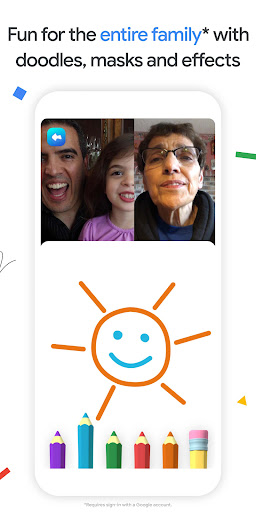
Google Meet has become one of those apps that quietly earns a permanent spot on a phone. After spending real time with it across quick one-to-one calls, longer family chats, and practical join-by-link meetings, I came away with the same overall impression I’ve had with the best communication tools: when it works well, it disappears. That is a compliment. The first thing Meet gets right is how little friction there is between opening the app and actually talking to someone. The interface is clean, familiar, and refreshingly free of clutter. There are no ads fighting for your attention, no obvious upsell traps, and very little ceremony before a call begins. If you live in Google’s ecosystem, the app feels especially natural because it leans into that account-based simplicity. Contacts are easy to reach, links are easy to share, and joining a conversation from a phone or tablet feels straightforward instead of technical. In everyday use, the strongest part of Google Meet is basic call quality. Video generally looks sharp enough to feel modern rather than merely functional, and audio is often clearer than what I get from a standard phone call. On a stable connection, Meet does a very good job of fading into the background and letting the conversation matter more than the software. I used it for casual calls and more purposeful sessions, and in both cases it handled the essentials well: connect quickly, stay stable, and keep voices intelligible. That sounds obvious, but plenty of communication apps still stumble there. Another thing I liked is that Meet scales nicely from personal to practical use. It doesn’t feel locked into one scenario. You can use it for a family catch-up, a school-related conversation, a quick coffee chat, or a lightweight meeting without feeling like you picked the wrong tool. The app has enough polish to serve formal use, but it’s simple enough that less technical people can still navigate it without coaching. That balance is harder to achieve than it looks. I also appreciated that Meet doesn’t feel barebones. Visual extras like backgrounds, reactions, and filters add a bit of personality, and they’re easy to understand. They’re not essential features, but they help the app feel current and flexible rather than stiff. Real-time captions are another genuinely useful touch in practice. Anything that improves clarity in a call, especially in noisy environments or when someone’s microphone is less than ideal, adds real value. That said, Google Meet is not perfect, and some of its rough edges show up in exactly the places where communication apps need to be dependable. My biggest frustration was audio inconsistency. Most calls sounded good, but there were occasional moments where the app felt less reliable than it should—sound dropping, one side not hearing the other properly, or needing to retry a call to get everything working normally again. Those glitches do not define the experience, but they happen often enough to mention because they break trust faster than cosmetic flaws ever could. I’m also not fully sold on parts of the app flow when launching or receiving calls. In some situations, Meet feels a little too eager to present the camera-first experience. That is fine when you want a face-to-face chat, but less ideal when you simply want an audio call or when you’re opening the app somewhere you don’t want the camera active right away. A communication app should make both modes feel equally natural, and Meet still leans a bit too hard toward video as the default emotional center of the experience. Then there are the feature gaps and small usability misses. Meet covers the fundamentals well, but there are moments where I wanted just a bit more. Attendance-style tracking for hosted calls would be genuinely useful. Some call states could be communicated more clearly. A few users will also bump into limitations depending on what kind of collaboration they expect from the app. In short, Meet is polished at the core, but not always as richly informative or flexible as power users may want. Performance also seems to vary a little by device and connection quality. On a good internet connection, it is smooth and confident. On weaker conditions, you may see the occasional freeze, dropped quality, or hiccup in responsiveness. To Meet’s credit, it usually recovers without much drama, but the app is still only as good as the connection underneath it. Who is Google Meet for? It’s a great fit for Android users who want a reliable, low-friction calling app for family, friends, classes, and everyday meetings. It is especially good for people who value ease of use, clean design, and strong baseline audio/video performance over endless customization. It also makes sense for households already using Google services, because it feels like an extension of tools they already understand. Who is it not for? If you need every advanced collaboration feature under the sun, want maximum control over call management, or expect every call to behave perfectly no matter the network conditions, Meet may feel a little too lightweight or a little too inconsistent in key moments. It is excellent at simple communication, but not always the last word in power-user depth. Overall, Google Meet is easy to recommend because it nails the fundamentals more often than it misses them. It looks clean, it is simple to use, call quality is usually strong, and it adapts well to both casual and semi-formal communication. Its occasional audio issues and a few frustrating design choices stop it from being an unquestioned five-star experience, but for most people, it is still one of the best free calling apps available on Android.