Apps Games Articles
Fonts Keyboard
Fonts Keyboard
Rating 4.6star icon
Editor's summary
Editor rating
star icon star icon star icon star icon
half star icon
4.5

One-line summary Fonts Keyboard is an easy app to recommend if you want stylish text instantly inside your favorite apps, but it’s harder to love as an everyday keyboard because the typing features lag behind a normal one.

  • Installs

    50M+

  • Developer

    Fonts Keyboard

  • Category

    Personalization

  • Content Rating

    Everyone

  • Latest version

    4.6.0.17569

  • Package

    com.fontskeyboard.fonts

Screenshots
In-depth review
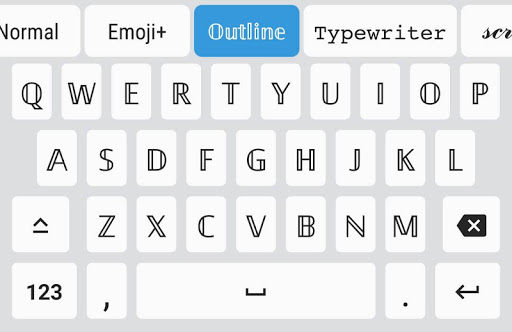
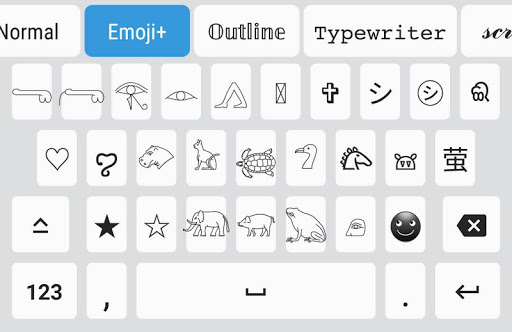
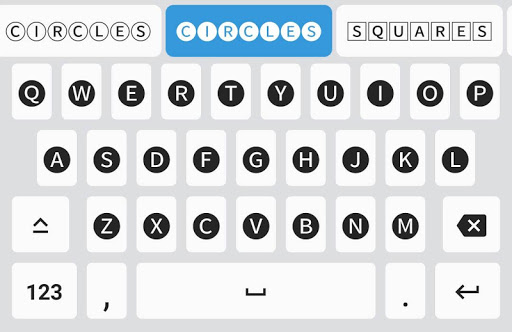
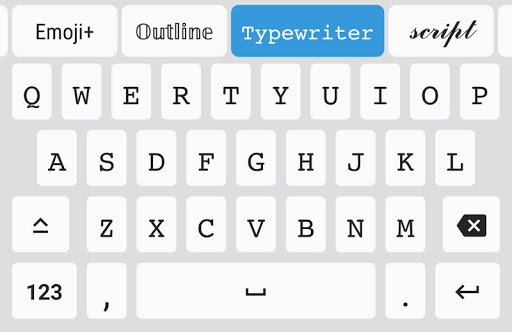
Fonts Keyboard knows exactly what it wants to be: a fast, playful way to type in decorative styles without the usual detour through a website, a text generator, or a tedious copy-and-paste workflow. After spending time with it in everyday messaging, social bios, and casual posting, that focus comes through clearly. This is not trying to replace a full-featured productivity keyboard in every respect. It is trying to make your text look more expressive, more attention-grabbing, and more fun, and for the most part it succeeds. The setup is familiar for this kind of app. You enable it as a keyboard, switch over to it, and from there the main appeal is immediate: a large selection of font styles and symbols is available right where you type. That convenience is the biggest reason Fonts Keyboard works so well. In actual use, the app removes friction. If you are updating an Instagram bio, posting in TikTok comments, decorating a Discord status, or sending a playful message in chat, it feels much better to choose a style from the keyboard itself than to leave the app, generate text elsewhere, copy it, and come back. That alone makes Fonts Keyboard feel useful rather than gimmicky. What stood out most during use is how approachable it is. The interface does not bury the point of the app under too many menus or confusing controls. You switch fonts, type, and see the result immediately. There is a satisfying sense of instant payoff here. Some styles are elegant, some are cute, some are intentionally over-the-top, and the app gives you enough variety that you can usually find something that fits the mood. The added symbols, kaomoji-style flourishes, and decorative extras help round out the package. For anyone who likes making social posts feel a little more personal, this app is fun in a very low-effort way. Another thing I appreciated is that the app generally feels generous compared with many style-focused keyboards. It does not constantly nag or interrupt the experience every few taps. Even when some content is gated behind ads or optional purchases, the overall tone is still more usable than many apps in this category, where every attractive font seems to sit behind a paywall. Here, I was able to get value from the app quickly instead of feeling like I had installed a demo. That matters, because a personalization tool should feel playful, not transactional. The catch is that Fonts Keyboard is much better as a specialty keyboard than as your primary one. The moment you move from styling short text to writing normally for longer stretches, its weaknesses become more obvious. The biggest one is the typing experience itself. On a standard keyboard, you get used to conveniences like autocorrect, word suggestions, swipe typing, quick typo recovery, and fluid switching. Fonts Keyboard is more basic. If you are drafting a long message, fixing mistakes, or typing quickly, it can feel slower and less forgiving than Gboard or other mainstream keyboards. I found myself using it for bursts of expression, then switching back for regular conversation. That leads to the second major drawback: switching in and out of decorative text is not as smooth as it should be. If you want to bounce between a fancy font and plain text, the process can feel awkward. A simple, obvious return-to-normal shortcut would make a real difference in daily use. As it stands, there is just enough friction that the app sometimes interrupts your rhythm, especially if you are the kind of person who only wants the occasional styled phrase instead of every word in a message. The third issue is inconsistency. Not every font looks equally good, and not every character transforms cleanly. In testing, letters are generally the star of the show, but numbers, punctuation, and certain symbols may not match the style as neatly as you would hope. Some fonts are crisp and attractive; others can look too small, uneven, or visually off in actual text. On top of that, compatibility depends on where you use them. In many apps the stylized text displays nicely, but in some games or app fields, special characters may render oddly, lose color, get filtered, or fail entirely. That is not unique to this app, but it does affect how dependable the experience feels. Still, within its lane, Fonts Keyboard is polished enough to be easy to recommend. It is at its best for people who care about aesthetic expression more than keyboard power features: social media users, teens customizing chats and bios, casual creators, or anyone who likes making names, captions, and statuses stand out. It is especially good for those who are tired of the old copy-paste font generator routine and just want a direct tool that works in most popular apps. It is not ideal for users who need a full-time keyboard with strong predictive typing, fast correction tools, or the most efficient text entry possible. If your priority is speed, accuracy, and comfort over long typing sessions, this will probably feel like a companion keyboard rather than a replacement. And if you need perfect consistency across every app, game, and symbol set, you may run into limits. Even with those caveats, I enjoyed using Fonts Keyboard more than I expected. It delivers the core experience cleanly: open keyboard, pick a style, type something fun, and move on. That simplicity is its charm. It may not be the keyboard I would choose for writing an email or a long note, but for making ordinary text feel more expressive, it earns its place. If you treat it as a stylish utility rather than a complete typing solution, it does exactly what it should.
Alternative apps