Apps Games Articles
Galaxy Wearable (Samsung Gear)
Samsung Electronics Co., Ltd.
Rating 4.1star icon
Editor's summary
Editor rating
star icon star icon star icon star icon empty star icon
4.3

One-line summary Galaxy Wearable is one of the best companion apps for configuring a Samsung watch or buds without pecking at a tiny screen, but its occasional crashes and flaky notification syncing can turn a polished setup into a troubleshooting session.

  • Installs

    500M+

  • Developer

    Samsung Electronics Co., Ltd.

  • Category

    Tools

  • Content Rating

    Everyone

  • Latest version

    2.2.53.22101061

  • Package

    com.samsung.android.app.watchmanager

Screenshots
In-depth review
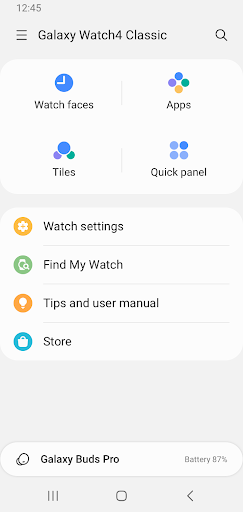
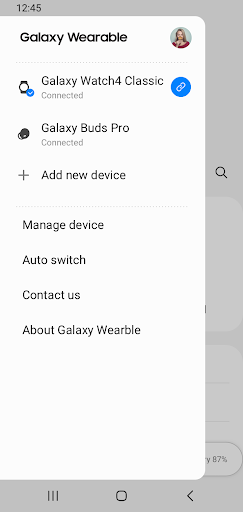
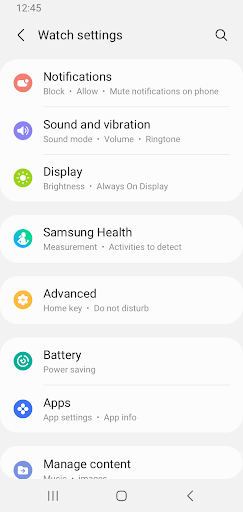
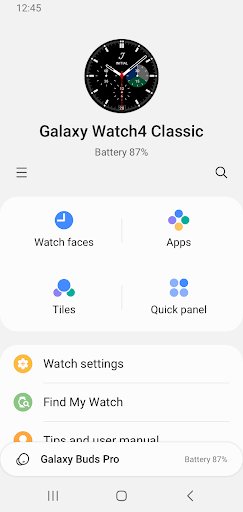
Galaxy Wearable is the kind of app that makes immediate sense the moment you pair a Samsung wearable. After spending time using it as the control center for a Galaxy watch, the biggest takeaway is simple: this app is not flashy, but it is extremely practical when it behaves itself. It takes jobs that are tedious on a watch screen—changing settings, organizing apps, adjusting notifications, hunting for device options—and puts them on your phone where they belong. That convenience is the app’s strongest selling point. On a smartwatch, even a good interface can feel cramped when you are trying to fine-tune a dozen settings in a row. In Galaxy Wearable, those same tasks feel faster and much more natural. Reordering apps and widgets, changing watch options, checking software status, and browsing device-related settings all happen in a way that feels designed for actual use rather than as an afterthought. We found ourselves using the phone app for almost everything except the quick interactions that naturally belong on the watch itself. The setup experience is also generally strong. Pairing over Bluetooth is straightforward, and once the app finds the wearable, the flow is guided well enough that even someone new to smartwatches should be able to get through it without much confusion. One of the more appealing things here is that Samsung has made the app approachable without making it feel simplistic. Menus are logically arranged, the language is mostly clear, and there is a good sense that the app is there to help manage the device rather than overwhelm you with technical clutter. In day-to-day use, Galaxy Wearable earns a lot of points for making the watch feel more complete. The app turns the wearable into part of a broader phone experience instead of a separate gadget with its own tiny world. Features like notification management are especially important here. Being able to decide what comes through to the wrist, and how, is one of those things that can make a smartwatch feel either indispensable or annoying. When it is working well, this app gives you the control you need to make the device useful rather than distracting. That said, this is not an app we would call flawless. The biggest weakness is reliability. During our time with it, the app felt polished most of the time, but not all of the time, and that inconsistency matters more here than it would in a casual utility. If your wearable companion app crashes, hangs on a loading screen, or loses its grip on notification syncing, the wearable itself becomes less useful immediately. That is the frustration with Galaxy Wearable: when it stumbles, it does not just inconvenience the app experience; it affects the product connected to it. Notification syncing is another area where the app can be excellent one week and irritating the next. In normal use, alerts come through and the system feels dependable. But there are moments when texts or other notifications stop behaving correctly, and troubleshooting often means going back through connection settings, permissions, or even reconnecting the device. This is the second major weakness: the app asks for trust because it sits at the center of the wearable experience, yet it can occasionally feel a bit too fragile for that role. A third annoyance is that Galaxy Wearable can sometimes feel more dependent on a stable connection than it should. That is understandable to a point—this app is built around an active link between phone and wearable—but when the connection gets temperamental, some features stop feeling seamless. If you are the kind of user who expects everything to reconnect invisibly in the background every single time, there may be days when this app tests your patience. Still, it is important to emphasize how much Galaxy Wearable gets right. First, it is genuinely easier to manage a Samsung wearable from here than from the watch itself. Second, it gives a broad set of meaningful controls without putting them behind a paywall or cluttering the app with ads or upsells. Third, when paired and stable, the overall experience feels mature, smooth, and surprisingly comprehensive. It makes older and newer Samsung wearables alike feel more manageable and more useful. Who is this app for? It is for Samsung wearable owners who want their phone to be the real dashboard for their watch or buds. If you like adjusting settings, organizing device behavior, and keeping your wearable tuned to your routine, this app is practically essential. It is also a good fit for first-time smartwatch users because it lowers the barrier to understanding what the device can actually do. Who is it not for? It is not for people outside the Samsung wearable ecosystem, and it is not ideal for anyone with zero tolerance for occasional app-side hiccups. If you want a companion app that you will never have to think about again after setup, Galaxy Wearable sometimes gets close to that ideal, but it does not always stay there. Overall, Galaxy Wearable is a very good companion app with moments of excellence and occasional lapses in reliability. When it works, it makes Samsung wearables far easier and more enjoyable to live with. When it misfires, it reminds you how central it is to the whole experience. Despite those rough edges, we would still recommend it to Samsung wearable users because the core design is smart, the control it offers is genuinely useful, and for everyday management, it is far better than trying to do everything from your wrist.