Apps Games Articles
Google’s Find Hub
Google LLC
Rating 4.3star icon
Editor's summary
Editor rating
star icon star icon star icon star icon
half star icon
4.5

One-line summary Google’s Find Hub is one of the easiest and most reliable ways to recover a misplaced Android device, but its usefulness still drops fast when a phone is offline, dead, or missing key settings ahead of time.

  • Installs

    1B+

  • Developer

    Google LLC

  • Category

    Tools

  • Content Rating

    Everyone

  • Latest version

    VARY

  • Package

    com.google.android.apps.adm

Screenshots
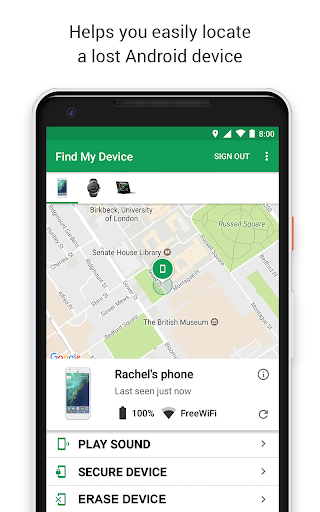
In-depth review
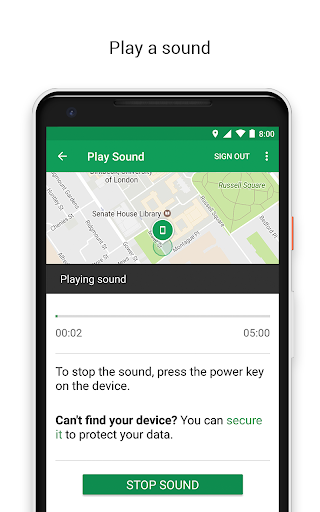
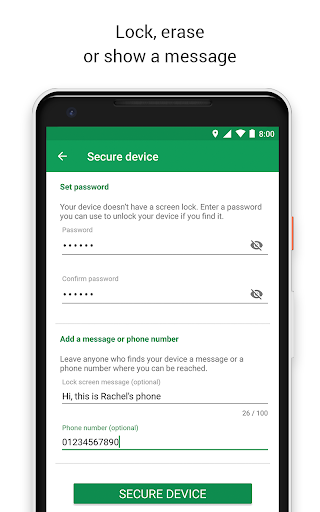
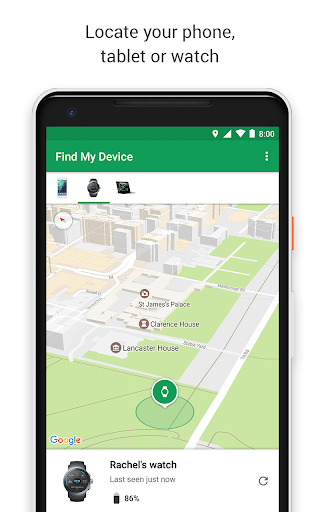
Google’s Find Hub is the kind of app you hope you never need, but the moment you do, you want it to work immediately and without drama. After spending time with it in the way most people actually use it—not as a novelty, but as a practical recovery tool for misplaced devices—it comes across as one of Google’s more quietly essential utilities. It is not flashy, and that is exactly why it works. The app opens straight into the problem it is meant to solve: where are my things, and what can I do right now? The first thing that stood out in daily use was how little friction there is. Once signed in, the interface is straightforward: your linked devices appear clearly, you select the one you need, and the app gives you the core actions you actually care about. In testing, that simplicity mattered more than any design flourish. When you are trying to find a phone you left in another room, under a car seat, or somewhere in a bag, the “play sound” feature is the star of the show. It is fast, obvious, and wonderfully low-stress. Even if a device is on silent, the ability to force a ring makes this app feel useful in seconds rather than minutes. That convenience is the app’s first big strength: it solves the most common “lost device” scenarios with almost no learning curve. This is not an app you need to study. It is an app you instinctively understand the first time you open it. During hands-on use, that translated into a very confident feeling. You are not poking through menus wondering where the important controls are. They are right there. The second strength is that the app gives enough information to be genuinely actionable without turning the experience into a technical mess. Device location, battery level, and last-seen status all help build a picture of whether your phone is nearby, left behind, or gone farther than you hoped. On a map, Find Hub is often best thought of as directional intelligence rather than perfect precision. In open areas and ordinary day-to-day cases, location can feel impressively accurate. In dense indoor spaces, large buildings, or crowded environments, the app is better at narrowing the search than pinpointing the exact shelf, seat, or room. That still makes it extremely useful. In practice, getting from “no idea” to “it’s somewhere around here” is often the difference between recovering a device and writing it off. Its third major strength is peace of mind. The remote security tools make the app feel like more than just a finder. Being able to secure or erase a device, and to display a custom message on the lock screen, gives it real weight in theft or loss situations. Even if you never need those options, just knowing they are there changes how the app feels. It shifts from convenience tool to safety net. That said, Find Hub is not magic, and its limitations become obvious the moment the ideal conditions disappear. The biggest weakness is that recovery still depends heavily on the state of the missing device. If the phone is powered off, the battery is dead, or key settings were not enabled before it went missing, your options become much thinner. The app can still provide a last known location in some cases, which is better than nothing, but the sense of control drops fast when the device goes dark. This is not really a flaw in the interface so much as a frustrating reality of the category, but from a user perspective it still feels like a limitation. A second frustration is that location is not always exact enough in real-world environments. In a house, office, school, mall, or transit setting, the map can point you in the right direction while still leaving a lot of ground to cover. The sound trigger helps enormously once you are close, but there are moments when the app feels like it gets you 80 percent of the way there and asks you to do the rest. That is acceptable, but it does mean the app is at its best when paired with a bit of patience and common sense. The third weak spot is that some users will wish for more remote control than Google currently gives them. After using secure, ring, and erase, it is easy to start wanting extra powers: remotely turning location on, forcing more settings changes, or taking stronger anti-theft actions. Find Hub is good at what it does, but it can feel conservative. In a tense loss scenario, that restraint can read as safety-minded design or as frustrating limitation depending on your expectations. In everyday use, though, the app remains surprisingly polished. It loads quickly, the controls are clean, and there is no ad clutter or nonsense getting in the way. That matters. An app like this should feel calm and dependable, and Find Hub mostly does. It also helps that it supports more than just phones in concept; the broader idea of locating devices and compatible items makes it a more relevant utility than a single-purpose emergency tool. Who is it for? Android users, especially anyone who misplaces their phone regularly, travels often, manages multiple devices, or wants a basic layer of security in case a device is lost or stolen. It is also a strong fit for families who want location sharing in the same ecosystem. Who is it not for? Anyone expecting military-grade precision indoors, deep remote device control beyond the essentials, or guaranteed recovery when a phone is offline and unprepared. Overall, Google’s Find Hub succeeds because it understands the real emotional state of the person using it: distracted, stressed, and in a hurry. It is quick, clear, and useful in the moments that matter. It does have real limits, especially once a device is off the grid, but as a free built-in safety tool for Android users, it is easy to recommend and even easier to keep installed.