Apps Games Articles
ProCleaner - Storage Cleaner
Appsiko
Rating 4.0star icon
Editor's summary
Editor rating
star icon star icon star icon star icon empty star icon
4.1

One-line summary ProCleaner is an easy, genuinely useful storage tidy-up tool for people who want quick results, but its ad-supported, utility-first experience stops it short of feeling essential.

  • Installs

    1M+

  • Developer

    Appsiko

  • Category

    Tools

  • Content Rating

    Everyone

  • Latest version

    1.1.4

  • Package

    com.procleaner.clean

Screenshots
In-depth review
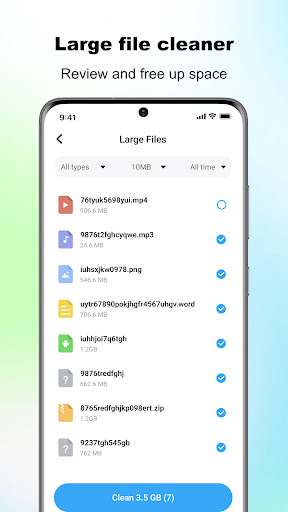
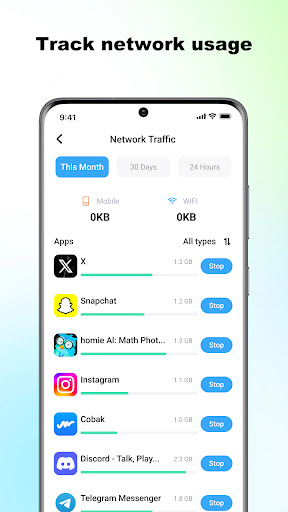
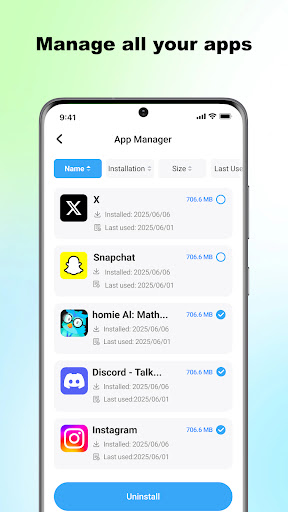
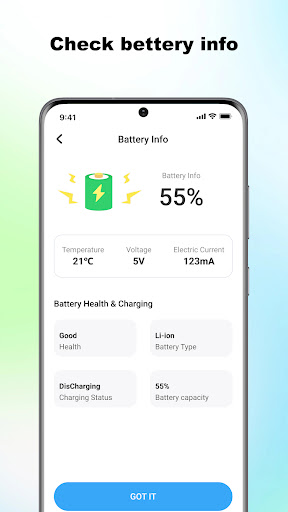
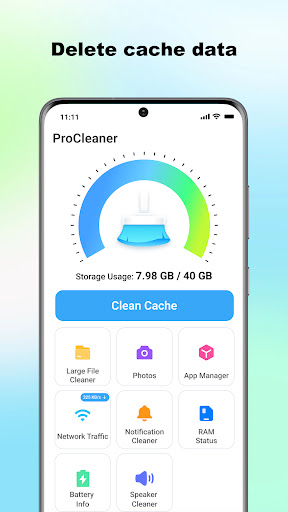
ProCleaner - Storage Cleaner is the kind of Android utility that knows exactly what most people want from a cleaning app: open it, scan the phone, find obvious clutter, and help recover space without making the process feel technical. After spending time with it as an everyday maintenance tool rather than a one-time curiosity, my impression is that ProCleaner gets the basics right more often than not. It is not a magical performance booster, and it does not reinvent Android housekeeping, but it does offer a straightforward, low-friction way to manage storage when your device starts feeling cramped. The first thing ProCleaner gets right is accessibility. The app is built around simple actions, and that matters in this category. Cleaner apps often fall into one of two traps: they either oversimplify to the point of feeling useless, or they stuff the screen with too many panels, gauges, and dramatic warnings about your phone’s condition. ProCleaner mostly avoids both. In day-to-day use, it feels designed for someone who wants a quick scan and a clear next step. The main storage-cleaning workflow is the star here. Running a scan is easy, and the app presents cache and junk cleanup in a way that feels understandable rather than intimidating. That ease of use is the app’s strongest selling point. If your phone keeps warning you that storage is getting full, ProCleaner feels like a practical response instead of a project. On a device with the usual buildup of app cache and leftover files, the app quickly surfaced disposable clutter and made cleanup fast. It is satisfying in the way a good utility should be: not flashy, just efficient. The one-tap angle is not pure marketing fluff either. While you still need to make some choices depending on what the app finds, the experience is much closer to “tap and tidy” than many bloated cleaner apps that bury basic actions behind too many menus. Its second strength is that it does more than just sweep cache. The inclusion of large-file management and multi-app uninstall tools makes ProCleaner more useful over time. In actual use, this broadens it from a one-note junk cleaner into a more general storage management app. Large files are often the real reason a phone feels full, and having a direct way to spot them is much more meaningful than simply deleting temporary clutter. The uninstall management option also makes sense if you have a backlog of apps you no longer use. Together, these features make ProCleaner feel like a decent storage control panel rather than a novelty cleaner. The third thing I liked is that the app keeps its purpose grounded in local device maintenance. Based on the way it presents itself, it is focused on scanning files on the phone and handling actions locally. That gives the app a more utilitarian, less invasive feel than some rivals in this space that seem more interested in account hooks or exaggerated optimization claims. ProCleaner works best when approached as a file and cache maintenance tool, and in that role it feels honest enough. That said, this is not an app without friction. The most obvious drawback is the presence of ads. Since the app is free, ads are not surprising, but they do affect the rhythm of use. Utility apps live or die by momentum: you launch them because you want to solve a problem quickly. Anything that interrupts that flow feels more annoying here than it would in a game or social app. ProCleaner remains usable, but the ad-supported experience occasionally undercuts the otherwise smooth cleanup process. Another weakness is that some of its extra tools feel more supplemental than essential. Network speed monitoring and battery status checks are fine to have, but they do not feel tightly connected to why most people will install this app in the first place. I kept returning to the cleaner, large-file, and uninstall features; the rest felt more like filler around the core experience. That does not make them bad, but it does make the app feel slightly less focused than it could be. The third issue is one that affects many apps in this category: permission sensitivity. To do its job, ProCleaner asks for storage access, and app usage permission is needed for managing installed applications. That is understandable given the feature set, but it still means this is not the kind of app every privacy-conscious user will install casually. The app explains its functional needs, but cleaner apps always ask for a level of trust that some users simply do not want to extend. If you are highly skeptical of maintenance utilities, ProCleaner is unlikely to change your mind purely through design polish. In everyday use, though, the app generally leaves a positive impression. It feels quick, simple, and effective enough to keep around if your device regularly runs low on space or accumulates too much app residue. I especially liked that it did not feel needlessly complicated. On a modern Android phone, where manual storage management can become a tedious sequence of opening system menus and checking app by app, ProCleaner offers a faster route to the same outcome. It is not a substitute for understanding what is taking space on your device, but it is a convenient shortcut. Who is it for? ProCleaner is for Android users who want a lightweight-feeling utility to clear cache, remove junk, locate large files, and batch-uninstall apps without digging through system settings. It is especially suitable for people with limited storage, older devices, or anyone who prefers simple maintenance tools over manual cleanup. Who is it not for? It is not for users who dislike ads, distrust cleaner apps on principle, or expect dramatic speed improvements beyond basic storage housekeeping. It also will not impress power users looking for a highly advanced file management suite. Overall, ProCleaner is a solid free storage cleaner that succeeds because it stays useful in the moments when you actually need it. It is fast to understand, easy to operate, and effective at basic cleanup. The ads and somewhat unfocused extra tools keep it from being a top-tier must-have, but as a practical maintenance app, it does enough right to earn a recommendation.