Apps Games Articles
Apps Manager - Your Play Store
MyInnos
Rating 4.1star icon
Editor's summary
Editor rating
star icon star icon star icon star icon empty star icon
4.0

One-line summary Apps Manager – Your Play Store is easy to recommend if you want a fast, surprisingly capable app toolbox for viewing, sharing, and organizing what is installed on your phone, but it is harder to love if you expect a clean, tightly focused utility without extra fluff.

  • Installs

    1M+

  • Developer

    MyInnos

  • Category

    Productivity

  • Content Rating

    Everyone

  • Latest version

    0.3279994

  • Package

    in.myinnos.AppManager

In-depth review
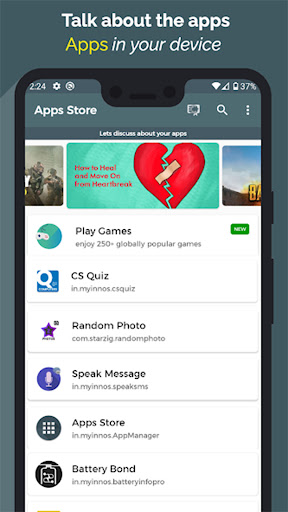
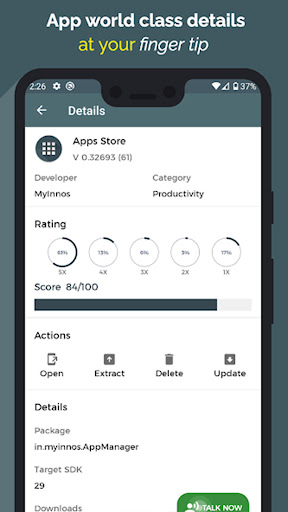
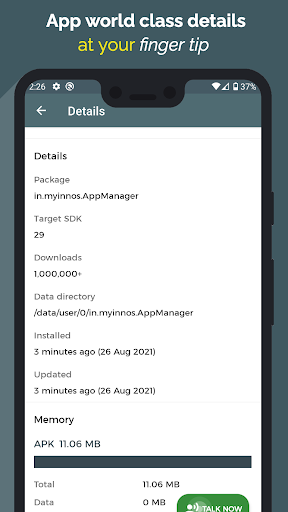
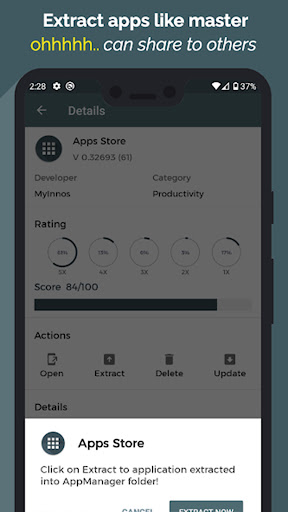
Apps Manager – Your Play Store is one of those Android utilities that tries to do a lot more than its name first suggests. I went into it expecting a fairly plain app list with uninstall and APK backup tools. What I found instead was a broader “device app hub” that mixes practical management features with a layer of stats, widgets, visual extras, and a few playful ideas that make it feel more ambitious than a basic app organizer. In day-to-day use, the app’s strongest quality is speed. Browsing through installed apps feels quick, search is responsive, and common actions are easy to reach. That matters more than it sounds. Many utility apps in this category bury useful functions under cluttered menus or old-fashioned interfaces, but Apps Manager generally keeps the core workflow simple: open the app, find what you installed, tap into details, and do what you came to do. If your goal is to check version numbers, package names, storage usage, update timing, or basic app information, it gets there with very little friction. The APK extraction feature is one of the most practical reasons to install it. During testing, it felt fast and refreshingly straightforward, especially compared with older extractor tools that can feel slow or awkward. If you regularly back up apps, share installers between devices, or just like having more control over your installed software, this is a genuinely useful inclusion. It is the kind of feature that turns the app from “interesting extra utility” into something you may actually keep on your phone. Another thing the app does well is present information in a way that feels inviting rather than overly technical. Permission analysis, battery impact details, storage stats, and weekly summaries could have easily turned into a wall of jargon. Instead, the app aims for a friendlier tone, which makes it more approachable for regular users who want insight without digging through Android settings menus. I also liked that it tries to make app management feel less dry with touches like icon color palettes, custom themes, and widgets. None of those are essential, but they make the app feel less like a system tool and more like something built for everyday use. That said, this broad feature set is also where some of the app’s weaknesses begin to show. The biggest issue is focus. Apps Manager wants to be an app manager, an APK extractor, a stats dashboard, a sharing tool, a widget provider, a feedback space, and even a lighter entertainment hub. In practice, that means the experience is not always as lean as power users might want. If you prefer a stripped-down utility that only handles app inspection and backup, some of the extra sections can feel like noise rather than value. The interface is mostly easy to understand, but not consistently elegant. There are moments where it feels polished and helpful, then others where it feels busy. Some labels and feature ideas are more playful than necessary, and the app occasionally gives off a “kitchen sink” impression where everything has been added because it could be, not because it sharpens the main experience. For casual users this may read as generous; for more demanding users it can feel slightly unfocused. Ads and premium nudges are another point worth mentioning. Since this is a free app with ads and in-app purchases, that trade-off is part of the package. The app is still useful without paying, but if you are sensitive to promotional elements, reward systems, or unlockable cosmetic extras, the experience may feel a little less clean than the best minimalist utilities. It never completely overwhelms the core functions, but it does remind you that this is not a purely utilitarian, no-frills system tool. There is also the reality that some features will be more useful on some devices than others. Android app management is heavily shaped by device restrictions and OS version behavior, so tools related to permissions, notifications, and system-level access can feel uneven depending on the phone you are using. In my time with the app, the core browsing and extraction features were the reliable center. The more advanced or system-adjacent extras felt less universally essential. Where Apps Manager succeeds most is in making ordinary device housekeeping feel accessible. Exporting app lists, checking what has changed recently, seeing storage trends, and quickly pulling APKs are all things that can be genuinely helpful when switching phones, troubleshooting, or just cleaning up a crowded device. It is especially good for Android users who like to know what is installed and want more visibility than the default settings app provides. There is enough here for enthusiasts, but it is approachable enough for less technical users too. Who is it for? It is a good fit for Android users who frequently manage installed apps, back up APKs, compare versions, monitor storage, or simply like having more insight into what is happening on their phone. It is also a nice option for people who enjoy utility apps with a bit of personality rather than purely sterile interfaces. Who is it not for? If you want a highly minimal, ad-free-feeling tool with a laser focus on one job, this may not be your ideal pick. It is also not the best choice for someone who never thinks about app management and just wants the default Play Store and system settings to handle everything. Overall, Apps Manager – Your Play Store is a better app than its somewhat generic name suggests. It is fast, genuinely useful in its core tools, and more user-friendly than many Android utility apps. Its main drawback is that it occasionally tries to be too many things at once. Still, the practical value is real, and for the right user, it can earn a permanent place on the home screen.